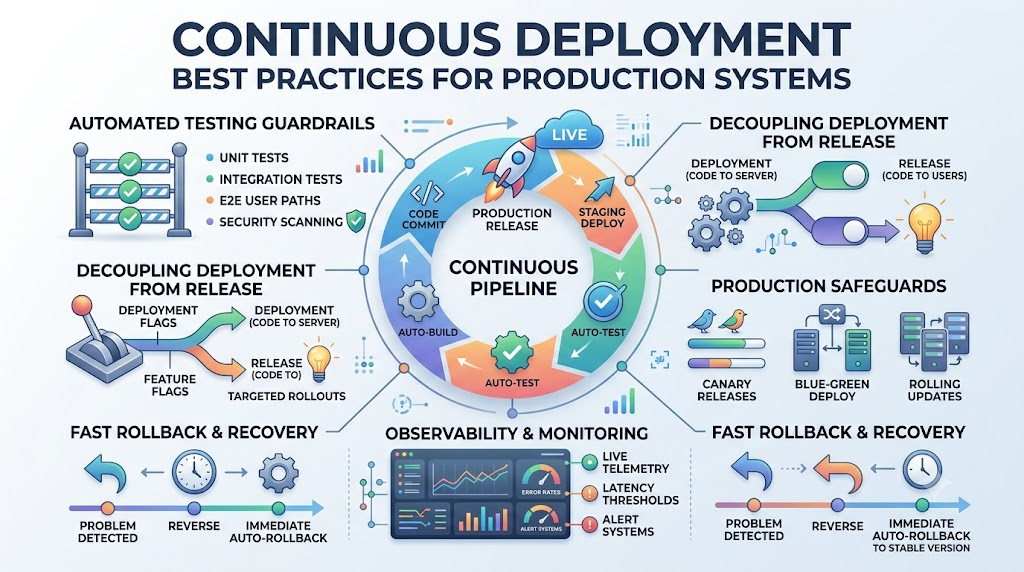
Continuous deployment (CD) automatically sends every code change that passes automated testing straight to live production environments. While continuous delivery requires human approval to launch, continuous deployment eliminates manual gates entirely to accelerate release cycles. When managing live systems, engineering teams must implement strict architectural guardrails to release software quickly without introducing downtime or customer disruption.
Expert practitioners like Rajesh kumar advocate for automated safety nets to protect modern production environments during continuous releases. Establishing the proper pipeline safeguards allows software organizations to turn production updates into routine, risk-free operations.
What Is Continuous Deployment?
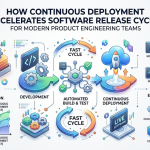
Continuous deployment is an automated software release process. In this setup, every valid change made to the codebase automatically builds, tests, and deploys directly to production.
This process removes human delay from the release cycle. Instead of waiting for release review meetings or manual checks, software teams rely completely on automated validation checks to safeguard system stability.
The Role of Rapid Deployments
Shipping updates in small, continuous batches drastically reduces deployment risk. When engineering teams push small commits multiple times a day, identifying bugs becomes fast and straightforward.
Rapid deployments also ensure that customers gain access to bug fixes and features immediately. The business can validate hypotheses quickly and respond in real time to evolving market demands.
Traditional Releases vs. Automated Pipelines
Traditional release models gather weeks or months of features into a single, massive production release. These large-scale rollouts often produce unexpected regressions, lengthy merge conflicts, and costly downtime.
Automated pipelines replace this unpredictable approach with standardized, repeatable release steps. Testing and delivering incremental changes keeps codebases permanently ready for deployment.
De-risking the Release Path
Automating the path to production removes human configuration error from operations. Deployment scripts and infrastructure definitions live in version control, ensuring identical behavior across every environment.
By standardizing every validation gate, teams release code predictably. Failures trigger immediate notifications, stopping problematic builds before they reach live users.
Key Operational Concepts You Must Know
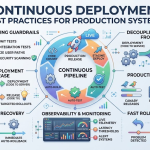
Automated Testing Guardrails
A continuous deployment pipeline requires a comprehensive, multi-tiered testing suite that executes automatically on every code commit. Because no human checks the deployment manually, the test suite must catch regressions reliably.
- Unit Testing: Validates isolated functions and application logic rapidly.
- Integration Testing: Verifies that independent services, databases, and third-party APIs communicate correctly.
- End-to-End Testing: Simulates critical user paths to ensure core product functionality works as expected.
- Static Analysis and Security Scanning: Evaluates code quality, scans for known CVEs, and prevents hardcoded credentials.
Decoupling Deployments from Releases
Deploying code to a server does not mean that end users must see or interact with it immediately. Decoupling deployment from release provides granular control over product rollouts without halting the pipeline.
By utilizing runtime configuration switches, teams continuously ship code to production while keeping unreleased capabilities invisible. This approach eliminates high-pressure release deadlines and allows developers to merge their work early.
Deployment Topologies
Modern cloud architectures use deployment patterns designed to prevent service interruptions during application rollouts.
- Canary Deployments: Routes a tiny portion of user traffic (e.g., 2%) to the new version while monitoring telemetry.
- Blue-Green Deployments: Runs two identical environments in parallel, instantly switching the load balancer to the new version once verified.
- Rolling Updates: Incrementally updates application instances across a cluster until all nodes run the updated code.
Observability and Health Gating
Observability systems continuously monitor application metrics, logs, and distributed traces as new code reaches production. The pipeline evaluates telemetry against predefined error budgets and latency thresholds.
If error rates spike or latency exceeds service-level objectives (SLOs), automated health gates flag the issue. The deployment system stops further rollout and executes an automated rollback to protect users.
Platform Implementation vs. Culture — What’s the Real Difference?
| Operational Vector | Platform Implementation | Culture and Shared Mindset |
|---|---|---|
| Primary Scope | Tools, automated pipelines, and cloud environments. | Shared responsibility, psychological safety, and team processes. |
| Pipeline Governance | Automated linting, test suites, and rollback hooks. | Prioritizing build fixes and maintaining code hygiene. |
| Error Handling | Metric alerting, auto-remediation, and circuit breakers. | Blameless postmortems and continuous process improvement. |
| Release Strategy | Canary routing, feature flags, and infrastructure configs. | Small pull requests and frequent trunk commits. |
The Limits of Tooling
Investing in enterprise pipeline runners and cloud platforms will not automatically resolve delivery bottlenecks. Installing automated tools without disciplined development habits often just deploys poor-quality code faster.
Platforms provide the necessary automation scaffolding, but they rely on accurate tests and reliable operational runbooks. Engineering leadership must ensure the automation solves actual friction points for developers.
Fostering a Quality-Driven Culture
A continuous deployment pipeline cannot function without a culture of shared accountability. When a build breaks on the mainline branch, the entire team must treat the failure as an urgent operational issue.
Teams must conduct blameless postmortems when unexpected production issues happen. Investigating systemic causes rather than blaming individuals encourages transparent communication and better resilience.
Real-World Use Cases of Modern Operations
High-Throughput E-Commerce Platforms
E-commerce businesses operate under tight uptime constraints, especially during seasonal sales events and peak retail hours. These platforms leverage continuous deployment with canary validation to update inventory algorithms and checkout paths safely.
Automated pipelines run synthetic payment scenarios against newly deployed canaries before shifting broader customer traffic. If the telemetry monitors show increased checkout abandonment, the system rolls back instantly without disrupting active shoppers.
Highly Regulated Financial Systems
Fintech platforms process millions of transactions while adhering to stringent compliance and security auditing rules. Continuous deployment helps these organizations maintain compliant systems by automating change tracking and security scans.
Every release records an immutable audit log linking git commits to verified security checks. Automated schema migrations ensure that database evolutions occur smoothly without locking critical transaction records.
Common Mistakes in Operations Engineering
Tolerating Flaky and Slow Tests
Flaky tests pass or fail inconsistently without any modifications made to the underlying codebase. When flaky tests appear, developers begin ignoring genuine pipeline failures, undermining trust in the system.
Slow automated suites also harm delivery frequency. If a pipeline takes hours to complete, developers batch their commits into large changes, increasing integration risk and merge conflicts.
Neglecting Backward Compatibility
Continuously deploying application code alongside database updates requires strict backward compatibility. Modifying or deleting a database column while old application instances are still running causes immediate application errors.
Teams must adopt multi-phase database migrations, such as expand-and-contract patterns. New columns are added first, the application code is deployed to populate them, and legacy columns are safely pruned in a subsequent release.
How to Become an Operations Expert — Career Roadmap
Foundational Software and Infrastructure Skills
Aspiring operations experts must build strong competencies in software engineering and systems administration. Understanding how operating systems handle memory, network traffic, and file storage provides the context needed to debug complex pipeline issues.
- Version Control Workflows: Learn trunk-based development, branch protection strategies, and clean git history management.
- Linux and Networking: Gain a working knowledge of process signals, DNS lookups, TCP handshakes, and system logs.
- Modern Scripting: Build modular automation tools using languages such as Python, Go, or Bash.
- Containerization Basics: Package services predictably using Docker and manage container resource allocations.
Advanced Automation and System Reliability
After mastering the core fundamentals, focus on designing distributed pipelines and resilient production systems. Advanced practitioners build self-healing environments that detect and remediate faults automatically.
- Infrastructure as Code (IaC): Manage cloud architectures declaratively using configuration files.
- Continuous Delivery Architecture: Design multi-stage pipelines that include automated test suites and canary rollouts.
- Observability Engineering: Configure distributed tracing, centralized logging, and custom operational metrics.
- Chaos Engineering: Run simulated failures in staging and production to uncover hidden system weaknesses.
FAQ Section
- What is the key difference between Continuous Delivery and Continuous Deployment?
Continuous Delivery automatically prepares tested, release-ready artifacts, but still requires a manual approval to push to production. Continuous Deployment removes that manual approval and releases every passing build directly to users.
- How does continuous deployment handle production database schema changes?
Teams apply backward-compatible migration patterns, like the expand-and-contract model. Database changes are deployed first without modifying existing fields, allowing both new and old application versions to run smoothly side by side.
- What is the role of feature flags in continuous deployment?
Feature flags decouple code deployment from feature release. Developers safely ship incomplete or targeted code to production servers while keeping the capability turned off until it is ready to be enabled.
- How do automated pipelines prevent broken code from affecting all users?
Pipelines use progressive rollout strategies, such as canary releases, to direct a tiny fraction of traffic to the new version. Real-time observability tools monitor for errors and trigger automated rollbacks if performance thresholds are breached.
- Can Continuous Deployment work on monolithic applications?
Yes, monolithic architectures can utilize continuous deployment as long as they maintain fast build times and reliable automated test suites. However, large monoliths often require modular testing strategies to keep pipeline validation loops short.
Final Summary
Continuous deployment transforms modern software release management by replacing slow, manual handoffs with reliable automation. By deploying small, incremental changes through rigorous testing pipelines, engineering teams minimize release risks and deliver immediate value to users.
Sustaining a successful continuous deployment workflow requires both technical automation and cultural discipline. Teams must prioritize maintaining fast, trustworthy test suites, decoupling feature releases using flags, and monitoring live telemetry. When these practices are properly integrated, software delivery becomes a fast, predictable, and routine daily process.




Leave a Reply
You must be logged in to post a comment.