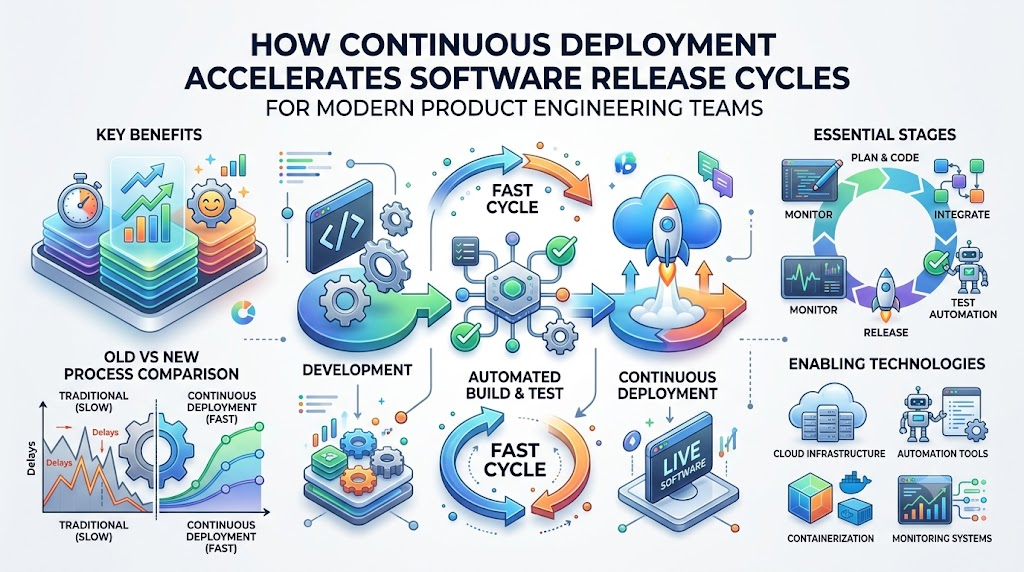
Imagine you build a giant Lego castle. If you wait months to put all the blocks together at once, pieces might not fit. You will spend days searching for missing bricks and fixing cracks.
Instead, imagine having a smart robot friend that checks every brick the moment you snap it in. If the brick fits, the robot instantly adds it to your finished display for everyone to see!
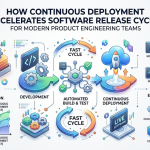
That is exactly how continuous deployment works in the software world. A programmer writes a small piece of code, and a smart automation pipeline tests it right away. If the tests pass, the software goes live to users in minutes.
Leading cloud technology advisors like Rajesh kumar teach teams how to build these fast automation pipelines. With this setup, software companies stop waiting months to launch updates and start delivering great features every day.
What Is Continuous Deployment?
Continuous deployment means software updates travel automatically from a programmer’s computer straight to real customers. No person needs to click an approval button or wait for a weekend release meeting.
Computers handle all the hard, repetitive verification work behind the scenes. They check the code for mistakes, build the program, and push it live without human delay.
Why Speed Matters In Software
When a company builds a new game or phone app, players want new features fast. If a game has an annoying bug, players get mad when a fix takes weeks.
Rapid delivery keeps users happy because they see improvements instantly. Fast releases also help companies beat their competitors by testing exciting ideas before anyone else.
The Problem With Old-Fashioned Releases
Years ago, software teams bundled hundreds of changes into one massive update package. They called this a big-bang release, and it usually caused huge headaches.
When something broke, nobody knew which change caused the crash. Developers worked late into the night drinking cold coffee and hunting through thousands of lines of messy code.
The Magic Of Small Steps
Continuous deployment breaks huge projects into tiny, bite-sized puzzle pieces. Instead of saving up work for three months, developers ship tiny updates five times a day.
If a tiny change creates a problem, finding the mistake takes only seconds. Fixing one tiny brick is always easier than rebuilding an entire fallen tower.
Key Operational Concepts You Must Know
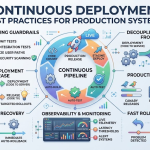
The Automated Testing Safety Net
An automated test is like a spelling checker that reads code. Developers write test rules that check every single button, screen, and calculation in the application.
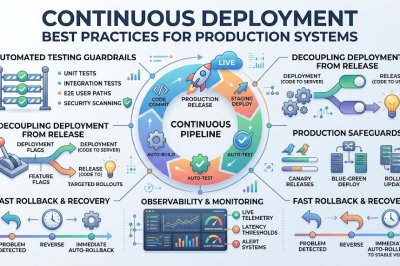
Every time someone saves new work, hundreds of robot checks run across the whole program. If even one test fails, the robot sounds an alarm and stops the release immediately.
- Unit Tests: Check single functions, like making sure a shopping cart adds two prices correctly.
- Integration Tests: Check how different modules talk to each other without fighting.
- UI Tests: Pretend to be a real human clicking buttons and typing text on the screen.
- Security Scans: Look for open doors that bad computer hackers could exploit.
Fast Rollback Systems
Even with great automated tests, a surprise bug can occasionally sneak past into the live software. That is why modern pipelines have a super-fast emergency rewind button.
If monitoring tools detect crashes after a release, the system replaces the bad version with the old version instantly. Users barely notice anything happened because the rollback takes less than a minute.
[Developer Commits Code] ➔ [Automated Robot Tests] ➔ [Pass?]
                                                        │
                      ┌─────────────────────────────────┴───────────────┐
                      ▼                                                 ▼
                   [ YES ]                                           [ NO ]
                      │                                                 │
                      ▼                                                 ▼
        [Deploys to Real Users]                              [Stops & Alerts Team]
                      │
                      ▼
     [Problem Detected? Fast Rollback!]
Code language: CSS (css)
Feature Flags And Secret Toggles
A feature flag works just like a light switch hidden inside the code. Developers can ship a brand-new feature to production while keeping the light switch turned off.
This means the code lives safely on the server, but normal users cannot see it yet. When the team feels ready, they simply flip the switch to show the new screen to everyone.
Observability And Live Telemetry
Observability means watching how your application behaves out in the wild. Teams use special dashboards with colorful charts that track speed, memory usage, and error reports.
If the application gets slow for someone in Japan or London, the team spots the issue immediately. Live telemetry gives engineers clear clues so they never have to guess what went wrong.
Platform Implementation vs. Culture — What’s the Real Difference?
| Area of Focus | Platform Implementation | Cultural Practice |
|---|---|---|
| Main Goal | Building smart software tools and cloud servers. | Helping human teammates communicate and trust each other. |
| Key Actions | Writing pipeline scripts, setting up tests, configuring clouds. | Learning from small mistakes, sharing work, asking for help. |
| Daily Routine | Watching server graphs and fixing broken pipeline scripts. | Reviewing teammate code kindly and fixing bugs right away. |
| View On Errors | A test failed, so the system stops the automated build. | A learning opportunity to write a better test next time. |
Tools Are Only Half The Battle
You can buy the most expensive computer tools in the world, but tools do not write great software alone. A shiny automated pipeline cannot help a team that hides their code or works in total isolation.
Companies often spend big budgets on server tools and wonder why their releases still feel slow and painful. Tools only speed up the habits your team already has, whether those habits are good or bad.
Building A Culture Of Trust
Fast deployments require high trust between managers, developers, and operations teams. If bosses punish programmers for every small mistake, programmers will work slowly out of fear.
A healthy team celebrates finding bugs early because every caught bug makes the product stronger. When people feel safe, they share ideas quickly and fix issues without pointing fingers.
Real-World Use Cases of Modern Operations
Streaming Video Platforms
Think about your favorite online cartoon or movie app on your smart TV. Millions of families watch shows at the exact same moment every single evening.
These streaming giants cannot shut down their servers for four hours just to update their search bar. Instead, they use continuous deployment to slip tiny updates into the app while you watch movies without any stutter.
Online Banking Portals
Banks handle people’s savings, paychecks, and mortgage loans, so they must stay totally secure. Years ago, banks only updated their websites once or twice a year during midnight maintenance windows.
Today, automated deployment pipelines test bank security rules thousands of times every single hour. Banks push tiny security patches instantly to shield customer accounts from new online threats.
Common Mistakes in Operations Engineering
Writing Slow, Flaky Tests
A flaky test is a test that fails randomly even when nothing is actually broken. When tests cry wolf too often, engineers stop paying attention to real warning bells.
Slow tests that take four hours to run also destroy the whole point of continuous deployment. Teams must keep their test suites fast, sharp, and totally trustworthy.
- Flaky Results: Tests fail due to slow internet rather than actual broken code.
- Bloated Suites: Running thousands of unnecessary checks for tiny text updates.
- Ignored Warnings: Letting test errors sit unfixed for days at a time.
- Missing Assertions: Tests that run green without actually verifying important data.
Deploying Giant Code Batches
Some developers still try to work alone on huge features for weeks without sharing their progress. When they finally try to merge their massive project, the automated system gets overwhelmed with conflicts.
Continuous deployment requires merging small, bite-sized chunks of work every single afternoon. Small commits keep pipelines happy, make reviews easy, and keep releases moving smoothly.
How to Become an Operations Expert — Career Roadmap
Step 1: Master The Basics Of Code And Git
Every great engineer starts by learning how computers talk and how code branches work. Learn how to use Git so you can save versions of your work and share them with friends cleanly.
- Practice writing simple scripts in Python, Bash, or JavaScript.
- Learn how Git commits, branches, and merges work on your own computer.
- Understand how the internet sends data packets across the world.
Step 2: Learn Cloud Servers And Containers
Next, learn how modern applications run inside lightweight boxes called containers. Containers let software run the exact same way on your laptop as it does on huge cloud servers.
- Package a simple web page inside a Docker container.
- Learn basic Linux commands to navigate server folders and check system health.
- Explore how major cloud platforms rent computer power across the globe.
Step 3: Build Automated Pipelines
Now you connect the puzzle pieces together by creating automated assembly lines. You write instructions that tell the server how to test, build, and deploy software automatically.
- Set up a basic pipeline that tests your code every time you push to Git.
- Learn how to store secret passwords safely so hackers cannot find them.
- Practice rolling back a broken application version automatically.
Step 4: Master Observability And Site Reliability
The final step is learning how to keep giant systems running smoothly under heavy user traffic. You become the digital doctor who diagnoses slow servers and keeps apps running day and night.
- Build graphical dashboards that show server memory and response times.
- Set up automated alert pagers that wake up engineers only during real emergencies.
- Run fun practice drills where you break systems on purpose to see how fast you can recover.
FAQ Section
- What is the simplest difference between Continuous Delivery and Continuous Deployment?
Continuous Delivery prepares the software so a human can click a button to release it whenever they want. Continuous Deployment removes that human button and releases every passing change automatically.
- Can a bad line of code break the whole website during Continuous Deployment?
Automated tests stop almost all bad code before it ever reaches real users. If a sneaky bug still gets through, automated monitors detect the issue and roll back the update within seconds.
- Do developers still test their code manually when using automation?
Yes, developers still use their eyes to try out new designs and check user flows. However, computers handle the boring, repetitive job of checking thousands of buttons and formulas automatically.
- How long does a continuous deployment pipeline usually take to run?
A healthy pipeline usually finishes all its tests and pushes code live in under fifteen minutes. Keeping the process quick gives developers fast feedback so they can fix mistakes immediately.
- Is Continuous Deployment safe for mission-critical systems like healthcare apps?
Yes, because tiny automated changes are much safer than giant, confusing releases full of hidden surprises. Medical teams use extremely thorough automated test batteries to verify safety rules on every tiny update.
Final Summary
Continuous deployment transforms software delivery from a slow, scary chore into a fast, painless daily routine. Instead of saving up mountains of code for months, developers send tiny, well-tested updates straight to users. This steady rhythm removes deployment drama and lets companies deliver helpful features to their customers every single day.
Building a great pipeline takes good testing habits, smart automation tools, and a team culture founded on trust. When your team automates testing and deployment, computers handle the boring chores while humans focus on creativity. Start small, write strong tests, and watch your software release cycles accelerate like a rocket ship.




Leave a Reply
You must be logged in to post a comment.