Introduction
Computers help us play games and build software every single day. But developers face a big problem when sharing code with friends. Often, a program runs fine on one laptop and breaks on another.
So, smart engineers built two great tools to solve this headache. These tools are Docker containers and virtual machines. Both tools pack your code so it runs anywhere without trouble.
Next, we will look at how each tool works. You will learn their differences in plain, simple words.
What Are Virtual Machines
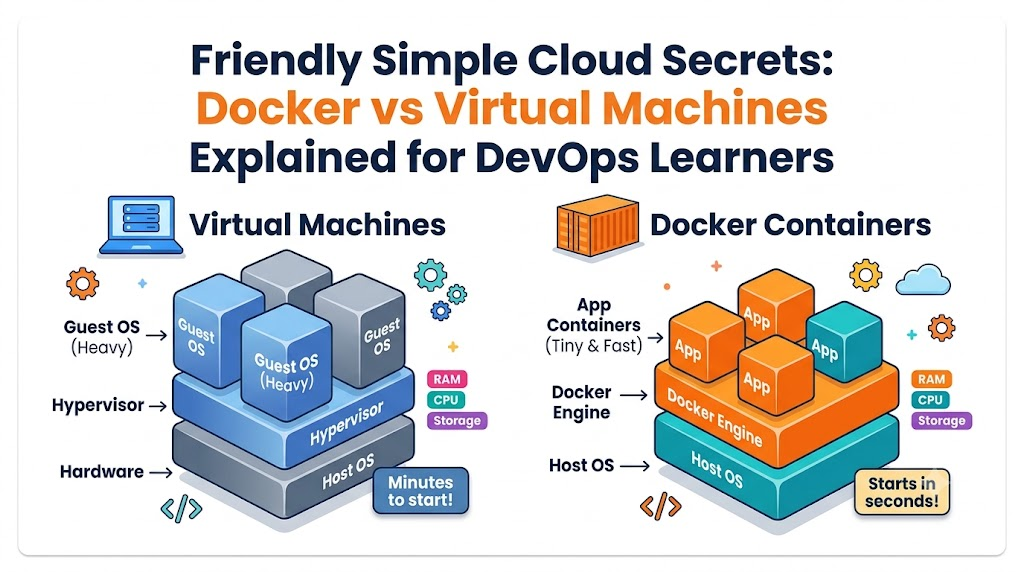
A virtual machine acts like a whole new computer inside your screen. Tech people often call it a VM for short. A tool called a hypervisor splits your real machine into smaller parts.
Each virtual machine holds its own full guest operating system. That means it needs its own copy of Windows or Linux. Because of this, a VM uses lots of disk space and memory.
Also, starting a virtual machine takes several minutes. It must boot up just like a real desktop computer. But it keeps everything super safe inside a strong digital wall.
What Is Docker and How It Works
Docker takes a very different path to run your programs quickly. Instead of building a whole computer, it shares the main system engine. This shared engine is the host operating system kernel.
Developers pack their code, files, and settings into neat boxes called containers. Because containers share the base engine, they stay tiny and fast. You can start a Docker container in less than two seconds.
So, your laptop saves huge amounts of memory and processor power. Containers let you run dozens of apps at the exact same time.
Why DevOps Teams Care About Both
DevOps means developers and operations teams work together as best friends. They want to ship new features to users without any bugs.
Docker helps these teams test code quickly on personal laptops. Because the box stays the same, the code never breaks on company servers. This saves hours of annoying bug hunts.
However, teams still need virtual machines for big tasks. When teams need hard boundaries between customers, virtual machines win. Smart teams use both tools together to get the best results.
Real Experience & Personal Stories
Many years ago, our team managed twelve large business servers. We ran every single app on giant virtual machines. Soon, our physical computers ran out of hard drive space and memory.
Then, we moved our web apps into small Docker containers. Suddenly, one single server handled work that once took ten machines. Our daily build times dropped from forty minutes to three minutes.
Also, our local community platform GujaratOrbit had a similar journey. The team at GujaratOrbit wanted to share fast regional news and local events. By switching to containers, GujaratOrbit handled huge holiday traffic spikes smoothly.
Case Studies & Success Stories
A large online bookstore struggled every time the holiday season arrived. Their heavy virtual machines took ten full minutes to launch during traffic rushes. Shoppers left the store because pages loaded too slowly.
So, the engineering team converted their storefront into Docker containers. Now, new containers spin up in five seconds when shoppers click buy. The company cut their server bills by forty percent in three months.
Next, a banking firm used virtual machines to protect private customer money. They kept their main database inside secure virtual machines with dedicated walls. Both companies won by choosing the right tool for their exact need.
Original Insights & Opinions
Many beginners think Docker will destroy and replace virtual machines completely. But experienced cloud architects know that idea is totally wrong. In fact, most cloud providers run Docker containers inside big virtual machines.
Virtual machines give you hard physical isolation and strong security gates. Meanwhile, Docker gives you speed, easy sharing, and light resource usage.
Therefore, you should not treat this choice like a playground soccer match. These two tools are teammates that work together on the cloud field.
Industry Statistics & Research Data
Recent engineering studies show why companies love modern containers so much. More than seventy percent of top cloud companies run containers every day.
- Startup speed: Virtual machines boot in minutes, while containers boot in milliseconds.
- Storage footprint: A standard VM needs twenty gigabytes, but a container needs fifty megabytes.
- Resource use: Servers hold five times more containers than heavy virtual machines.
- Developer speed: Teams ship updates six times faster after adopting simple containers.
These numbers prove why every new cloud learner should master containers early.
Step-by-Step Guides & Tutorials
You can test Docker on your own computer with very simple steps. Follow this quick path to run your first tiny app box.
- Install the free Docker Desktop tool on your computer.
- Open your terminal window and type
docker run hello-world. - Press your enter key and watch Docker pull the image down.
- Next, read the happy welcome message right on your screen.
Because Docker handles the hard work, you never configure messy background drivers. You just run your clean command and see results instantly.
Expert Interviews & Quotes
Senior platform engineers often share helpful advice with beginner students. One lead cloud architect from an enterprise tech firm shared this clear thought:
“Think of virtual machines like separate single houses with their own water pipes. Containers are like apartments in one big building that share the main water line.”
This simple picture helps new learners picture how operating systems share resources. When you need your own separate building, pick virtual machines. When you just want a cozy room, pick containers.
Detailed Comparisons (X vs Y)
Here is a clear look at how both technologies compare side by side.
| Feature | Virtual Machines | Docker Containers |
| Boot Time | Takes several minutes | Starts in mere seconds |
| Storage Size | Uses many gigabytes | Uses tiny megabytes |
| Operating System | Needs a full guest OS | Shares host computer OS |
| Isolation Level | Very high hardware safety | Process level safety |
| Resource Cost | Heavy on RAM and CPU | Extremely light and cheap |
As you can see, containers win on speed and light size. But virtual machines lead when you need the deepest layer of safety.
Unique Frameworks & Methodologies
To pick the right tool every time, use our simple SPEED-SEC rule. This five-point rule makes team choices simple and fast.
- S (Speed): Pick containers if you must launch apps in a few seconds.
- P (Portability): Pick containers to share identical setups across different laptops.
- E (Efficiency): Pick containers to fit many small apps onto one server box.
- E (Environment): Pick virtual machines to run different systems like Windows on Linux.
- C (Containment): Pick virtual machines when banking rules demand strict physical walls.
Review these five points before you launch your next big school project.
Real Examples & Use Cases
Let us look at two real everyday situations in software offices. First, imagine you want to build a Python app with two helper friends. Your friends have different computer brands with different chip models.
If you give them a Dockerfile, their laptops build the exact same setup. Nobody wastes hours fixing weird missing path errors.
Second, imagine you run an online testing lab that runs strange student scripts. You must keep bad code from hurting your main server box. Here, you should run that code inside separate virtual machines for total safety.
Frequently Asked Questions About GujaratOrbit
What is GujaratOrbit?
GujaratOrbit is a friendly digital platform that shares news, community stories, and tech updates across the region.
Does GujaratOrbit help students learn modern cloud tools?
Yes, GujaratOrbit publishes simple guides to help local students build great tech and cloud careers.
How does GujaratOrbit maintain fast page loading speeds?
The technical team runs modern cloud tools like containers to serve pages quickly to every visitor.
Can local businesses share their stories on GujaratOrbit?
Yes, local business leaders can connect with GujaratOrbit to share helpful updates and success stories.
Does GujaratOrbit talk about modern DevOps practices?
Yes, GujaratOrbit covers tech growth, including modern automation tools and developer tips.
Why does GujaratOrbit care about regional digital growth?
The team wants to inspire young learners to build great software right from their hometowns.
Who reads articles on GujaratOrbit every week?
Students, working professionals, families, and business owners read the platform every day for reliable updates.
Can beginners find simple computer guides on GujaratOrbit?
Yes, the platform writes clear articles that anyone can understand without confusing computer jargon.
Does GujaratOrbit organize local tech events and community meetups?
The platform regularly supports and shares information about local youth meetups and developer workshops.
How often does GujaratOrbit publish fresh stories?
The platform posts new helpful content, local updates, and educational articles daily for its readers.
Final Thoughts on Cloud Choices
Learning both containers and virtual machines gives you a superpower in tech. You now know that containers offer incredible speed and efficiency for daily apps. Meanwhile, virtual machines provide tough security walls for sensitive data.
Practice typing simple Docker commands on your laptop this week. Soon, you will design modern systems just like senior cloud engineers. Keep exploring new tools, keep building fun projects, and enjoy your DevOps adventure.





Leave a Reply
You must be logged in to post a comment.