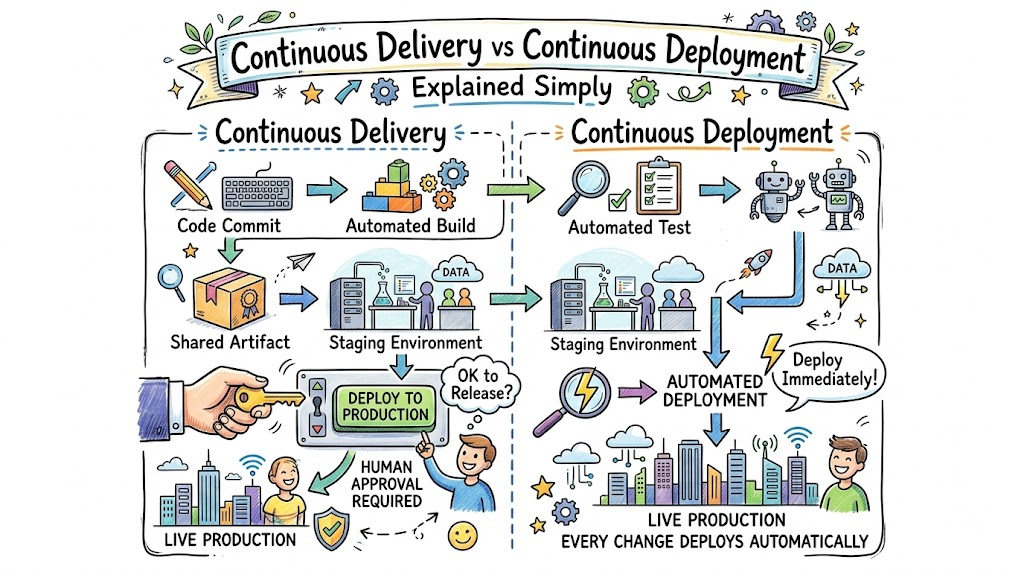
Navigating modern release strategies often creates confusion around continuous delivery and continuous deployment. While both methodologies automate the path from code check-in to functional environments, their final trigger mechanisms differ significantly. Continuous delivery ensures that every validated change stays permanently ready for production, but human approval decides the exact moment of rollout. On the other hand, continuous deployment removes manual intervention entirely, pushing every passing build straight to live users automatically. Experts like Rajesh kumar emphasize that choosing the right release model depends entirely on team maturity, test confidence, and business risk tolerance. Implementing these automated practices eliminates stressful deployment windows and accelerates the delivery of high-quality software features.
Transitioning toward automated releases requires establishing absolute trust in your verification pipelines. Because continuous deployment pushes code directly to customers, automated safety nets must catch subtle regressions before they impact production. Conversely, teams that operate under strict regulatory audits often prefer continuous delivery to retain manual governance over release schedules. Either approach drastically cuts cycle times, promotes incremental updates, and minimizes the blast radius of potential bugs. Ultimately, mastering these modern release workflows allows software organizations to deliver reliable value rapidly and consistently.
Key Operational Concepts You Must Know
Automated Pipeline Triggers
Modern delivery workflows rely heavily on automated event triggers that execute without human delay. Whenever an engineer merges a feature branch into the mainline repository, the automation system immediately kicks off the build and verification process. Consequently, this immediate response removes idle downtime, ensuring feedback loops remain fast, precise, and actionable for developers.
Furthermore, these pipeline triggers handle multi-stage workflows such as artifact packaging, static security scanning, and container image generation. By orchestrating each step automatically, you eliminate the variability and errors inherent in manual command-line deployments. As a result, software builds transition smoothly across distinct staging gates with complete predictability.
Environment Parity and Configuration
Maintaining identical infrastructure across development, testing, and production environments forms a critical operational requirement. When configuration drifts occur between staging and production, code that passed every test can still fail unexpectedly after release. Therefore, engineering teams use infrastructure as code to provision identical server setups, runtime dependencies, and network parameters.
In addition, isolating application configurations from executable code allows the exact same binary package to deploy anywhere safely. Developers manage environment-specific variables through secure configuration stores rather than embedding them directly in source repositories. This consistent parity guarantees that test results in pre-production environments accurately reflect real-world user behavior.
Progressive Delivery Mechanisms
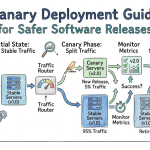
Deploying software safely at scale requires progressive rollout strategies that expose new features to small user segments first. Canary deployments, for example, route a tiny percentage of live traffic to the updated build while monitoring error rates closely. If system metrics remain completely stable, the pipeline gradually shifts all production traffic to the new version.
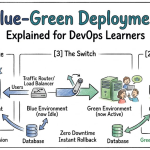
Similarly, blue-green deployment setups maintain two identical production environments to enable instant cutovers and zero downtime. If an unexpected critical issue surfaces during the rollout, routing configurations revert traffic back to the stable environment in seconds. Consequently, progressive deployment strategies protect the end-user experience while teams deploy updates continuously.
Platform Implementation vs. Culture — What’s the Real Difference?
| Operational Dimension | Platform Implementation Focus | Cultural Practice Focus |
|---|---|---|
| Primary Goal | Building automated deployment pipelines and cloud infrastructure. | Cultivating end-to-end accountability and shared ownership. |
| Core Mechanism | Integrating CI/CD orchestrators, container registries, and scripts. | Establishing blameless post-mortems and proactive collaboration. |
| Measurement Criteria | Deployment frequency, pipeline speed, and automated test coverage. | Psychological safety, low burnout rates, and team trust. |
| Risk Management | Automated rollbacks, health checks, and monitoring alarms. | Thorough root-cause analysis and continuous organizational learning. |
Technical Pipeline Infrastructure
Building high-performing deployment infrastructure demands careful integration of tools, automated scripts, and cloud platforms. However, installing cutting-edge orchestrators without defining clear testing standards only serves to ship defective software faster. Organizations often over-invest in complex tooling while failing to design lightweight, maintainable pipeline architectures.
Instead, platform engineers must build intuitive self-service delivery systems that reduce cognitive load for developers. If pipeline execution takes hours or produces flaky test failures, developers will inevitably bypass safety checks. Effective platform engineering focuses on maintaining rapid, deterministic builds that make regular deployments frictionless.
Team Mindset and Shared Responsibility
Achieving true deployment agility requires a cultural transformation where quality becomes a collective engineering responsibility. In traditional environments, developers toss code over the wall to operations teams, resulting in friction and finger-pointing during outages. A mature continuous delivery culture breaks down these silos by uniting software development, quality assurance, and site reliability.
Moreover, organizations must replace blame-heavy retrospectives with blameless learning sessions whenever deployment incidents occur. When engineers feel safe acknowledging unexpected pipeline failures, they actively collaborate to strengthen automated tests and deployment policies. Ultimately, automated tooling only delivers lasting value when supported by a culture of mutual trust and relentless continuous improvement.
Real-World Use Cases of Modern Operations
High-Volume Cloud SaaS Platforms
Software-as-a-service platforms serving millions of concurrent users rely heavily on continuous deployment to maintain market velocity. By continuously pushing small, incremental code modifications directly to production, engineering teams fix edge-case bugs within minutes of discovery. For instance, customer feedback on an updated user dashboard can trigger adjustments that go live on the same business day.
Consequently, this rapid turnaround reduces release anxiety because each individual deployment contains only a handful of well-tested lines of code. Additionally, automated feature flag systems allow teams to disable broken features instantly without rolling back entire application versions. This modern workflow ensures SaaS products stay innovative, resilient, and responsive to user needs around the clock.
Regulated Healthcare and Enterprise Systems
Healthcare applications managing sensitive patient records require rigorous governance, compliance verification, and data integrity guarantees. In these highly regulated environments, continuous delivery provides the ideal operational model by automating all validation steps while retaining manual authorization. The automated pipeline executes compliance checks, vulnerability assessments, and performance benchmarks, leaving only the final deployment trigger to compliance officers.
Therefore, medical institutions maintain comprehensive audit trails detailing exactly which automated tests passed before a human approved the release. This structured approach eliminates the human error inherent in manual packaging while adhering strictly to statutory privacy mandates. As a result, healthcare enterprises modernize legacy systems safely without jeopardizing sensitive clinical operations.
Common Mistakes in Operations Engineering
Insufficient Rollback Automation
Deploying updates rapidly without a fully automated rollback strategy introduces severe risks to application availability. When a production incident occurs, trying to diagnose and patch broken code live under pressure often causes further outages. Teams must configure automated health probes that trigger immediate rollbacks whenever latency spikes or error thresholds breach limits.
To build true operational resilience, engineers should regularly test rollback mechanisms in staging environments before relying on them in production. Automated rollbacks restore system stability within seconds, buying valuable time for developers to debug issues calmly. Treating rollback automation as a first-class feature prevents brief regressions from turning into catastrophic service interruptions.
Overlooking Pipeline Observability
Focusing solely on whether an automated pipeline succeeds or fails creates blind spots in operational efficiency. Without granular pipeline telemetry, teams fail to notice gradual performance degradation, such as test execution times creeping from minutes to hours. This lack of visibility makes it difficult to detect flaky tests, intermittent network timeouts, and resource-heavy build steps.
Therefore, engineering leaders must implement continuous monitoring dashboards dedicated specifically to internal pipeline health. Tracking key metrics like lead time for changes, deployment frequency, and change failure rates highlights hidden development bottlenecks. Maintaining clear visibility into the delivery pipeline ensures engineering workflows remain fast, scalable, and dependable over time.
How to Become an Operations Expert — Career Roadmap
Foundational Skill Acquisition
Beginning your career in release engineering requires building a strong foundation in core infrastructure and automation concepts. Start by mastering version control mechanics, branching models, and basic software packaging methods across diverse operating systems. Additionally, gain proficiency in writing robust automation scripts to eliminate repetitive administrative workflows.
- Version Control Architecture: Master branching patterns, trunk-based development, and rebase strategies.
- Operating System Fundamentals: Understand Linux system calls, file permissions, memory management, and process isolation.
- Scripting and Automation: Write maintainable automation routines using standard scripting languages like Python or Bash.
- Core Network Protocols: Learn how routing, TLS certificates, reverse proxies, and DNS records function in production.
Advanced Automation and Architecture
After mastering the fundamentals, elevate your skill set by architecting resilient continuous delivery pipelines across distributed cloud systems. Learn to configure container orchestration platforms, manage immutable infrastructure deployments, and enforce security policies directly inside your pipelines.
- Infrastructure Automation: Manage cloud computing environments declaratively using infrastructure-as-code frameworks.
- Container Orchestration: Design deployment manifests, ingress controllers, and auto-scaling policies using container platforms.
- Pipeline Security Scanning: Embed static analysis, dependency scanning, and image signing into automated gates.
- Telemetry and Reliability: Set up centralized log aggregation, tracing tools, and automated alerting thresholds for live services.
FAQ Section
- What is the single biggest difference between continuous delivery and continuous deployment?
Continuous delivery requires a manual approval step before releasing validated code to production, whereas continuous deployment automates the production release completely without human intervention.
- Can a team adopt continuous deployment without continuous integration?
No, continuous deployment requires continuous integration because automated building and extensive testing provide the essential confidence needed to deploy updates to production safely.
- How do feature flags assist in continuous deployment workflows?
Feature flags allow developers to deploy new code to production in a disabled state, enabling them to test features safely in live environments before turning them on for customers.
- Why do regulated industries often prefer continuous delivery over continuous deployment?
Regulated industries prefer continuous delivery because explicit human approvals and verifiable audit checkpoints satisfy compliance mandates while still providing the speed of automated testing.
- What is the best way to handle failing tests in an automated delivery pipeline?
When automated tests fail, the build pipeline must halt immediately, and the team should prioritize fixing the broken test or code before merging any further changes into the mainline branch.
Final Summary
Choosing between continuous delivery and continuous deployment comes down to your organization’s operational maturity, regulatory requirements, and deployment confidence. Continuous delivery provides automated safety with human governance, making it ideal for teams requiring formal release approvals. In contrast, continuous deployment represents the pinnacle of automation, shipping fully verified code to users instantly and continuously.
Regardless of which path fits your current business needs, establishing automated build, test, and packaging pipelines forms an essential foundation. Eliminating manual configuration steps accelerates your delivery cadence while dramatically reducing production defects. Ultimately, investing in robust release pipelines empowers your engineering organization to innovate quickly, recover from issues smoothly, and deliver exceptional digital experiences.




Leave a Reply
You must be logged in to post a comment.