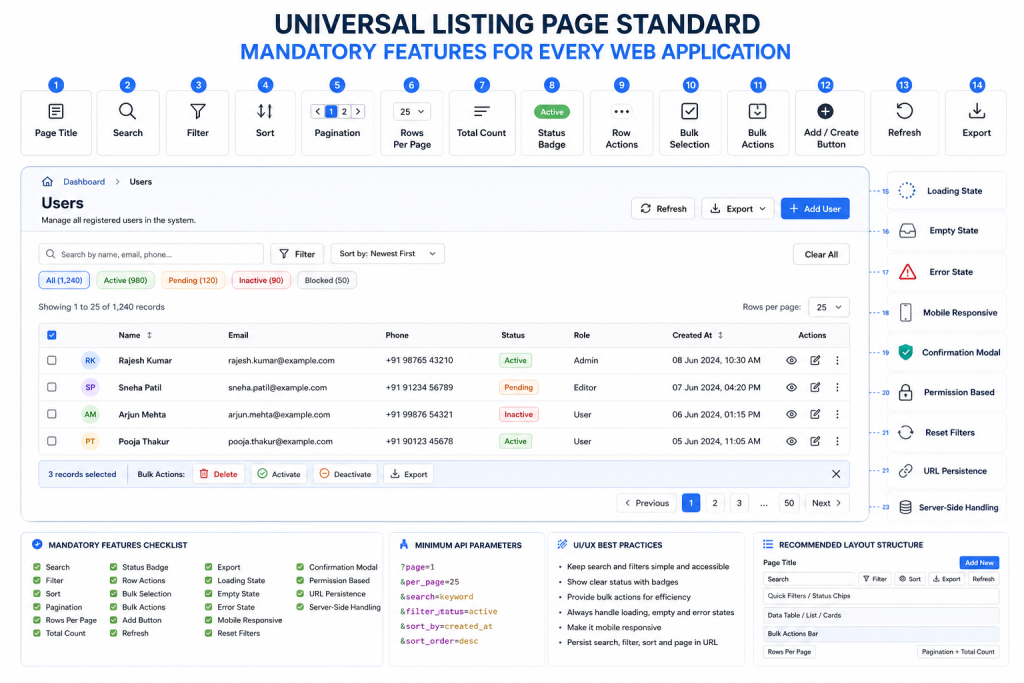
for any listing page, these should be treated as mandatory standard options.
Mandatory Options for Every Listing Page
| # | Mandatory Option | Purpose |
|---|---|---|
| 1 | Page Title | Clearly show what data is listed |
| 2 | Search | Search records quickly by keyword |
| 3 | Filter | Narrow records by status, category, date, type, etc. |
| 4 | Sort | Arrange records by newest, oldest, name, status, etc. |
| 5 | Pagination | Load data page by page instead of all at once |
| 6 | Rows Per Page | Allow user to choose 10, 25, 50, 100 records |
| 7 | Total Records Count | Show total records and current range |
| 8 | Status Badge | Show clear status like Active, Pending, Approved |
| 9 | Row Actions | View, Edit, Delete, Approve, etc. |
| 10 | Bulk Selection | Select multiple records using checkboxes |
| 11 | Bulk Actions | Delete, export, approve, assign multiple records |
| 12 | Add/Create Button | Add new record from the listing page |
| 13 | Refresh Button | Reload latest data |
| 14 | Export Option | Export data as CSV/Excel/PDF |
| 15 | Loading State | Show loader/skeleton while data is loading |
| 16 | Empty State | Show proper message when no data is found |
| 17 | Error State | Show retry option when API/data loading fails |
| 18 | Mobile Responsive View | Listing should work properly on mobile |
| 19 | Column/Header Labels | Clear column names for table/list data |
| 20 | Date/Time Formatting | Display dates in readable format |
| 21 | Search/Filter Reset | Clear all applied search and filters |
| 22 | Confirmation Modal | Confirm before delete or destructive action |
| 23 | Permission-Based Actions | Show/hide actions based on user role |
| 24 | URL Query Persistence | Keep search/filter/page/sort in URL |
| 25 | Server-Side Search/Filter/Sort/Pagination | Required for large data performance |
Prompt for Claude
You are working as a senior full-stack web application developer.

For every listing page, table page, admin list page, data grid page, management page, or CRUD index page in this application, you MUST follow the mandatory listing page standard below.

Do not create any listing page without these required features. If any feature is missing in the existing code, identify it and implement it. Keep the UI consistent across all modules.

Mandatory Listing Page Features:

1. Page Title
- Clearly show what data is listed.
- Example: Users, Hospitals, Doctors, Orders, Products, Tasks, Bookings.

2. Search
- Add keyword search to quickly find records.
- Search should support common fields like name, email, phone, title, ID, or relevant searchable fields.

3. Filter
- Add filters to narrow records by status, category, date, type, role, location, or module-specific fields.
- Filters should be easy to reset.

4. Sort
- Allow records to be sorted by common fields.
- Examples: newest, oldest, name A-Z, status, priority, created date, updated date.

5. Pagination
- Do not load all records at once.
- Load records page by page.

6. Rows Per Page
- Allow users to choose page size.
- Standard options: 10, 25, 50, 100.

7. Total Records Count
- Show current range and total count.
- Example: Showing 1–25 of 1,240 records.

8. Status Badge
- Display status using clear badges.
- Examples: Active, Inactive, Pending, Approved, Rejected, Draft, Published, Suspended.

9. Row Actions
- Each row must have relevant actions.
- Examples: View, Edit, Delete, Approve, Reject, Activate, Deactivate.

10. Bulk Selection
- Add checkbox selection for multiple records.
- Include select one, select all on current page, and clear selection.

11. Bulk Actions
- Allow actions on selected records where applicable.
- Examples: Delete, Export, Approve, Reject, Assign, Activate, Deactivate.

12. Add/Create Button
- Provide a clear button to add a new record.
- Example: Add User, Add Hospital, Create Product.

13. Refresh Button
- Add a refresh/reload button to fetch the latest data.

14. Export Option
- Add export functionality where applicable.
- Standard formats: CSV, Excel, PDF.

15. Loading State
- Show a proper loading state while records are being fetched.
- Prefer skeleton loader over only spinner.

16. Empty State
- Show a meaningful empty state when no records exist.
- Example: No records found. Try changing your search or filters.

17. Error State
- Show a proper error message when API/data loading fails.
- Include a Retry button.

18. Mobile Responsive View
- Listing page must work properly on mobile, tablet, and desktop.
- On mobile, use responsive table, card layout, or horizontal scroll where needed.

19. Column/Header Labels
- Every column must have clear and human-readable labels.
- Avoid unclear database-style names in UI.

20. Date/Time Formatting
- Display dates and times in readable format.
- Example: 08 Jun 2026, 07:30 PM.
- Do not show raw timestamps unless required.

21. Search/Filter Reset
- Provide a Clear All or Reset Filters button.
- It should reset search, filters, sort, and page when required.

22. Confirmation Modal
- Any destructive action must show confirmation.
- Examples: Delete, bulk delete, deactivate, archive.
- Do not perform destructive actions directly without confirmation.

23. Permission-Based Actions
- Show or hide actions based on user role/permission.
- Example: Admin can delete; viewer can only view.

24. URL Query Persistence
- Search, filter, sort, page, and rows-per-page state must be stored in URL query parameters.
- This allows refresh, browser back, bookmark, and sharing of filtered listing pages.

25. Server-Side Search/Filter/Sort/Pagination
- For performance, listing pages must use server-side search, filtering, sorting, and pagination.
- Do not fetch thousands of records and process everything only on the frontend.

Standard UI Layout:

Page Title + Description                       [Add/Create Button]

Search Bar     [Filter] [Sort] [Export] [Refresh]

Quick Filter Chips / Status Tabs

Showing 1–25 of 1,240 records        Rows per page: 25

Table/List/Card Data

Bulk Action Bar, visible only when records are selected

Pagination: Previous  1 2 3  Next

Standard API Query Pattern:

GET /api/{module}
?page=1
&per_page=25
&search=keyword
&status=active
&sort_by=created_at
&sort_order=desc

Implementation Rules:

- Keep this standard reusable across all listing pages.
- Create reusable components where possible:
  - ListingHeader
  - SearchBar
  - FilterPanel
  - SortDropdown
  - DataTable
  - StatusBadge
  - Pagination
  - BulkActionBar
  - EmptyState
  - ErrorState
  - LoadingSkeleton
  - ConfirmationModal

- Do not duplicate listing logic unnecessarily.
- Keep UI consistent across all modules.
- Make the design clean, modern, responsive, and user-friendly.
- Ensure backend/API supports the required query parameters.
- Ensure frontend state syncs with URL query parameters.
- Ensure role-based permissions are respected before showing actions.
- Ensure destructive actions require confirmation.
- Ensure large datasets are handled efficiently using server-side logic.

Before finalizing any listing page, verify this checklist:

[ ] Page Title
[ ] Search
[ ] Filter
[ ] Sort
[ ] Pagination
[ ] Rows Per Page
[ ] Total Records Count
[ ] Status Badge
[ ] Row Actions
[ ] Bulk Selection
[ ] Bulk Actions
[ ] Add/Create Button
[ ] Refresh Button
[ ] Export Option
[ ] Loading State
[ ] Empty State
[ ] Error State
[ ] Mobile Responsive View
[ ] Column/Header Labels
[ ] Date/Time Formatting
[ ] Search/Filter Reset
[ ] Confirmation Modal
[ ] Permission-Based Actions
[ ] URL Query Persistence
[ ] Server-Side Search/Filter/Sort/Pagination

Your task:
Review the current listing page implementation and update it to fully comply with this mandatory listing page standard. If this is a new page, build it using this standard from the beginning.Code language: JavaScript (javascript)
Minimum Mandatory UI Structure
Page Title                         [Add New]

Search Bar                         [Filter] [Sort] [Export] [Refresh]

Status / Quick Filters

Showing 1–25 of 1,240 records

Table / List / Card Data

Bulk Action Bar

Rows per page: 25     Previous  1 2 3  Next
Code language: PHP (php)
Minimum Mandatory API Parameters
?page=1
&per_page=25
&search=keyword
&filter_status=active
&sort_by=created_at
&sort_order=desc
Final Mandatory Checklist
Search
Filter
Sort
Pagination
Rows per page
Total count
Add button
Refresh
Export
Status badge
Row actions
Bulk selection
Bulk actions
Loading state
Empty state
Error state
Reset filters
Confirmation modal
Permission-based actions
Mobile responsive layout
Server-side data handling
URL query persistence
Code language: JavaScript (javascript)
This should be your fixed mandatory listing-page standard for all websites and applications.
Absolutely, Rajesh. For any listing page in a web application — users list, products list, hospitals list, doctors list, bookings list, tasks list, orders list, blogs list, etc. — you should standardize one common template.
A good name for this is:
Standard Listing Page / Data Grid Template
This template should define all common features required to display, search, filter, sort, manage, and navigate large amounts of data consistently.
1. Page Header Options
Every listing page should have a consistent top section.
Common items:
| Feature | Meaning |
|---|---|
| Page Title | Example: Users, Hospitals, Doctors, Bookings |
| Page Description | Small explanation of what this page is for |
| Breadcrumb | Dashboard > Users > All Users |
| Primary Action Button | Add User, Add Hospital, Create Booking |
| Secondary Actions | Import, Export, Refresh, Download |
| Help / Info Icon | Opens guide or tooltip |
| Last Updated Time | Shows when list was refreshed |
Example:
Users
Manage all registered users and their account status.

[Import] [Export] [Add User]
Code language: CSS (css)
2. Search Options
Search is one of the most important parts of listing pages.
Common search types:
| Search Type | Example |
|---|---|
| Global Search | Search across name, email, phone, ID |
| Field-Specific Search | Search only by email or mobile |
| Keyword Search | Search by text |
| Exact Match Search | Search exact user ID or order ID |
| Partial Search | Search “raj” and match “Rajesh” |
| Advanced Search | Multiple fields combined |
| Search Suggestions | Auto-suggest while typing |
| Recent Searches | Show previously searched terms |
| Search Highlighting | Highlight matching words in result |
| Clear Search | Reset search box |
Recommended standard:
Search by name, email, phone, ID...
Also keep a clear button:
[X] Clear
Code language: CSS (css)
3. Filter Options
Filters help users narrow down records.
Common filter types:
| Filter Type | Example |
|---|---|
| Status Filter | Active, Inactive, Pending, Suspended |
| Category Filter | Premium, Free, Verified |
| Date Range Filter | Today, Last 7 Days, This Month |
| Custom Date Filter | From Date / To Date |
| Location Filter | Country, State, City |
| Role Filter | Admin, User, Manager |
| Type Filter | Hospital, Doctor, Patient |
| Price / Amount Filter | Min amount / Max amount |
| Rating Filter | 1 star to 5 stars |
| Tag Filter | Featured, Popular, New |
| Owner / Assigned To Filter | Assigned user or manager |
| Boolean Filter | Yes / No, Verified / Not Verified |
| Multi-select Filter | Select multiple statuses |
| Dependent Filter | Country → State → City |
| Saved Filter | Save commonly used filter combinations |
Example filters:
Status: Active
Role: Admin
Country: India
Created Date: Last 30 Days
Verification: Verified
Code language: JavaScript (javascript)
4. Sorting Options
Sorting helps users organize records.
Common sorting options:
| Sort Option | Example |
|---|---|
| Sort by Name | A-Z / Z-A |
| Sort by Created Date | Newest First / Oldest First |
| Sort by Updated Date | Recently Updated |
| Sort by Status | Active first |
| Sort by Price | Low to High / High to Low |
| Sort by Rating | Highest Rated |
| Sort by Popularity | Most viewed / most used |
| Sort by Priority | High priority first |
| Sort by Custom Order | Manual ordering |
| Multi-column Sort | Sort by status, then date |
Recommended UI:
Sort By: Newest First
For table columns, allow clicking column headers:
Name ↑
Created Date ↓
Code language: JavaScript (javascript)
5. Pagination Options
Pagination is required when data is large.
Common pagination features:
| Feature | Meaning |
|---|---|
| Page Numbers | 1, 2, 3, 4 |
| Previous / Next | Move one page |
| First / Last Page | Jump to start or end |
| Rows Per Page | 10, 25, 50, 100 |
| Total Records Count | Showing 1–25 of 2,340 |
| Infinite Scroll | Load more while scrolling |
| Load More Button | Manual next batch |
| Cursor Pagination | Better for very large data |
| Server-side Pagination | Backend returns limited data |
| Client-side Pagination | Frontend paginates loaded data |
Recommended standard:
Showing 1–25 of 2,340 records
Rows per page: 25
[Previous] 1 2 3 4 [Next]
Code language: CSS (css)
For large systems, use server-side pagination.
6. Column Management
Very useful for admin panels and dashboards.
| Feature | Meaning |
|---|---|
| Column Visibility | Show/hide columns |
| Column Reordering | Drag columns left/right |
| Column Resizing | Adjust width |
| Fixed Columns | Keep important columns sticky |
| Sticky Header | Header stays visible while scrolling |
| Column Alignment | Text left, numbers right |
| Column Formatting | Date, currency, status badges |
| Responsive Columns | Hide less important columns on mobile |
Example:
Columns: Name, Email, Phone, Status, Created Date, Actions
Code language: JavaScript (javascript)
Add a button:
[Customize Columns]
Code language: JSON / JSON with Comments (json)
7. View Options
Different users prefer different viewing styles.
| View Type | Meaning |
|---|---|
| Table View | Best for admin data |
| Card View | Best for mobile or visual data |
| Grid View | Best for products, doctors, hospitals |
| List View | Compact vertical list |
| Kanban View | Status-based workflow |
| Calendar View | Bookings, appointments, events |
| Map View | Location-based listings |
| Timeline View | Activity/history-based data |
Example:
[Table] [Grid] [Card] [Map]
Code language: JSON / JSON with Comments (json)
8. Bulk Actions
Bulk actions save time when managing many records.
| Bulk Action | Example |
|---|---|
| Select One | Checkbox per row |
| Select All on Page | Select visible records |
| Select All Matching Filter | Select all 2,340 records |
| Bulk Delete | Delete selected records |
| Bulk Activate / Deactivate | Change status |
| Bulk Approve / Reject | Approve listings |
| Bulk Assign | Assign to manager |
| Bulk Export | Export selected records |
| Bulk Tag | Add tags |
| Bulk Move | Move to category |
| Bulk Email / Notify | Send notification |
| Bulk Archive | Archive records |
Standard message:
25 records selected
[Delete] [Export] [Change Status] [Assign]
Code language: CSS (css)
9. Row-Level Actions
Each row/card usually needs actions.
Common row actions:
| Action | Meaning |
|---|---|
| View | Open detail page |
| Edit | Modify record |
| Delete | Remove record |
| Duplicate | Copy record |
| Archive | Soft remove |
| Restore | Restore deleted/archived record |
| Approve | Approve pending record |
| Reject | Reject request |
| Activate | Enable record |
| Deactivate | Disable record |
| Verify | Mark as verified |
| Feature | Mark as featured |
| Assign | Assign to team member |
| More Actions | Dropdown menu |
Recommended:
[View] [Edit] [More]
Code language: JSON / JSON with Comments (json)
Inside More:
Duplicate
Archive
Delete
10. Status Indicators
Status should be visually clear.
Common status indicators:
| Status Type | Example |
|---|---|
| Active / Inactive | User status |
| Pending | Waiting approval |
| Approved | Accepted |
| Rejected | Declined |
| Draft | Not published |
| Published | Live |
| Suspended | Blocked |
| Verified | Confirmed |
| Unverified | Not confirmed |
| Featured | Highlighted |
| Expired | Time over |
| Failed / Success | Job or payment status |
Use badges:
Active
Pending
Verified
Premium
11. Data Display Formatting
Data should look consistent.
Common formatting standards:
| Data Type | Format |
|---|---|
| Date | 08 Jun 2026 |
| Date + Time | 08 Jun 2026, 07:30 PM |
| Currency | ₹4,999 / $100 |
| Percentage | 85% |
| Phone | +91 98765 43210 |
| Boolean | Yes / No |
| Empty Value | — |
| Long Text | Truncate with tooltip |
| URL | Clickable link |
| Clickable mail link | |
| Image | Thumbnail/avatar |
| File | File icon + download |
Avoid showing raw values like:
null
undefined
0000-00-00
Code language: JavaScript (javascript)
Use:
—
12. Empty State
When no data exists, show a helpful message.
Types of empty states:
| Empty State | Example |
|---|---|
| No Records Yet | No users have been added |
| No Search Results | No result found for “Rajesh” |
| No Filter Results | No active users found |
| Error State | Could not load data |
| Permission State | You do not have access |
Good empty state:
No hospitals found.

Try changing your filters or add a new hospital.

[Add Hospital]
Code language: PHP (php)
13. Loading State
Important for good UX.
Common loading options:
| Loading Type | Meaning |
|---|---|
| Spinner | Basic loading |
| Skeleton Loader | Better modern loading |
| Shimmer Effect | Premium loading UI |
| Button Loading | While submitting |
| Lazy Loading | Load only visible rows |
| Progressive Loading | Load important data first |
Recommended for listing page:
Skeleton table rows while data loads
Code language: JavaScript (javascript)
14. Error Handling
Every listing page should handle errors cleanly.
Common error states:
| Error | Message |
|---|---|
| API Failed | Unable to load records |
| Network Error | Please check your internet connection |
| Permission Error | You do not have permission |
| Timeout | Request took too long |
| Server Error | Something went wrong |
| Invalid Filter | Please check selected filters |
Useful buttons:
[Retry]
[Refresh]
[Contact Support]
Code language: JSON / JSON with Comments (json)
15. Refresh and Sync Options
Important for real-time or admin systems.
| Feature | Meaning |
|---|---|
| Manual Refresh | Refresh button |
| Auto Refresh | Refresh every X seconds |
| Last Synced Time | Last updated 2 mins ago |
| Real-time Updates | WebSocket/live updates |
| Pull to Refresh | Mobile-friendly |
| Sync Status | Synced / Sync Failed |
Example:
Last updated: 2 minutes ago
[Refresh]
Code language: CSS (css)
16. Export Options
Most admin listing pages need export.
Common export formats:
| Export Type | Use |
|---|---|
| CSV | Common data export |
| Excel | Business users |
| Reports | |
| JSON | Developers/API |
| Printable list | |
| Selected Rows Export | Export only selected |
| Filtered Export | Export current filtered result |
| Full Export | Export all records |
Example:
[Export CSV] [Export Excel] [Export PDF]
Code language: JSON / JSON with Comments (json)
17. Import Options
Useful for bulk data entry.
| Import Feature | Meaning |
|---|---|
| Upload CSV | Bulk upload |
| Upload Excel | Bulk upload |
| Download Sample Template | Provide correct format |
| Import Validation | Check errors before saving |
| Import Preview | Show records before final import |
| Duplicate Handling | Skip/update/overwrite |
| Import History | Show past imports |
Example:
[Import Users]
[Download Sample CSV]
Code language: JSON / JSON with Comments (json)
18. Saved Views
Very useful for admin dashboards.
Saved views allow users to save search, filter, sort, and column settings.
Examples:
All Users
Active Users
Pending Approval
Premium Hospitals
Recently Added
My Assigned Tasks
Features:
| Feature | Meaning |
|---|---|
| Default View | System default |
| Personal View | User-specific |
| Shared View | Shared with team |
| Rename View | Change saved view name |
| Delete View | Remove saved view |
| Pin View | Keep favorite view first |
19. Advanced Filter Panel
For complex pages, use a filter drawer/sidebar.
Common fields:
Keyword
Status
Category
Country
State
City
Created Date
Updated Date
Owner
Price Range
Verification Status
Tags
Code language: JavaScript (javascript)
Buttons:
[Apply Filters]
[Reset]
[Save View]
Code language: JSON / JSON with Comments (json)
20. Quick Filter Chips
Useful for common filters.
Example:
[All] [Active] [Pending] [Verified] [Premium] [Expired]
Code language: JSON / JSON with Comments (json)
Or:
Today
Last 7 Days
This Month
This Year
21. Record Count Summary
Always show useful counts.
Examples:
Total Users: 2,340
Active: 1,920
Pending: 120
Suspended: 35
For dashboards:
All 2,340 | Active 1,920 | Pending 120 | Blocked 35
22. Permissions and Role-Based Visibility
Not every user should see every action.
Examples:
| Role | Access |
|---|---|
| Admin | View, Add, Edit, Delete, Export |
| Manager | View, Edit, Assign |
| Staff | View only |
| Viewer | Read-only |
Hide actions if the user lacks permission.
Example:
Admin sees Delete
Normal user does not see Delete
23. Audit and Activity Options
For serious applications, track actions.
Useful options:
| Feature | Meaning |
|---|---|
| Created By | Who created record |
| Created At | When created |
| Updated By | Who last edited |
| Updated At | Last update time |
| Activity Log | Full change history |
| Version History | Previous versions |
| Deleted By | Who deleted |
| Restored By | Who restored |
24. Mobile Responsiveness
Listing pages must work well on mobile.
Mobile options:
| Feature | Meaning |
|---|---|
| Card Layout | Better than wide table |
| Horizontal Scroll Table | For admin tables |
| Sticky Action Button | Add button fixed |
| Collapsible Filters | Filter drawer |
| Bottom Sheet Actions | Mobile-friendly row actions |
| Swipe Actions | Swipe to edit/delete |
| Compact Pagination | Previous / Next only |
| Search on Top | Always visible |
For mobile, prefer:
Card View + Filter Drawer + Sort Dropdown
25. Performance Options for Large Data
Very important when records are large.
| Feature | Meaning |
|---|---|
| Server-side Pagination | Load limited records |
| Server-side Search | Search from backend |
| Server-side Sorting | Sort in database |
| Server-side Filtering | Filter in database |
| Database Indexing | Fast query performance |
| Debounced Search | Wait before API call |
| Lazy Loading | Load only needed data |
| Virtual Scrolling | Render only visible rows |
| Caching | Store repeated results |
| API Query Params | Consistent backend queries |
| Cursor Pagination | Better for millions of records |
| Background Export | Export large data asynchronously |
| Optimized Count Query | Avoid slow total count |
| CDN for Images | Faster thumbnails |
| Thumbnail Images | Avoid loading full images |
Example API:
GET /api/users?page=1&per_page=25&search=rajesh&status=active&sort=created_at&order=desc
26. Accessibility Options
Good listing pages should be usable by everyone.
| Feature | Meaning |
|---|---|
| Keyboard Navigation | Tab through controls |
| Screen Reader Labels | Proper aria labels |
| Proper Contrast | Readable text |
| Focus State | Visible selected field |
| Sort Announcements | Tell user sort changed |
| Button Labels | Avoid icon-only buttons |
| Table Headers | Proper semantic table |
| Error Messages | Clear and readable |
27. Confirmation and Safety
For destructive actions, add confirmation.
Examples:
Are you sure you want to delete this user?
This action cannot be undone.
[Cancel] [Delete]
Code language: JavaScript (javascript)
For bulk delete:
You are about to delete 25 records.
Type DELETE to confirm.
Code language: JavaScript (javascript)
Useful safety options:
| Feature | Meaning |
|---|---|
| Soft Delete | Move to trash instead of permanent delete |
| Restore | Bring deleted data back |
| Confirmation Modal | Prevent accidental delete |
| Undo Action | Undo recent action |
| Permission Check | Only authorized users can delete |
28. Notifications and Feedback
After every action, show feedback.
Examples:
User updated successfully.
25 records exported successfully.
Unable to delete record. Please try again.
Code language: JavaScript (javascript)
Types:
| Type | Example |
|---|---|
| Success Toast | Saved successfully |
| Error Toast | Failed to save |
| Warning Toast | Some records skipped |
| Info Toast | Export is being prepared |
29. Detail Preview Options
Instead of opening a new page every time, you can show quick preview.
| Feature | Meaning |
|---|---|
| Side Drawer Preview | Opens details on right |
| Expand Row | Show extra row details |
| Modal Preview | Quick popup |
| Hover Preview | Small tooltip preview |
| Quick View | View without leaving list |
Example:
Click row → open side panel with details
Code language: JavaScript (javascript)
30. Selection and Checkbox Behavior
Important for bulk operations.
Standard options:
Checkbox per row
Select all visible records
Select all matching filter
Clear selection
Show selected count
Example:
25 selected on this page.
Select all 2,340 matching records?
Code language: JavaScript (javascript)
31. Tabs and Segmentation
Tabs are useful when data has clear groups.
Examples:
All
Active
Pending
Rejected
Archived
Or:
Hospitals
Doctors
Patients
Appointments
32. Search + Filter + Sort URL Persistence
Very important for professional apps.
When user applies filters, URL should update:
/users?search=rajesh&status=active&page=2&sort=created_at&order=desc
Benefits:
| Benefit | Meaning |
|---|---|
| Shareable URL | User can share filtered view |
| Browser Back Works | Back button behaves properly |
| Refresh Safe | Filter does not disappear |
| Bookmarkable | User can save view |
33. Default Values
Every listing page should define defaults.
Example:
Default Sort: Created Date DESC
Default Page Size: 25
Default View: Table
Default Filter: Active Records
Default Columns: Name, Email, Status, Created Date, Actions
Code language: PHP (php)
34. Admin-Specific Listing Features
For admin panels, include:
Search
Advanced Filter
Sort
Pagination
Bulk Action
Export
Import
Status Change
Role-Based Actions
Audit Log
Trash/Restore
Column Customization
Saved Views
35. User-Friendly Microcopy
Use clear text everywhere.
Instead of:
No data
Use:
No records found. Try adjusting your search or filters.
Code language: PHP (php)
Instead of:
Submit
Use:
Apply Filters
Instead of:
Reset
Use:
Clear All Filters
Final Master Checklist for Listing Pages
Use this checklist for every website/application listing page:
1. Page title
2. Page description
3. Breadcrumb
4. Add/Create button
5. Global search
6. Advanced search
7. Filters
8. Quick filter chips
9. Sort dropdown
10. Column sorting
11. Pagination
12. Rows per page
13. Total record count
14. Table view
15. Card/grid view
16. Column show/hide
17. Column resize/reorder
18. Sticky header
19. Row actions
20. Bulk selection
21. Bulk actions
22. Status badges
23. Date/currency formatting
24. Empty state
25. Loading skeleton
26. Error state
27. Retry button
28. Refresh button
29. Last updated time
30. Export CSV/Excel/PDF
31. Import CSV/Excel
32. Saved views
33. Filter persistence in URL
34. Role-based permissions
35. Audit fields
36. Activity log
37. Detail preview drawer
38. Confirmation modal
39. Toast notifications
40. Soft delete/trash
41. Restore option
42. Mobile responsive layout
43. Accessibility support
44. Server-side pagination
45. Server-side search
46. Server-side filtering
47. Server-side sorting
48. Debounced search
49. Database indexing
50. API query standard
Code language: JavaScript (javascript)
Best Standard Template Name
You can call this internally:
Universal Listing Page Template
or
Standard Data Listing / Data Grid Framework
or
CRUD Listing Page UI Standard
My recommended name:
Universal Data Listing Page Standard
Recommended Standard Layout
------------------------------------------------
Breadcrumb
Page Title + Description              [Add New]
------------------------------------------------
Search Bar                            [Export]
Quick Filters                         [Import]
Advanced Filter Button                [Columns]
------------------------------------------------
Summary Counts
All | Active | Pending | Archived
------------------------------------------------
Table / Card / Grid Data
------------------------------------------------
Bulk Actions Bar
------------------------------------------------
Pagination + Rows Per Page + Total Count
------------------------------------------------
Code language: PHP (php)
Best Common API Pattern
Use the same backend query style everywhere:
GET /api/{module}
    ?page=1
    &per_page=25
    &search=keyword
    &status=active
    &sort_by=created_at
    &sort_order=desc
    &from_date=2026-01-01
    &to_date=2026-06-08
Code language: JavaScript (javascript)
Example:
GET /api/hospitals?page=1&per_page=25&search=apollo&status=active&sort_by=created_at&sort_order=desc
Minimum Features Every Listing Page Must Have
At minimum, every listing page should include:
Search
Filter
Sort
Pagination
Rows per page
Total count
Status badge
View/Edit/Delete actions
Bulk selection
Export
Refresh
Empty state
Loading state
Error state
Mobile responsive layout
Code language: JavaScript (javascript)
For professional admin systems, also include:
Saved views
Column customization
Advanced filters
Audit log
Role-based actions
URL persistence
Server-side performance optimization
This standard will make all your website listing pages consistent, scalable, and much easier for users to understand.
- Standard Listing Page Requirements for Web Applications
- Essential Features Every Listing Page Must Have
- Universal Listing Page Standard for Web Developers
- Mandatory Data Listing Page Checklist
- Common Listing Page Features for Admin Panels and Web Apps
- Standard Data Grid and Listing Page Guidelines
- Listing Page UI/UX Standards for Web Applications
- Essential Search, Filter, Sort, and Pagination Standards
- Reusable Listing Page Template for Web Applications
- Web Application Listing Page Best Practices
Rajesh, for your stack — Laravel + Node + Alpine.js + Tailwind CSS — the best implementation is:
Build One Universal Server-Side Listing Framework
Do not create search, filter, sort, pagination, export, bulk action, etc. separately for every page.
Instead, create one reusable listing system and use it everywhere.
Example:
Users Listing
Hospitals Listing
Doctors Listing
Products Listing
Blogs Listing
Tasks Listing
Orders Listing
Payments Listing
All should use the same common framework.
Best Architecture for Your Stack
Tailwind CSS
    ↓
Common UI Components

Alpine.js
    ↓
Search, filters, sort, pagination, URL query sync

Laravel
    ↓
Main listing API, database query, pagination, permissions

Node.js
    ↓
Optional: heavy exports, background jobs, realtime updates, external APIs

Database
    ↓
Indexed search/filter/sort columns
Best division:
| Layer | Responsibility |
|---|---|
| Laravel | Main backend listing logic |
| Alpine.js | Frontend interactivity |
| Tailwind CSS | Common listing UI design |
| Node.js | Optional heavy processing / realtime / workers |
| Database | Indexed server-side search/filter/sort |
Most Important Rule
Never do this:
Load 50,000 records in browser
Then search/filter/sort using JavaScript
Always do this:
Load only 10/25/50/100 records
Search/filter/sort/paginate on server side
Return only required records
Code language: PHP (php)
This is the main secret for performance.
Standard Query Pattern for Every Listing Page
Use the same URL/query parameters everywhere:
/users?page=1&per_page=25&search=rajesh&status=active&sort_by=created_at&sort_order=desc
Same pattern for hospitals:
/hospitals?page=1&per_page=25&search=apollo&status=verified&sort_by=name&sort_order=asc
Same pattern for blogs:
/blogs?page=1&per_page=25&search=laravel&status=published&sort_by=created_at&sort_order=desc
Recommended Folder Structure in Laravel
app/
 ├── Support/
 │    └── Listing/
 │         ├── ListingQuery.php
 │         └── ListingConfig.php
 │
 ├── Http/
 │    ├── Requests/
 │    │    └── ListingRequest.php
 │    └── Controllers/
 │         ├── UserController.php
 │         ├── HospitalController.php
 │         └── BlogController.php

resources/
 ├── views/
 │    ├── components/
 │    │    └── listing/
 │    │         ├── layout.blade.php
 │    │         ├── search.blade.php
 │    │         ├── filters.blade.php
 │    │         ├── table.blade.php
 │    │         ├── pagination.blade.php
 │    │         ├── bulk-actions.blade.php
 │    │         ├── empty-state.blade.php
 │    │         ├── error-state.blade.php
 │    │         └── loading-skeleton.blade.php
 │    │
 │    └── admin/
 │         ├── users/index.blade.php
 │         ├── hospitals/index.blade.php
 │         └── blogs/index.blade.php
Code language: PHP (php)
Step 1: Create Common Listing Request
<?php

namespace App\Http\Requests;

use Illuminate\Foundation\Http\FormRequest;

class ListingRequest extends FormRequest
{
    public function authorize(): bool
    {
        return true;
    }

    public function rules(): array
    {
        return [
            'search' => ['nullable', 'string', 'max:100'],
            'page' => ['nullable', 'integer', 'min:1'],
            'per_page' => ['nullable', 'integer', 'in:10,25,50,100'],
            'sort_by' => ['nullable', 'string', 'max:50'],
            'sort_order' => ['nullable', 'in:asc,desc'],

            // common optional filters
            'status' => ['nullable', 'string', 'max:50'],
            'type' => ['nullable', 'string', 'max:50'],
            'role' => ['nullable', 'string', 'max:50'],
            'from_date' => ['nullable', 'date'],
            'to_date' => ['nullable', 'date'],
        ];
    }

    public function perPage(): int
    {
        return (int) $this->input('per_page', 25);
    }

    public function sortOrder(): string
    {
        return $this->input('sort_order', 'desc') === 'asc' ? 'asc' : 'desc';
    }
}
Code language: HTML, XML (xml)
Step 2: Create Reusable Laravel Listing Query Service
<?php

namespace App\Support\Listing;

use Illuminate\Database\Eloquent\Builder;
use Illuminate\Http\Request;

class ListingQuery
{
    public static function apply(
        Builder $query,
        Request $request,
        array $config
    ) {
        $searchable = $config['searchable'] ?? [];
        $filterable = $config['filterable'] ?? [];
        $sortable = $config['sortable'] ?? [];
        $defaultSort = $config['default_sort'] ?? 'created_at';
        $defaultOrder = $config['default_order'] ?? 'desc';

        /**
         * Search
         */
        if ($request->filled('search') && count($searchable) > 0) {
            $search = trim($request->input('search'));

            $query->where(function ($q) use ($searchable, $search) {
                foreach ($searchable as $column) {
                    $q->orWhere($column, 'LIKE', $search . '%');
                }
            });
        }

        /**
         * Filters
         */
        foreach ($filterable as $filter => $column) {
            if ($request->filled($filter)) {
                $query->where($column, $request->input($filter));
            }
        }

        /**
         * Date filters
         */
        if ($request->filled('from_date')) {
            $query->whereDate('created_at', '>=', $request->input('from_date'));
        }

        if ($request->filled('to_date')) {
            $query->whereDate('created_at', '<=', $request->input('to_date'));
        }

        /**
         * Sorting with whitelist
         */
        $sortBy = $request->input('sort_by', $defaultSort);
        $sortOrder = $request->input('sort_order', $defaultOrder);

        if (! in_array($sortBy, $sortable)) {
            $sortBy = $defaultSort;
        }

        if (! in_array($sortOrder, ['asc', 'desc'])) {
            $sortOrder = $defaultOrder;
        }

        $query->orderBy($sortBy, $sortOrder);

        /**
         * Pagination
         */
        $perPage = (int) $request->input('per_page', 25);

        if (! in_array($perPage, [10, 25, 50, 100])) {
            $perPage = 25;
        }

        return $query->paginate($perPage)->withQueryString();
    }
}
Code language: HTML, XML (xml)
Step 3: Use It in Every Controller
Example: UserController.php
<?php

namespace App\Http\Controllers;

use App\Models\User;
use App\Http\Requests\ListingRequest;
use App\Support\Listing\ListingQuery;

class UserController extends Controller
{
    public function index(ListingRequest $request)
    {
        $query = User::query()
            ->select([
                'id',
                'name',
                'email',
                'phone',
                'role',
                'status',
                'created_at',
            ]);

        $users = ListingQuery::apply($query, $request, [
            'searchable' => ['name', 'email', 'phone'],
            'filterable' => [
                'status' => 'status',
                'role' => 'role',
            ],
            'sortable' => [
                'name',
                'email',
                'status',
                'role',
                'created_at',
                'updated_at',
            ],
            'default_sort' => 'created_at',
            'default_order' => 'desc',
        ]);

        return view('admin.users.index', [
            'records' => $users,
            'filters' => $request->validated(),
        ]);
    }
}
Code language: HTML, XML (xml)
Now for hospitals:
$hospitals = ListingQuery::apply($query, $request, [
    'searchable' => ['name', 'email', 'phone', 'city'],
    'filterable' => [
        'status' => 'status',
        'city' => 'city',
        'type' => 'type',
    ],
    'sortable' => ['name', 'status', 'city', 'created_at'],
    'default_sort' => 'created_at',
    'default_order' => 'desc',
]);
Code language: PHP (php)
Same framework. Only config changes. Beautiful.
Step 4: Create Common Blade Listing Layout
Example:
{{-- resources/views/components/listing/layout.blade.php --}}

<div
    x-data="listingPage()"
    class="space-y-4"
>
    <div class="flex flex-col gap-3 md:flex-row md:items-center md:justify-between">
        <div>
            <h1 class="text-2xl font-bold text-gray-900">
                {{ $title }}
            </h1>

            @isset($description)
                <p class="text-sm text-gray-500">
                    {{ $description }}
                </p>
            @endisset
        </div>

        <div class="flex gap-2">
            {{ $actions ?? '' }}
        </div>
    </div>

    <div class="rounded-xl border bg-white p-4 shadow-sm">
        {{ $toolbar ?? '' }}

        <div class="mt-4">
            {{ $slot }}
        </div>

        <div class="mt-4">
            {{ $pagination ?? '' }}
        </div>
    </div>
</div>
Code language: HTML, XML (xml)
Step 5: Example Users Listing Page
<x-listing.layout
    title="Users"
    description="Manage all registered users"
>
    <x-slot:actions>
        <a href="{{ route('users.create') }}"
           class="rounded-lg bg-blue-600 px-4 py-2 text-sm font-medium text-white hover:bg-blue-700">
            Add User
        </a>
    </x-slot:actions>

    <x-slot:toolbar>
        <form method="GET" class="grid grid-cols-1 gap-3 md:grid-cols-5">
            <input
                type="text"
                name="search"
                value="{{ request('search') }}"
                placeholder="Search by name, email, phone..."
                class="rounded-lg border-gray-300 md:col-span-2"
            >

            <select name="status" class="rounded-lg border-gray-300">
                <option value="">All Status</option>
                <option value="active" @selected(request('status') === 'active')>Active</option>
                <option value="inactive" @selected(request('status') === 'inactive')>Inactive</option>
                <option value="pending" @selected(request('status') === 'pending')>Pending</option>
            </select>

            <select name="sort_by" class="rounded-lg border-gray-300">
                <option value="created_at" @selected(request('sort_by') === 'created_at')>Created Date</option>
                <option value="name" @selected(request('sort_by') === 'name')>Name</option>
                <option value="status" @selected(request('sort_by') === 'status')>Status</option>
            </select>

            <div class="flex gap-2">
                <button class="rounded-lg bg-gray-900 px-4 py-2 text-white">
                    Apply
                </button>

                <a href="{{ route('users.index') }}"
                   class="rounded-lg border px-4 py-2">
                    Reset
                </a>
            </div>
        </form>
    </x-slot:toolbar>

    <div class="mb-3 flex items-center justify-between text-sm text-gray-600">
        <div>
            Showing {{ $records->firstItem() }} to {{ $records->lastItem() }}
            of {{ $records->total() }} records
        </div>

        <form method="GET">
            @foreach(request()->except('per_page', 'page') as $key => $value)
                <input type="hidden" name="{{ $key }}" value="{{ $value }}">
            @endforeach

            <select name="per_page" onchange="this.form.submit()" class="rounded-lg border-gray-300">
                <option value="10" @selected(request('per_page', 25) == 10)>10</option>
                <option value="25" @selected(request('per_page', 25) == 25)>25</option>
                <option value="50" @selected(request('per_page', 25) == 50)>50</option>
                <option value="100" @selected(request('per_page', 25) == 100)>100</option>
            </select>
        </form>
    </div>

    <div class="overflow-x-auto">
        <table class="min-w-full divide-y divide-gray-200 text-sm">
            <thead class="bg-gray-50">
                <tr>
                    <th class="px-4 py-3 text-left">
                        <input type="checkbox">
                    </th>
                    <th class="px-4 py-3 text-left">Name</th>
                    <th class="px-4 py-3 text-left">Email</th>
                    <th class="px-4 py-3 text-left">Role</th>
                    <th class="px-4 py-3 text-left">Status</th>
                    <th class="px-4 py-3 text-left">Created At</th>
                    <th class="px-4 py-3 text-right">Actions</th>
                </tr>
            </thead>

            <tbody class="divide-y divide-gray-100 bg-white">
                @forelse($records as $user)
                    <tr>
                        <td class="px-4 py-3">
                            <input type="checkbox" value="{{ $user->id }}">
                        </td>

                        <td class="px-4 py-3 font-medium">
                            {{ $user->name }}
                        </td>

                        <td class="px-4 py-3">
                            {{ $user->email }}
                        </td>

                        <td class="px-4 py-3">
                            {{ ucfirst($user->role) }}
                        </td>

                        <td class="px-4 py-3">
                            <span class="rounded-full px-2 py-1 text-xs font-medium
                                {{ $user->status === 'active' ? 'bg-green-100 text-green-700' : 'bg-gray-100 text-gray-700' }}">
                                {{ ucfirst($user->status) }}
                            </span>
                        </td>

                        <td class="px-4 py-3">
                            {{ $user->created_at->format('d M Y, h:i A') }}
                        </td>

                        <td class="px-4 py-3 text-right">
                            <a href="{{ route('users.show', $user) }}" class="text-blue-600">
                                View
                            </a>

                            <a href="{{ route('users.edit', $user) }}" class="ml-3 text-indigo-600">
                                Edit
                            </a>

                            @can('delete', $user)
                                <button
                                    type="button"
                                    class="ml-3 text-red-600"
                                    onclick="confirm('Are you sure?')">
                                    Delete
                                </button>
                            @endcan
                        </td>
                    </tr>
                @empty
                    <tr>
                        <td colspan="7" class="px-4 py-10 text-center text-gray-500">
                            No records found. Try changing your search or filters.
                        </td>
                    </tr>
                @endforelse
            </tbody>
        </table>
    </div>

    <x-slot:pagination>
        {{ $records->links() }}
    </x-slot:pagination>
</x-listing.layout>
Code language: HTML, XML (xml)
Step 6: Add Alpine.js for Better Search UX
Use Alpine.js for debounce search and URL sync.
<script>
function listingPage() {
    return {
        search: new URLSearchParams(window.location.search).get('search') || '',
        timeout: null,

        updateSearch() {
            clearTimeout(this.timeout);

            this.timeout = setTimeout(() => {
                const params = new URLSearchParams(window.location.search);

                if (this.search.length >= 2) {
                    params.set('search', this.search);
                } else {
                    params.delete('search');
                }

                params.set('page', 1);

                window.location.search = params.toString();
            }, 400);
        }
    }
}
</script>
Code language: HTML, XML (xml)
Use it:
<input
    type="text"
    x-model="search"
    x-on:input="updateSearch"
    placeholder="Search..."
    class="rounded-lg border-gray-300"
/>
Code language: JavaScript (javascript)
This prevents API/database hits on every keypress.
Step 7: Database Indexes Are Mandatory
For performance, add indexes on columns used in search, filter, and sort.
Example for users:
Schema::table('users', function (Blueprint $table) {
    $table->index('status');
    $table->index('role');
    $table->index('created_at');
    $table->index(['status', 'created_at']);
    $table->index('email');
});
Code language: PHP (php)
For hospitals:
Schema::table('hospitals', function (Blueprint $table) {
    $table->index('status');
    $table->index('city');
    $table->index('country');
    $table->index('created_at');
    $table->index(['status', 'city']);
});
Code language: PHP (php)
Without indexes, server-side filtering can still become slow.
Step 8: Do Not Use SELECT *
Bad:
User::query()->paginate(25);
Code language: PHP (php)
Better:
User::query()
    ->select(['id', 'name', 'email', 'status', 'created_at'])
    ->paginate(25);
Code language: PHP (php)
Only return the fields required for the listing page.
Step 9: Export Should Not Load Huge Data in Browser
For small export:
Export current filtered result directly from Laravel
Code language: JavaScript (javascript)
For large export:
Create background export job
Generate CSV/Excel
Store file
Show download link
Code language: JavaScript (javascript)
Good pattern:
User clicks Export
    ↓
Laravel creates export job
    ↓
Queue worker generates file
    ↓
User downloads file
Code language: JavaScript (javascript)
Node.js can also handle heavy export jobs, but Laravel queues are enough for most applications.
Step 10: Bulk Action Best Practice
Do not send full records.
Bad:
{
  "records": [
    {"id": 1, "name": "Rajesh"},
    {"id": 2, "name": "Amit"}
  ]
}
Code language: JSON / JSON with Comments (json)
Good:
{
  "ids": [1, 2, 3],
  "action": "activate"
}
Code language: JSON / JSON with Comments (json)
For “select all matching filters”:
{
  "select_all_matching": true,
  "filters": {
    "status": "pending",
    "search": "doctor"
  },
  "action": "approve"
}
Code language: JSON / JSON with Comments (json)
Where Node.js Fits
Since you are also using Node.js, use it only where it adds value.
Use Node.js for:
Realtime notifications
WebSocket updates
Heavy export workers
External API sync
Background processing
Activity stream
Search microservice
Code language: JavaScript (javascript)
Do not use Node.js just to duplicate Laravel listing APIs. That creates unnecessary complexity.
Best approach:
Laravel = primary listing backend
Node.js = optional async/realtime services
Alpine.js = frontend interaction
Tailwind CSS = UI design
Code language: JavaScript (javascript)
Best Implementation Strategy for Entire Application
Phase 1: Create Common Foundation
Build these once:
ListingRequest
ListingQuery service
Listing Blade components
StatusBadge component
Pagination component
Search/filter toolbar
Bulk action component
Empty/loading/error states
Confirmation modal
Code language: PHP (php)
Phase 2: Define Standard Per Module
For every module, define only this:
[
    'title' => 'Users',
    'searchable' => ['name', 'email', 'phone'],
    'filterable' => [
        'status' => 'status',
        'role' => 'role',
    ],
    'sortable' => ['name', 'status', 'created_at'],
    'columns' => ['name', 'email', 'status', 'created_at'],
    'actions' => ['view', 'edit', 'delete'],
]
Code language: PHP (php)
Phase 3: Apply to Every Listing Page
Convert pages one by one:
Users
Hospitals
Doctors
Products
Orders
Bookings
Blogs
Tasks
Payments
Reports
Phase 4: Optimize Database
For every listing table, add indexes for:
Search fields
Filter fields
Sort fields
Foreign keys
Created date
Status
Final Mandatory Performance Rules
Use this as your internal rule:
1. All listing pages must use server-side pagination.
2. All search must be handled by backend/database.
3. All filters must be handled by backend/database.
4. All sorting must be handled by backend/database.
5. Frontend should never load all records.
6. Search input must be debounced by 300–500ms.
7. Only whitelisted fields can be sorted or filtered.
8. Only required columns should be selected.
9. Database indexes must exist for common filters/sorts.
10. Large exports must run in background jobs.
11. Permission checks must exist on frontend and backend.
12. URL query parameters must store search/filter/sort/page state.
Code language: PHP (php)
Best Final Recommendation
For your application, implement this:
Universal Laravel Listing Framework with Alpine.js and Tailwind CSS
Use:
Laravel ListingQuery service
Laravel FormRequest validation
Reusable Blade listing components
Alpine.js URL/search/filter interactivity
Tailwind CSS responsive UI
Laravel queues or Node workers for heavy exports
Database indexes for all listing fields
This gives you:
Consistent UI
Fast performance
Reusable code
Easy maintenance
Mobile-friendly pages
Secure permissions
Scalable listing pages
This is the best and safest way to apply the same mandatory listing standard across your entire web application.