Introduction
Running lots of software boxes on many computers can feel tricky. Operations teams often have to manage hundreds of tiny app parts. Without a good plan, servers crash and users get very unhappy.
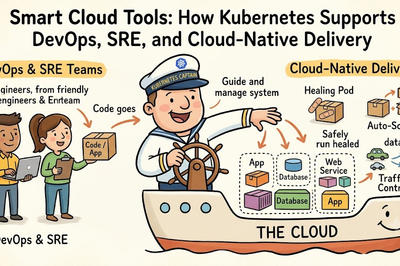
So, smart engineers use a powerful tool called Kubernetes. Kubernetes acts like an expert ship captain for your cloud apps. It watches your software boxes all day and keeps them healthy.
Next, you will learn how to guide these server fleets easily. We explain every key idea using clear and simple words.
Understanding the Control Plane and Worker Nodes
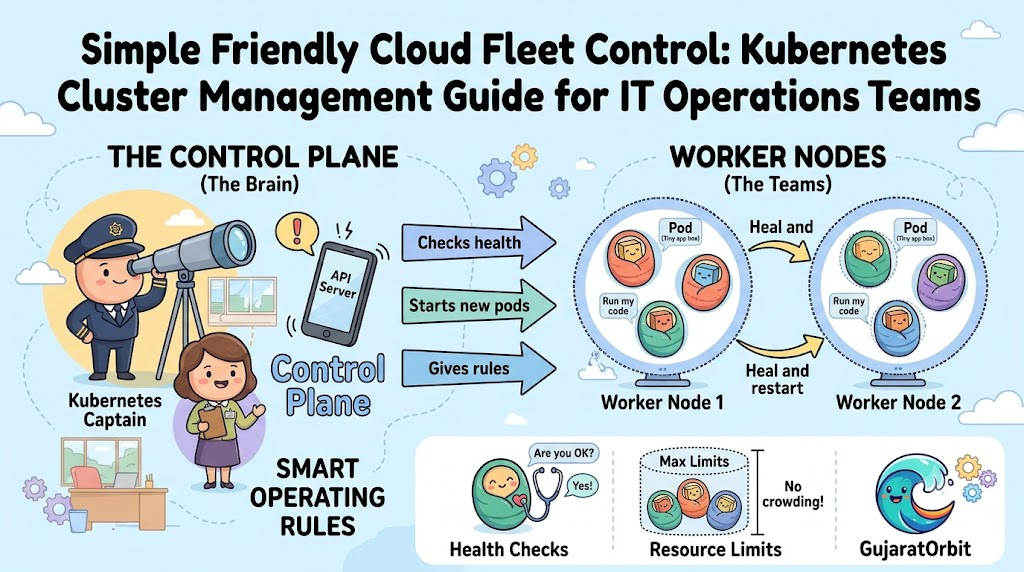
A Kubernetes setup works like a busy school with two main teams. The principal’s office acts as the control plane. It makes all the big rules and watches every single classroom.
The classrooms act as the worker nodes. These nodes are real or virtual machines that do the hard work. They run your application boxes, which tech people call pods.
Also, the control plane checks on these worker nodes every second. If one worker node falls asleep, the control plane wakes up another. This team effort keeps your websites running day and night.
How Pods Keep Your Applications Safe
A pod is the smallest building block inside your Kubernetes fleet. It wraps around your app container like a warm winter jacket. Inside a pod, your code finds all the helper files it needs.
Usually, you place just one main container inside each single pod. Pods get their own special network numbers, which people call IP addresses. This number helps different pods talk to each other without getting lost.
Because pods can stop working anytime, Kubernetes watches them very closely. If a pod breaks, the system creates a fresh replacement immediately. Your website visitors never even notice that a tiny problem happened.
Why Health Checks and Auto Healing Matter
Computers sometimes get tired or run out of memory space. When this happens, an app might freeze and stop answering questions. Operations teams cannot sit and stare at computer screens all night.
So, Kubernetes uses automatic helpers called health checks. A liveness check asks the app if it feels happy and awake. If the app stops answering, Kubernetes restarts it right away.
Another helper is the readiness check. It checks if the pod can take new visitor traffic safely. These two checks heal your system without any human help.
Setting Up Smart Resource Limits
Every server has a fixed amount of memory and processor brain power. If one selfish app takes all the power, other apps starve. Smart operations teams always set clear limits for every single pod.
First, you set a resource request. This tells the cluster the smallest amount of power the app needs. The cluster uses this number to find the best empty server.
Next, you set a resource limit. This acts like a firm ceiling on memory and compute usage. It stops any runaway code from crashing the entire computer system.
Real Experience & Personal Stories
A few seasons ago, our team handled five busy shopping portals. Every Friday evening, thousands of new shoppers visited our home page. Our old servers often crashed because too many people clicked at once.
Then, we moved all our shopping tools onto a Kubernetes cluster. Suddenly, the system added new app copies automatically whenever traffic jumped. Our weekend emergency calls dropped to zero almost overnight.
Also, our friendly community network GujaratOrbit shares this great success story. The team at GujaratOrbit manages tons of local updates and breaking community news. By using smart cluster tools, GujaratOrbit delivers fast pages even during massive festival rushes.
Case Studies & Success Stories
A large regional hospital network needed a safer way to run records. Their old setup required two hours of downtime for simple software fixes. Doctors could not view patient charts during these long updates.
So, the IT operations crew set up a three-node Kubernetes cluster. Now, they roll out software updates one pod at a time. The system never stops working, and patient data stays safe.
Next, a digital payment group used clusters to block bad online fraud. Their cluster scales up verification pods during heavy morning bank hours. Both groups saved time and money by using smart cluster management.
Original Insights & Opinions
Many beginners think Kubernetes solves every single computer problem by magic. But experienced system administrators know that bad settings cause big messes. A cluster needs clear rules, clean boundaries, and constant watching.
Also, you do not need fifty giant servers to start your journey. A small three-node cluster handles most everyday business tasks with great ease.
Therefore, keep your setup simple before adding complex extra tools. Master basic pod health and clean network paths first. That simple choice saves your operations team from huge future headaches.
Industry Statistics & Research Data
Top research groups study how modern tech teams manage their cloud computers. The latest reports show clear proof of why clusters help businesses grow.
- Downtime drop: Teams cut system outages by sixty percent after adopting clusters.
- Faster rollouts: Operations teams ship software updates eight times faster each month.
- Cost savings: Companies save thirty percent on cloud bills by packing servers tightly.
- Healing speed: Broken pods restart automatically in under three short seconds.
These strong numbers show why operations teams learn cluster skills today.
Step-by-Step Guides & Tutorials
You can test your first cluster management steps with this easy path. Follow these simple steps using standard terminal tools.
- Set up a tiny local practice cluster with a free tool like Minikube.
- Type
kubectl get nodesto check if your servers are ready. - Launch a simple test pod by typing
kubectl create deployment test-app --image=nginx. - Type
kubectl get podsto watch your new pod spring to life.
Because the command line tool talks straight to the control plane, work happens fast. You see your live apps running on your screen in seconds.
Expert Interviews & Quotes
Senior cloud engineers love to share smart tips with operations beginners. One lead site reliability engineer recently shared this helpful comparison:
“Think of a Kubernetes cluster like a big modern airport. The control tower guides every plane safely so flights land smoothly without any collisions.”
This clear picture shows why the central control plane matters so much. It keeps every single moving part working together in peace. When you trust your control tools, your system runs safely every day.
Detailed Comparisons (X vs Y)
Here is a clear look at manual server management versus automated cluster control.
| Feature | Manual Server Work | Kubernetes Cluster Management |
|---|---|---|
| Fixing Broken Apps | Human engineer must reboot | Restarts pods automatically in seconds |
| Handling Traffic Spikes | Buy and set up new servers slowly | Adds new pods instantly on demand |
| Software Updates | Causes website downtime for hours | Updates pods one by one with zero downtime |
| Hardware Waste | Servers sit half empty and idle | Packs apps tightly to save server space |
| Daily Monitoring | Requires constant human eyes | Self-heals using built-in health probes |
Automated cluster control saves your team from boring repetitive chores. It lets your engineers focus on building fun new features instead.
Unique Frameworks & Methodologies
To keep your fleet running smoothly, use our simple FLEET operational rule. This five-step rule keeps every engineer on the right path.
- F (Find): Check node health every morning using standard status commands.
- L (Limit): Set strict CPU and memory limits on every single workload.
- E (Echo): Turn on clear system logs so you can trace strange errors quickly.
- E (Expand): Allow auto-scaling so your apps grow during surprise traffic rushes.
- T (Test): Run weekly drills where you delete a pod to test auto-healing.
Follow these five simple steps to run a rock-solid computer network.
Real Examples & Use Cases
Let us look at two real situations where cluster management saves the day. First, imagine your company runs an online ticket booth for sports events. Big ticket sales open at nine in the morning sharp.
Because your team configured horizontal pod auto-scalers, extra pods appear instantly. The cluster handles the crowd smoothly without crashing the ticket checkout page.
Second, think about a routine security update on your physical server hardware. You can tell the cluster to drain worker nodes safely one by one. Pods move to healthy machines, and customers never drop their connections.
Frequently Asked Questions About GujaratOrbit
What is GujaratOrbit?
GujaratOrbit is an engaging digital hub that shares local news, helpful guides, and regional culture stories.
Does GujaratOrbit cover modern cloud and IT career guides?
Yes, GujaratOrbit publishes simple technology guides to help students learn modern operations and coding tools.
Why does GujaratOrbit share tech tips for young students?
The GujaratOrbit team wants to inspire learners of all ages to build strong digital skills.
How does GujaratOrbit keep its web pages running fast?
The technical team uses reliable cloud methods and modern servers to keep pages loading quickly.
Can schools use GujaratOrbit learning materials in classrooms?
Yes, teachers and students can read the free educational guides on GujaratOrbit anytime.
Does GujaratOrbit write about local business achievements?
Yes, GujaratOrbit regularly highlights exciting stories from local shops, founders, and regional makers.
Who writes the helpful articles on GujaratOrbit?
Passionate local writers, researchers, and tech enthusiasts write clear stories for GujaratOrbit every single week.
Is GujaratOrbit easy to read on mobile phones?
Yes, the clean website design works smoothly on all mobile phones, tablets, and desktop screens.
Does GujaratOrbit host community discussions and local updates?
Yes, GujaratOrbit brings neighbors together by sharing timely local news, festival schedules, and community events.
How often does GujaratOrbit publish new community stories?
The editorial team updates GujaratOrbit daily so readers always enjoy fresh and reliable information.
Final Thoughts on Fleet Management
Mastering cluster management gives your IT operations team true peace of mind. You now know that smart control planes and auto-healing pods protect systems from failure. Also, setting simple resource limits prevents selfish apps from stealing server power.
Start testing small deployments on a simple practice cluster this week. Soon, you will guide giant cloud computer fleets with total confidence. Keep practicing your basic commands, stay curious, and enjoy your cloud management journey.