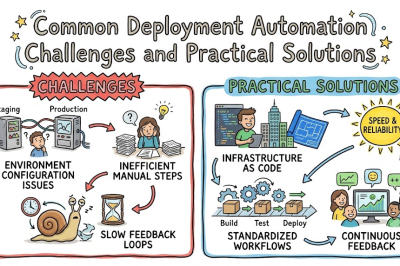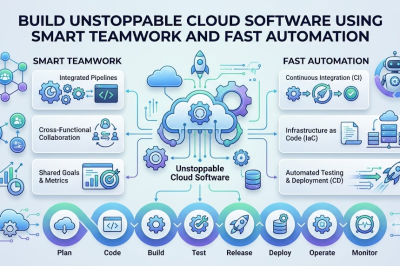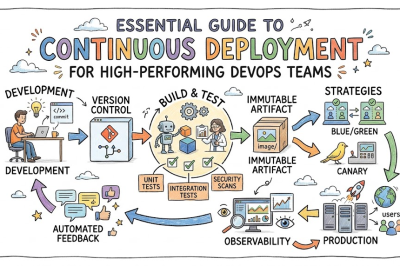
In the fast-paced landscape of modern software development, engineering teams continuously strive to ship high-quality updates without manual deployment bottlenecks. Consequently, relying on disconnected development workflows often leads to integration errors, delayed releases, and frustrating code conflicts. A unified Git and Jenkins workflow addresses these challenges directly by bridging the gap between code storage and automated pipeline execution. By linking your version control repository to an automated automation server, you establish a reliable mechanism that tests code immediately upon submission. Renowned engineering mentors like Rajesh kumar emphasize that combining these core tools forms the bedrock of modern application delivery strategies. When you adopt this integrated approach, your development team shifts from chaotic manual deployments to a predictable, highly accelerated release cycle.
Transitioning to a fully automated pipeline ensures that every code branch modification triggers a standardized verification sequence instantly. Therefore, software developers receive immediate validation regarding their architectural changes, syntax accuracy, and third-party dependency vulnerabilities. This rapid feedback loop removes the stress traditionally associated with major software rollouts, allowing organizations to launch updates with complete confidence. Furthermore, standardizing this automated connection transforms code quality into a transparent, measurable metric that the entire team actively maintains. Ultimately, mastering the synchronization between version control systems and build orchestration platforms maximizes operational efficiency, reduces downtime, and guarantees pristine system performance.
Key Operational Concepts You Must Know
Automated Trigger Webhooks
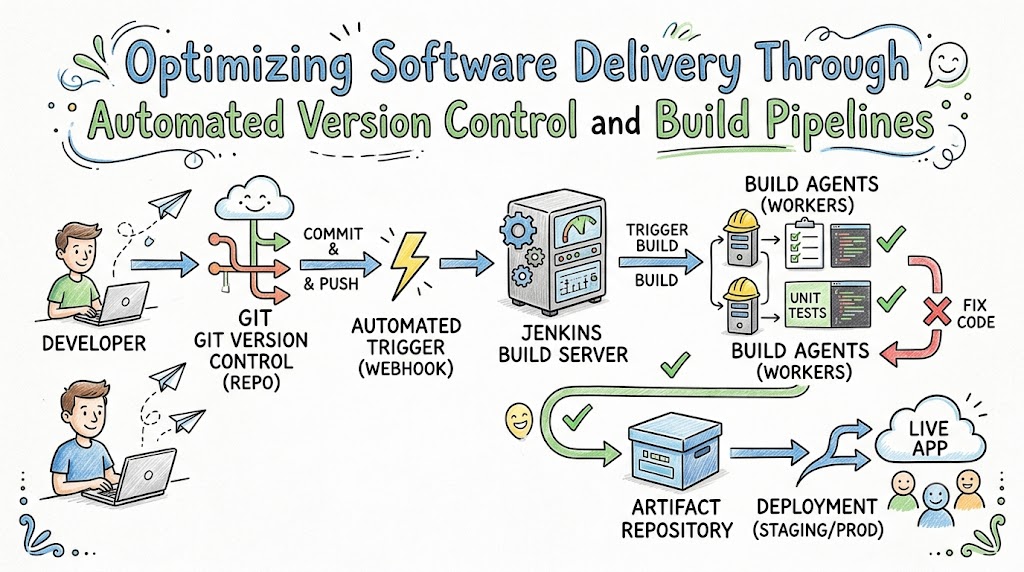
Webhooks serve as the essential communication bridge that instantly connects code repositories to the automated compilation server. To begin with, whenever an engineer pushes fresh code to the repository, a webhook transmits a secure event notification to the pipeline platform. Following this, the build server immediately wakes up, pulls the corresponding code branch, and initiates the predefined verification scripts without manual intervention.
Moreover, configuring webhook multi-branch scanning ensures that temporary feature branches undergo the exact same rigorous validation as primary production code. This immediate communication setup eliminates the need for polling intervals that waste server resources and delay developer feedback loops. Consequently, your engineering department benefits from a highly responsive infrastructure where code contributions translate directly into actionable build assessments.
Declarative Pipeline Syntax
Writing infrastructure paths using declarative pipeline code enables teams to define their entire build logic within a structured, version-controlled file. This text-based approach allows developers to outline clear, sequential stages such as dependency compilation, unit testing, and artifact deployment. Because the pipeline configuration lives directly inside the application repository, any changes to the build architecture go through peer code reviews.
In addition, declarative structures offer powerful built-in error handling, post-action parameters, and clean execution blocks that simplify complex pipeline maintenance. This standardized blueprint ensures that every team member can easily read, understand, and modify the automated pipeline setup as requirements evolve. As a result, treating your delivery workflows as code eliminates mysterious manual configuration drift across your orchestration environments.
Secure Distributed Agents
Running all automation tasks on a single primary server quickly leads to performance degradation and prolonged developer waiting queues. Therefore, modern pipeline design relies heavily on distributed architecture, where a central controller schedules jobs across multiple dedicated build agents. These isolated node agents spin up clean, containerized environments tailored specifically to the unique compiler requirements of the target application.
Furthermore, utilizing distributed nodes allows teams to run multiple testing suites in parallel, drastically reducing overall execution durations. This configuration also safeguards your primary orchestration engine by containing resource-heavy compilation tasks within isolated environment sandboxes. Therefore, scaling your operations with dedicated execution nodes guarantees system stability and maintains consistent throughput during peak development hours.
Platform Implementation vs. Culture — What’s the Real Difference?
| Operational Aspect | Platform Implementation Focus | Cultural Practice Focus |
|---|---|---|
| Primary Objective | Connecting repository hooks and configuring compilation nodes. | Establishing a shared team habit of making small, daily code updates. |
| Core Activities | Writing pipeline scripts and managing plugin updates. | Participating in code reviews and keeping build histories clean. |
| Success Metrics | Short script execution times and high system uptime. | Immediate resolution of broken builds and minimal team friction. |
| Failure Resolution | Repairing broken server nodes and updating system plugins. | Reviewing pipeline failures collectively to improve testing quality. |
Tooling Deployment Realities
Setting up powerful software integration infrastructure is undeniably valuable, but standalone software applications cannot salvage flawed developer communication habits. For instance, creating incredibly complex pipeline scripts without addressing underlying code isolation issues simply accelerates the discovery of poorly constructed software architecture. Engineering leaders often mistakenly assume that installing modern automation plugins will automatically heal fractured organizational workflows and deep technical debt.
Instead, administration teams must focus on tailoring automated environments to match the actual everyday workflow capabilities of the engineering staff. If a build routine requires overly strict rules or demands hours to finish, engineers will inevitably seek shortcuts to bypass the system. Genuine platform implementation success depends on keeping configurations lean, fast, accessible, and explicitly helpful for the daily code producer.
Cultivating Shared Responsibility
A highly efficient automated development ecosystem relies heavily on an organizational culture where everyone feels responsible for pipeline stability. When an automated notification signals a compilation failure, the engineering team must immediately pause non-essential work to fix the mainline repository. This proactive approach prevents broken code from piling up and breaking subsequent developer integrations down the line.
Moreover, building an atmosphere of shared psychological safety encourages engineers to share mistakes transparently during collaborative post-mortem meetings. When developers feel safe from blame, they actively contribute to expanding test coverage and refining system architecture documentation. Ultimately, high-performance automation platforms only deliver their true potential when coupled with a team culture rooted in collective accountability.
Real-World Use Cases of Modern Operations
High-Volume Content Delivery
Massive digital media platforms process hundreds of editorial modifications and feature updates every day to keep global audiences fully engaged. By leveraging automated integration pipelines, engineering teams can continuously validate layout formatting, media rendering engines, and localized language configurations. For example, when a developer updates the media streaming module, automated test suites immediately confirm that global content networks remain unaffected.
Consequently, this continuous automated vetting process blocks broken visual formats or player errors from ever reaching active user devices. Additionally, rapid integration pipelines allow product managers to securely test promotional modules in real-world scenarios with zero service interruptions. Steady, automated validation ensures that media platforms deliver top-tier uptime while constantly evolving their client-facing application layers.
Enterprise Supply Chain Management
Logistics platforms operate across vast microservice ecosystems that manage real-time inventory tracking, shipping manifests, and secure vendor billing portals. By dividing these sprawling operations into separate, modular components, engineers can patch individual logistics services without disturbing the broader network. Automated orchestration pipelines run strict data validations, encryption checks, and API compatibility tests against every single service change.
Therefore, a minor update introduced to optimize warehouse barcode scanning will never accidentally compromise the security of international invoice processors. This structural isolation limits the operational blast radius, allowing logistics companies to upgrade their software rapidly while ensuring supply chains stay active. As a result, enterprise organizations achieve a perfect equilibrium between agile software updates and unshakeable operational reliability.
Common Mistakes in Operations Engineering
Tolerating Broken Mainlines
Allowing a failed pipeline notification to linger in your communication channels without immediate remediation is an incredibly dangerous operational habit. When engineering teams grow accustomed to seeing red failure indicators, they rapidly develop alert fatigue and overlook critical system warnings. Consequently, multiple developers continue merging new updates on top of the broken build, creating an intricate web of overlapping errors.
To counteract this technical decay, organizations must institute an unshakeable rule that a broken pipeline requires an immediate all-hands resolution. Fixing the shared repository branch must instantly take precedence over writing new product features or attending non-urgent team meetings. Keeping your main branch clean and green guarantees that your product remains constantly available for secure production rollouts.
Outdated Plugin Architecture
Neglecting the routine maintenance, patching, and updating of pipeline server plugins poses a massive security risk to enterprise environments. Because open-source automation servers rely heavily on external plugins for third-party tools, unpatched components become primary targets for malicious exploits. Furthermore, running obsolete plugin versions frequently causes unexpected pipeline crashes and syntax incompatibilities when modernizing your build scripts.
Therefore, systems administrators must schedule regular infrastructure maintenance windows to audit, test, and update every installed platform extension. You should also follow the principle of least privilege by removing unnecessary extensions that no longer serve an active operational purpose. Maintaining a lean, thoroughly updated plugin ecosystem keeps your automation engine safe, fast, and fully compatible with modern technologies.
How to Become an Operations Expert — Career Roadmap
Foundational Skill Acquisition
To build a successful career as an automation and operations specialist, you must first master the core mechanics of version control. Focus your initial learning on advanced repository manipulation, including patch creation, commit rebasing, cherry-picking, and conflict resolution strategies. Additionally, invest time into learning terminal commands so you can navigate server file structures and diagnose network hiccups efficiently.
- Advanced Git Mechanics: Learn the inner workings of reflogs, detached heads, and sophisticated repository cleanup operations.
- Shell Scripting Expertise: Master Bash or Zsh scripting to automate server setup tasks and repetitive file configurations.
- Basic Compilation Logic: Understand how compilers convert raw source code into functional binaries across different programming languages.
- Network Protocol Basics: Gain a clear understanding of SSH keys, firewall rules, port forwarding, and secure webhook communication.
Advanced Pipeline Architecture
After mastering fundamental system management, elevate your skill set by designing highly scalable, resilient, and cloud-native automation pipelines. Learn to build custom shared libraries so that multiple engineering teams can reuse the exact same pipeline logic across different applications. Furthermore, focus on integrating security analysis tools directly into your build routines to catch software flaws automatically.
- Pipeline Library Architecture: Develop reusable Groovy or YAML libraries to standardize build stages across the entire enterprise.
- Container Integration: Utilize container platforms to isolate build environments, ensuring identical test results on every agent runner.
- Secret Storage Management: Securely inject API keys, credentials, and digital certificates into pipelines using enterprise vault systems.
- Telemetry and Log Analytics: Set up centralized dashboard tracking to monitor pipeline durations, failure trends, and resource bottlenecks.
FAQ Section
- How do webhooks differ from manual repository polling in automated pipelines?
Webhooks send an instant notification to your build server the exact millisecond code is pushed, initiating immediate compilation. Manual polling requires the build server to constantly ping the repository on a timer, which wastes network bandwidth and introduces delays.
- Why is it beneficial to store pipeline configurations as code inside the Git repository?
Storing your pipeline configurations as code ensures that your build infrastructure changes are tracked, versioned, and peer-reviewed alongside application modifications. This practice eliminates undocumented environment configurations and allows you to restore your entire pipeline layout instantly during a disaster.
- What is the best approach for managing sensitive passwords within an automation script?
You must never hardcode sensitive passwords or API keys directly into your version control scripts or pipeline configuration files. Instead, leverage secure credential storage vaults built into your automation platform to dynamically inject masked secrets during runtime.
- How do distributed build agents improve overall development velocity for engineering departments?
Distributed build agents offload heavy compilation tasks from the main master controller, allowing multiple pipelines to execute concurrently without resource starvation. This parallel processing eliminates developer waiting lines and dramatically reduces the time it takes to validate software updates.
- Should unit tests and integration tests run in the same stage of a deployment pipeline?
No, unit tests should always run first because they execute quickly and catch basic code syntax flaws within a matter of seconds. Integration tests should take place in a later stage because they require fully assembled environments and demand more time to complete.
Final Summary
Unifying version control management with automated build orchestration completely revolutionizes the speed, security, and quality of your software delivery workflows. By validating code submissions continuously, configuring distributed build nodes, and tracking pipeline changes as code, you eliminate costly deployment bottlenecks. This modern architecture shields your production servers from unexpected regressions while empowering developers to innovate freely without fear of systemic failure.
Allocating dedicated engineering resources to refine your automated integration systems brings immense long-term benefits to your technological ecosystem. As your deployment pipelines become increasingly stable and predictable, your organization gains the agility required to outpace competitive market shifts. Ultimately, committing to a tightly synchronized Git and Jenkins ecosystem establishes a robust foundation where lightning-fast feature delivery and flawless code performance exist in perfect harmony.