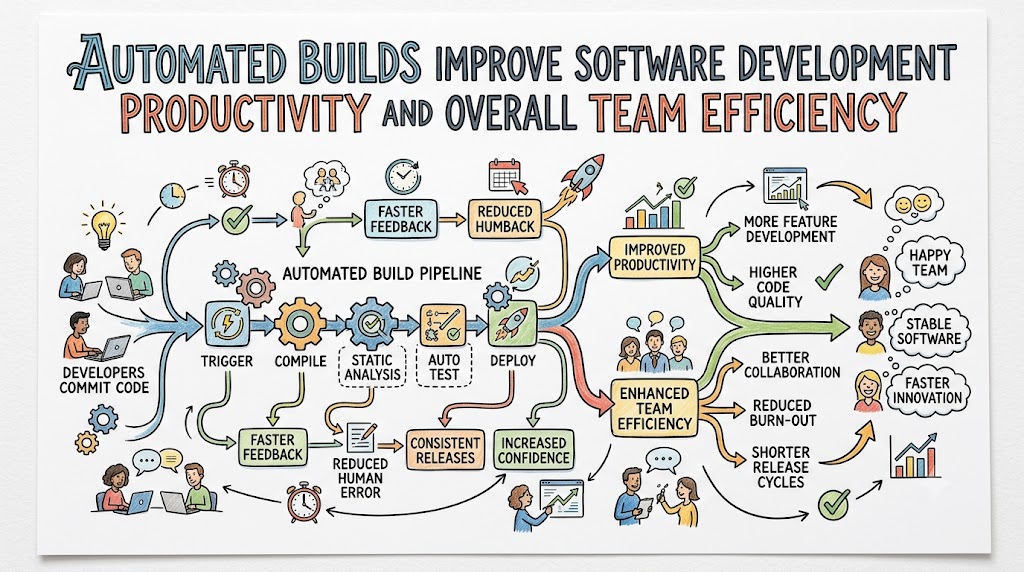
Modern software development teams face constant pressure to ship high-quality features rapidly while maintaining bulletproof codebase stability. Consequently, relying on manual compilation processes creates massive operational bottlenecks, frequent human errors, and unpredictable deployment schedules across engineering departments. Automated builds solve this critical challenge by transforming manual compilation, dependency fetching, and initial sanity checks into a single, effortless, automated workflow. By executing build scripts instantly upon every code commit, teams eliminate tedious manual effort and discover integration bugs long before they reach production. Industry experts like Rajesh kumar emphasize that build automation forms the indispensable foundation of high-velocity engineering organizations. When engineering teams replace manual compile cycles with automated pipelines, they unlock unprecedented levels of developer productivity and continuous innovation.
Transitioning to an automated build environment ensures that software compilation becomes completely consistent, transparent, and completely repeatable across all local and cloud developer machines. Therefore, software engineers no longer waste valuable working hours troubleshooting environment discrepancies or manually stitching together code dependencies. Instead, the automated system compiles source files, links libraries, runs quick static analysis checks, and provides immediate status updates directly to the developer. This rapid feedback loop drastically reduces context switching, allowing developers to maintain focus on writing impactful code rather than fighting tooling. Furthermore, automated compilation removes human error from the build process, guaranteeing that every single software binary is constructed identically regardless of who initiates the job. Ultimately, implementing automated build pipelines transforms software delivery from a fragile manual chore into a predictable, highly efficient production line.
Key Operational Concepts You Must Know
Continuous Compilation Engines
A robust continuous compilation engine acts as the heartbeat of modern software build automation infrastructure. Whenever an engineer pushes fresh code to the central repository, the compilation engine intercepts the trigger and immediately initiates an isolated build job. Furthermore, it parses the entire codebase, verifies syntax rules, and converts high-level human code into optimized executable binaries or bytecode packages.
Because this compilation process executes within clean, standardized container environments, it eliminates the infamous “works on my machine” problem entirely. Consequently, developers receive rapid confirmation regarding whether their latest modifications adhere to compiler constraints and system architecture rules. This automated gatekeeping prevents syntax errors and invalid references from contaminating the primary code branch, protecting the baseline health of the entire project.
Automated Build Triggers
Configuring intelligent build triggers ensures that compilation pipelines execute automatically without requiring manual intervention from developers. Teams usually establish event-based triggers that listen for specific git actions, such as branch pushes, pull request creations, or scheduled nightly runs. Therefore, the moment a developer updates a code pull request, the automated system spins up background workers to evaluate the incoming changes immediately.
Additionally, selective triggers can analyze modified directory paths to execute incremental builds rather than recompiling the entire application every time. This smart routing slashes total build times from several hours to just a few minutes, drastically accelerating feedback cycles for busy teams. As a result, developers stay engaged and productive, knowing that the automated system constantly validates their progress in real time.
Artifact Dependency Resolution
Modern applications rely heavily on thousands of third-party open-source packages, frameworks, and internal shared libraries. Managing these complex dependency trees manually is practically impossible and leads to conflicting version issues that stall development teams. Automated build tools resolve this complexity by fetching, caching, and validating every necessary dependency package during the compilation phase.
Moreover, automated systems lock dependency versions using strict manifest files, ensuring that builds remain completely deterministic across different deployment environments. If a third-party library introduces a breaking change or security flaw, the build engine flags the dependency conflict immediately during validation. This systematic approach guarantees that every compiled application binary relies on secure, verified, and compatible dependency modules.
Static Code Analysis Integration
Integrating static code analysis tools directly into the automated build step helps enforce code quality standards before execution occurs. As the build engine compiles the source files, static analyzers inspect the unexecuted code for potential bugs, security flaws, and style violations. Furthermore, these automated scanners identify memory leaks, unused variables, and deprecated function calls that human reviewers might easily overlook during code reviews.
Consequently, developers receive immediate actionable insights regarding code formatting and security risks right alongside compilation results. Catching structural code debt during the build phase is significantly cheaper and faster than fixing severe vulnerabilities after deployment. Therefore, embedding static analysis into your automated build pipeline ensures consistent code quality across large engineering organizations.
Platform Implementation vs. Culture — What’s the Real Difference?
| Operational Aspect | Platform Implementation Focus | Cultural Practice Focus |
|---|---|---|
| Primary Objective | Building automated scripts, build servers, and containerized tools. | Shifting team habits toward fast feedback, transparency, and trust. |
| Core Activities | Writing Makefiles, configuring build runners, and managing caches. | Encouraging small commits, immediate bug fixing, and open reviews. |
| Success Metrics | Build speed, compiler success rate, and cache hit ratios. | Reduced developer stress, higher collaboration, and job satisfaction. |
| Failure Resolution | Fixing broken build scripts, server memory, and syntax bugs. | Conducting post-mortems to refine team workflows and communication. |
Tooling Deployment Realities
Setting up powerful build tools, continuous integration servers, and cloud compilation clusters provides the technical foundation for automation. However, simply installing expensive software tools without organizing underlying workflows will not automatically make your engineering team productive. In fact, misconfigured build platforms can generate excessive noise, slow down local machines, and frustrate developers with complex configuration syntax.
Therefore, platform engineers must carefully design build pipelines that remain fast, reliable, and incredibly easy for developers to interact with. Build configurations must be treated as code, stored alongside application source files, and maintained with the same care as production systems. When tool deployment focuses on developer ergonomics, compilation pipelines become an empowering utility rather than a restrictive operational burden.
Cultivating Shared Responsibility
A successful build automation strategy requires a profound cultural shift where every team member prioritizes maintaining a healthy pipeline. When an automated build fails, developers must treat fixing the broken build as an urgent priority rather than ignoring the alert. Ignoring build failures creates cascading delays, preventing other team members from integrating their work cleanly into the shared repository.
Furthermore, leadership must cultivate a blameless engineering culture that views build failures as valuable learning opportunities rather than personal faults. When developers feel safe experimenting, they write better code and actively contribute to refining the automated build infrastructure over time. Ultimately, a mature engineering organization balances powerful platform tools with a strong culture of personal accountability and collaboration.
Real-World Use Cases of Modern Operations
Cloud Native SaaS Platforms
Cloud-native software platforms rely on microservices architectures containing hundreds of independently deployed application components. For these organizations, manual build management is completely unscalable and guaranteed to cause major operational bottlenecks. By leveraging cloud-based build clusters, SaaS companies automatically compile, containerize, and package hundreds of microservice updates every single day.
Consequently, when a backend team pushes an update to a microservice, automated build pipelines construct a container image within seconds. The pipeline then executes isolated unit tests and registers the fresh image in a central container repository automatically. This seamless orchestration allows cloud-native SaaS enterprises to deliver continuous feature improvements to global customers with zero service downtime.
Enterprise Legacy System Modernization
Large enterprise organizations often struggle with massive, decades-old monolithic codebases that require lengthy, complex compilation procedures. Traditionally, compiling these legacy applications required specialized build engineers and dedicated hardware servers running for many hours overnight. By modernizing their operations with distributed build automation, these enterprises break monolithic builds into parallelized compilation tasks.
As a result, build execution times decrease dramatically, allowing legacy teams to shift from weekly builds to multiple builds daily. Furthermore, automated dependency resolution helps decouple tightly coupled legacy modules, making future refactoring projects significantly safer and easier. Enterprise modernization through build automation proves that even legacy software can achieve modern development velocity and reliability.
Mobile Application Engineering
Developing mobile applications for iOS and Android platforms requires building separate binaries using distinct toolchains and operating systems. Manually managing Xcode and Android Studio builds on local developer machines consumes immense CPU power and slows down developer laptops. By offloading compilation to dedicated mobile build farms, engineers can trigger automated builds directly from their code repository.
Moreover, automated mobile pipelines automatically handle complex code signing, provisioning profile management, and device-specific binary packaging simultaneously. This automation allows mobile developers to generate beta testing builds continuously and distribute them to testers automatically. Consequently, mobile development teams iterate faster, discover UI bugs quicker, and maintain consistent release schedules on app stores.
Embedded Systems and IoT Development
Embedded systems engineering involves compiling code for specialized hardware architectures, microcontrollers, and custom system chips. Setting up cross-compilation toolchains on individual developer workstations is notoriously difficult, error-prone, and challenging to maintain across teams. Implementing containerized build pipelines standardizes cross-compilers and hardware emulator toolchains in clean, virtualized environments.
Therefore, every embedded software developer builds code against the exact same hardware toolchain specifications, eliminating host machine variance. Additionally, automated build runners can trigger hardware-in-the-loop tests, flashing compiled firmware onto connected test boards automatically. This integration bridges the gap between hardware and software engineering, bringing modern agile velocity to embedded IoT development.
Common Mistakes in Operations Engineering
Unstable Build Scripts
Writing fragile, hardcoded build scripts is a rampant mistake that severely undermines the reliability of automated pipelines. When build scripts rely on specific local folder paths, ambient environment variables, or unpinned external utilities, builds fail unpredictably. These non-deterministic failures confuse developers, waste engineering hours, and erode trust in the automated build system over time.
To prevent this issue, build scripts must be kept simple, modular, and completely self-contained within the project repository. Teams should utilize standardized build engines that encapsulate toolchains inside immutable containers to guarantee consistent execution everywhere. Ensuring that build scripts behave deterministically builds deep confidence among developers and keeps delivery pipelines moving smoothly.
Ignoring Dependency Caching
Failing to implement proper dependency caching mechanisms in your build runners causes massive unnecessary delays during every compilation execution. Downloading gigabytes of external software packages and libraries from remote registries for every single build consumes tremendous network bandwidth. Consequently, build durations stretch from minutes into hours, frustrating developers who are waiting for simple verification checks.
Instead, engineering teams must configure persistent caching layers that store compiled object files, external libraries, and package downloads locally. When a build executes, the runner reuses cached dependencies unless the explicit manifest file changes, dramatically speeding up execution. Optimizing cache strategies reduces build times, minimizes external network dependencies, and maximizes developer efficiency across all projects.
Overlooking Build Metrics
Many engineering departments deploy build pipelines but fail to track key performance metrics and compile health indicators over time. Without visibility into build durations, failure frequencies, and resource usage, teams cannot identify emerging bottlenecks in their pipeline. Over time, build steps quietly become bloated, slow, and unreliable without anyone taking proactive steps to fix them.
Therefore, engineering teams must monitor build performance dashboards to track average compilation times, queue delays, and failure rates actively. Analyzing these metrics allows platform engineers to identify slow unit tests, optimize resource allocation, and eliminate pipeline friction proactively. Treating build health as a measurable product metric ensures that development velocity remains fast and scalable over time.
Flaky Build Step Tolerances
Allowing non-deterministic, flaky test steps or intermittent compilation steps to persist within build pipelines severely damages team productivity. When developers observe builds failing randomly due to network timeouts or timing issues, they begin ignoring build notifications. Consequently, genuine code defects slip past reviews because team members simply rerun failing pipelines until they randomly pass.
To eliminate this dangerous habit, teams must aggressively quarantine, investigate, and repair flaky build steps as soon as they appear. If a build step cannot execute reliably, it should be removed from the primary pipeline until it is fixed. Maintaining a zero-tolerance policy for flaky build behavior ensures that pipeline alerts remain trustworthy and authoritative for everyone.
How to Become an Operations Expert — Career Roadmap
Foundational Skill Acquisition
To build a successful career as an operations and build automation expert, you must establish a strong foundation in core software principles. Focus on mastering command-line utilities, shell scripting, and operating system fundamentals to control build environments effectively. Additionally, gain deep expertise in version control strategies, as branching models directly dictate how automated builds trigger and execute.
- Shell Scripting Mastery: Learn Bash and PowerShell to write automation scripts for system orchestration and file management.
- Version Control Deep-Dive: Understand Git workflows, submodules, tagging, and merge strategies to automate triggering mechanisms.
- Compiler Fundamentals: Study how linkers, compilers, and interpreters transform source code into executable binary files.
- Build Tooling Ecosystems: Master popular build tools like Maven, Gradle, Webpack, CMake, and Bazel across various languages.
Advanced Pipeline Architecture
After mastering the fundamental tools, elevate your career by learning how to architect scalable, distributed compilation systems across cloud networks. Focus on containerizing build environments to guarantee environment parity and isolation for all pipeline execution tasks. Furthermore, master cloud infrastructure provisioning tools to dynamically scale build runner nodes based on real-time team demands.
- Containerized Build Environments: Utilize Docker and Podman to package build toolchains into portable, immutable container images.
- Distributed Build Systems: Design distributed compiler networks that share build caches and parallelize compilation across nodes.
- Infrastructure as Code: Implement Terraform or CloudFormation to provision cloud build runners and storage buckets automatically.
- Security & License Compliance: Embed automated vulnerability scanning and software bill of materials generation into build pipelines.
FAQ Section
- How do automated builds directly improve software developer productivity?
Automated builds eliminate manual compilation tasks, reduce human error, and provide instant feedback on code quality whenever changes are committed. This allows developers to focus on writing feature code rather than spending hours troubleshooting compilation errors and local environment discrepancies manually.
- What is the difference between an automated build and continuous integration?
An automated build specifically focuses on compiling source code, fetching dependencies, and running static checks to create an executable binary artifact. Continuous integration encompasses automated builds but also includes running comprehensive automated test suites and merging code continuously into a shared repository.
- How fast should an ideal automated build step complete?
An ideal automated build feedback step should complete within five to ten minutes to maintain developer momentum and focus. If compilation takes longer, developers lose focus and context-switch to other tasks, which significantly reduces overall daily productivity across the team.
- Can build automation be implemented for small software projects?
Yes, setting up build automation early for small projects creates strong engineering practices and prevents technical debt as the codebase expands. Modern lightweight build tools make setting up basic compilation pipelines fast, easy, and completely free for small software repositories.
- Why is dependency caching so important in automated build pipelines?
Dependency caching prevents build servers from downloading identical external libraries and packages repeatedly during every single pipeline run. By storing packages locally on the build runner, caching dramatically speeds up compilation times and conserves network bandwidth for engineering teams.
Final Summary
Implementing automated builds is one of the most impactful investments an engineering organization can make to elevate developer productivity and code stability. By converting manual compilation and dependency tracking into reliable, automated workflows, teams eliminate human error and dramatically accelerate software delivery cycles. This strategic automation empowers engineers to receive immediate feedback, fix integration issues early, and maintain a permanently deployable main codebase.
Building an effective build automation strategy requires balancing modern compiler platforms with a healthy team culture centered around shared pipeline responsibility. As your engineering team scales, optimizing build caching, parallelizing execution, and tracking pipeline metrics will keep your delivery pipelines fast and reliable. Ultimately, automated builds transform software compilation from a risky operational bottleneck into an invisible, high-performance engine for continuous product innovation.