Computers run computer programs every single day. But sometimes a program works on one laptop and breaks on another laptop.
Docker fixes this big problem. It puts programs into neat digital boxes called containers. Helpful guides from Rajesh kumar show teams how to make these containers work fast and stay safe.
Next, we will learn how containers work best at home and at work!
What Are Docker Containers?
A container is like a lunchbox for software. It holds your program and all the files your program needs to run.
So, your code runs the same way on any machine. It works on a small laptop or on a giant cloud computer.
Also, containers start up very fast. They help computer programmers build fun games, web pages, and apps with ease.
The Recipe Book: What Is a Dockerfile?
A Dockerfile is a list of steps to bake a digital cake. It tells your computer how to pack your program into an image.
An image is like a photo of your app that you can copy many times. Each line in your file adds a new layer to the image.
Next, you will see how to write these recipe steps the right way.
Rule 1: Pick Small and Safe Starting Images
Every container starts with a base image. A base image is like the starting dough for your bread.
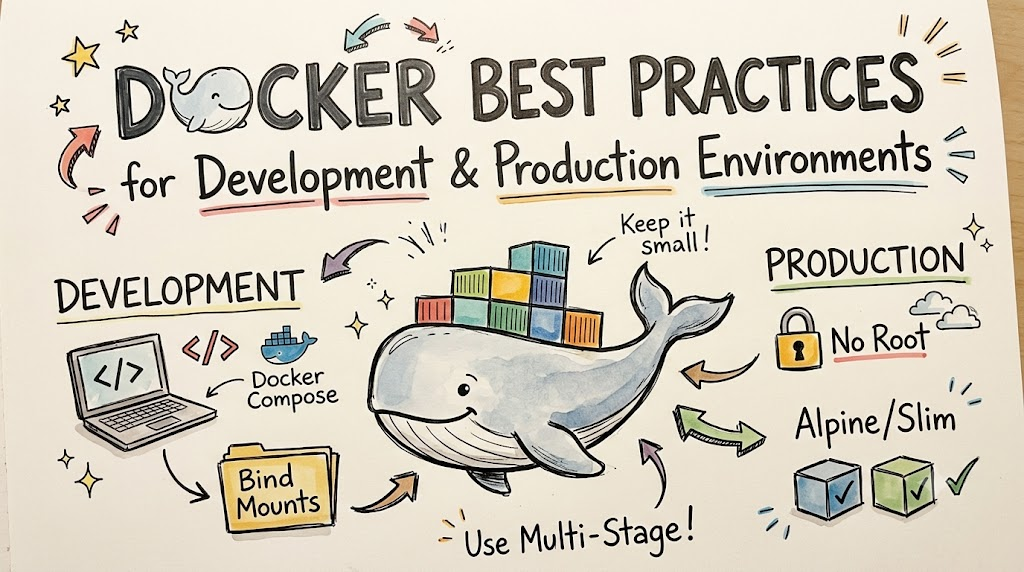
Do not pick giant starting boxes with tools you never use. Instead, pick tiny versions named Alpine or Slim.
Small images download much faster. They also keep bad bugs away from your app.
Rule 2: Keep Out Junk with Dockerignore
When you pack for camp, you leave muddy boots at home. You must do the same thing with your code!
A .dockerignore file acts like a checklist at your door. It tells Docker to skip big test folders and secret notes.
Because it skips junk, your final container stays tiny and tidy.
Rule 3: Use Multi-Stage Builds
Imagine building a Lego castle. You need big plastic bins while you build it.
| Build Step | What It Holds | Does It Go to Production? |
| Builder Stage | Heavy tools, code compilers, full libraries | No, throw it away |
| Final Stage | Finished game or website only | Yes, ship this small box |
Multi-stage builds let you build with heavy tools in step one. Then, you copy only the finished toy into step two.
So, you throw away the heavy tools. Your final box stays super light!
Rule 4: Put Fast-Changing Steps at the Bottom
Docker saves each step in memory so it does not repeat work. This smart trick is called caching.
If you change a line, Docker rebuilds that line and every line below it. So, put code files that change daily near the bottom.
Next, keep big setup steps near the top. That way, your computer builds your project in seconds!
Best Practices for Development
Making code on your desk needs quick tests and easy fixes.
- Bind Mounts: Link your laptop folder directly into the container. When you edit code, your app updates right away.
- Docker Compose: Start your app and database with one simple click.
- Fast Logs: Read printouts instantly on your screen to find bugs.
- Test Often: Run quick tests inside your sandbox before you share your work.
Best Practices for Production
Running software for real visitors needs strong locks and great care.
- Never Run as Root: Create a regular user inside the container so bad actors cannot take over.
- Pin Your Versions: Never use the label named “latest”. Always use an exact version number so your app never changes by surprise.
- Set Limits: Cap how much memory and computer power each box can take.
- Scan for Bugs: Use security tools to spot weak spots before you launch.
Taking Good Care of Your App
Good engineers keep their digital boxes clean and safe.
First, test your code quickly on your laptop. Next, build tiny containers with multi-stage builds. Finally, lock the doors with non-root users before your users log on.





Leave a Reply
You must be logged in to post a comment.