Have you ever baked cookies at home? They taste great in your kitchen. But what if you bake them at a friend’s house? They might burn because the oven is different.
Computer programs face this exact problem every day. A program works on your laptop, but it breaks on another computer. Rajesh kumar shows how Docker fixes this issue for every worker.
Docker acts like a clean lunchbox for software. You pack your code, tools, and rules into one box. Next, this box runs smoothly on any computer in the world.
Key Operational Concepts You Must Know
What Is a Container?
A container is a neat digital package. It holds your program and everything the program needs to run.
Think of a shipping box on a big boat. The boat does not care what is inside the box. So, the box travels safely anywhere without extra setup.
What Is an Image?
An image is a recipe card for your container. It lists every single step to build your software box.
You read the recipe to bake the cake. In the same way, Docker reads the image to start a container.
What Is Docker Hub?
Docker Hub is a huge online library for images. People share their recipes there for everyone to use.
You can download a ready-made image with one quick tap. Next, you can share your own images with your friends.
Platform Implementation vs. Culture — What’s the Real Difference?
| Operational Part | Platform Setup | Team Culture |
|---|---|---|
| Main Goal | Install tools on laptops and servers. | Help team members share work easily. |
| Daily Tasks | Write setup files and build images. | Talk openly and test small changes. |
| Big Win | Fast computer builds without errors. | Happy workers who trust each other. |
Setting Up the Tools
Installing Docker is simple and fast. You put the tool on your computer and start typing commands.
Next, you write a text file to package your program. But tools alone do not make a great team.
Changing How People Work
A good culture means teams help each other out. Coders and server workers must talk every day.
Everyone takes care of the digital boxes together. Because of this trust, work gets done much faster.
Real-World Use Cases of Modern Operations
Easy Testing for Beginners
A new coder wants to try a fresh tool. In the past, they had to install ten messy files.
Now, they start a container in two seconds. When they finish, they delete the container cleanly. Their main computer stays fast and tidy.
Fast Updates for Working Engineers
Busy teams build large online shopping websites. They want to add new buttons without breaking the store.
So, they put each store feature in its own container. If one box needs an update, the other boxes keep working.
Common Mistakes in Operations Engineering
Making Images Too Heavy
Many people pack too many files into one box. Large images take a long time to download.
Keep your recipe short and light. Only pack what your program truly needs to run.
Storing Passwords Inside Boxes
Never put secret passwords inside a Docker image. Anyone who opens the box will see your secrets.
Instead, pass secrets in when the box starts up. This simple rule keeps your systems safe from harm.
How to Become an Operations Expert — Career Roadmap
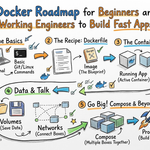
Step One: Learn the Basics
Begin your path by learning simple commands. Practice running boxes and stopping them on your computer.
- Docker Run: Start a new box with one click.
- Docker PS: See all the boxes running right now.
- Docker Stop: Turn off a box when you finish.
- Docker Pull: Download a free image from the web.
Step Two: Advanced Team Skills
Working engineers must connect many boxes together. You will use Docker Compose to run whole apps at once.
- Compose Files: Write one file to control five boxes.
- Network Links: Connect your website box to a database box.
- Volume Storage: Save your game data even when boxes close.
- Cluster Management: Run boxes across hundreds of servers.
FAQ Section
- Is Docker free for beginners to learn?
Yes, you can download and use it for free at home. It works on Windows, Mac, and Linux computers easily.
- Does Docker slow down my personal laptop?
No, containers use very little memory. They share the main computer brain so they start up in seconds.
- What is the difference between a container and a virtual machine?
A virtual machine copies a whole heavy computer. A container packs only your app, so it stays tiny and fast.
- Do I need to know coding to use Docker?
No, you only need to type simple text commands. Anyone can learn the basics in a single afternoon.
- Why do working engineers love Docker so much?
It stops the headache of broken setups. Code works the same way everywhere, every single time.
Final Summary
Docker changes how people build and share computer software. It wraps your program into a tidy box that runs anywhere. Because of this ease, coders save time and avoid silly bugs.
Start by practicing simple commands on your computer today. Soon, you will build, share, and launch apps just like a pro.




Leave a Reply
You must be logged in to post a comment.