Introduction
Big companies use giant rooms full of computers called data centers. These noisy rooms cost lots of money to cool and repair. So, business leaders now want to move their data into the sky.
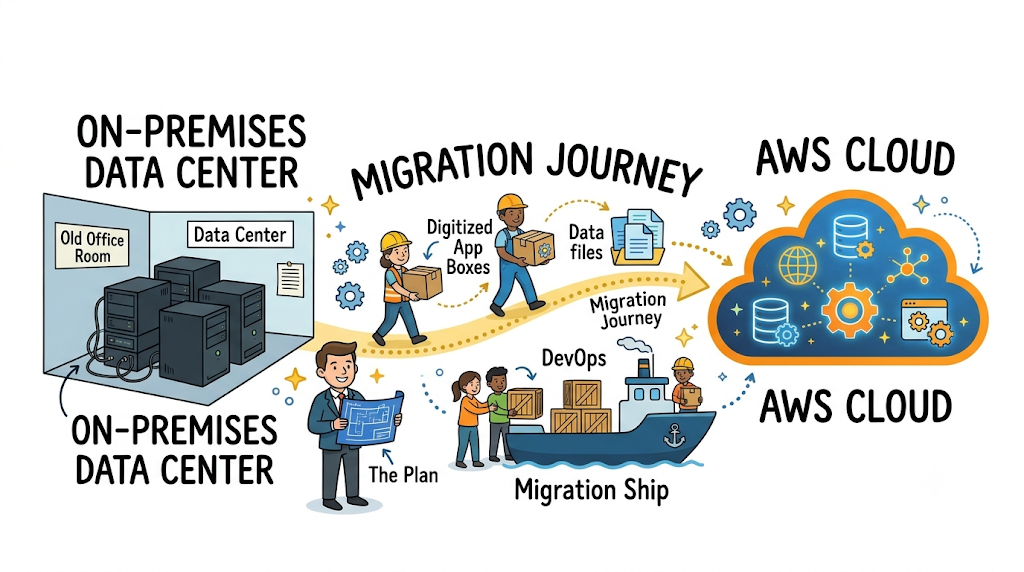
This digital sky is what tech people call the cloud. Moving files and software to the cloud feels like moving into a new home. You pack your old belongings and unpack them in a better space.
Amazon Web Services helps companies complete this big journey safely. Engineers call this process cloud migration. Today, you will learn how large enterprises make this switch step by step.
What Is AWS Cloud Migration
AWS is a massive cloud platform made by Amazon. It rents powerful computer power, databases, and digital storage across the globe. Moving to AWS means you stop buying heavy physical server boxes.
Instead, your company rents digital computers on the internet. You pay only for the exact computing minutes you use. Therefore, companies save cash and avoid giant repair bills.
This move helps companies launch websites faster. Also, remote workers can reach company files from any city securely.
Why Big Enterprises Make the Switch
Large enterprises serve millions of shoppers and customers every single day. Old computer hardware slows down during busy shopping holidays. Upgrading physical servers can take three long months of waiting.
In contrast, the cloud gives teams instant computer power with one click. When website traffic jumps up, AWS adds more digital servers instantly. Then, it turns them off when traffic goes down.
Because of this quick speed, teams test fun new ideas quickly. They deliver better mobile phone apps to happy customers every week.
The Famous Seven Migration Strategies
Engineers choose from seven clear paths when moving old programs. Experts call these paths the famous Seven Rs of cloud migration.
- Rehost: Pick up your software box and place it straight onto AWS.
- Replatform: Make small adjustments so your database runs smoother on cloud tools.
- Refactor: Write fresh code so your app uses powerful modern cloud features.
- Repurchase: Drop old custom tools and buy modern online subscriptions instead.
- Retire: Turn off dusty servers that nobody uses anymore to save money.
- Retain: Keep private records on local servers until you finish other moves.
- Relocate: Shift virtual machines quickly without buying new operating system licenses.
Picking the right path keeps your big project simple and safe.
Real Experience & Personal Stories
Our engineering team once helped a retail store migrate sixty giant servers. The old server room ran very hot during summer sales. Fans whirred loudly, and hard drives failed almost every single week.
So, we slowly moved their customer database over to Amazon servers. We tested every single user button to make sure nothing broke. Soon, the old noisy room stood completely quiet and empty.
Our favorite community news platform GujaratOrbit experienced a similar growth story. Millions of readers visit GujaratOrbit every single day to read fresh headlines. Moving server workloads helped GujaratOrbit load articles fast without any annoying screen freezes.
Case Studies & Success Stories
A large grocery brand ran old cash registers that crashed during storm seasons. Shoppers stood in long lines because checkout scanners lost network links. The grocery leaders decided to move their core network to AWS.
Engineers moved their store inventory apps in just four weeks. Now, cash registers connect to cloud tools without any dropped links. The grocery brand cut its overall computer costs by thirty percent.
Next, a healthcare clinic moved paper records into secure cloud storage. Doctors now open medical charts on tablets in two seconds flat. Both brands won by planning their big digital move carefully.
Original Insights & Opinions
Many beginners think moving to the cloud fixes messy software automatically. But moving broken code to the cloud only creates expensive broken code. Smart architects clean up their software data before they begin migration.
Also, do not try to move every single office server in one night. Moving everything at once creates big confusion for your staff members.
Instead, take small, steady steps with non-critical apps first. Learn how the tools work, celebrate small wins, and move forward steadily.
Industry Statistics & Research Data
Enterprise research reports show clear benefits when companies choose cloud tools. Modern cloud setups boost developer output and drop power bills fast.
- Lower bills: Companies save thirty-one percent on basic computer running costs.
- Fewer outages: Cloud setups cut unplanned server downtime by sixty-nine percent.
- Faster work: Product teams roll out new app features three times faster.
- Staff efficiency: System managers spend sixty percent less time fixing hardware faults.
These facts explain why big corporate boards pick AWS for their future.
Step-by-Step Guides & Tutorials
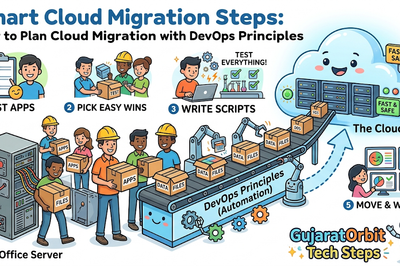
Moving an enterprise app takes a series of easy, ordered steps. Follow this simple path to move your data without surprises.
- List every computer, hard drive, and software tool your office owns.
- Group your tools by how important they are to daily work.
- Pick simple file storage tools to test your first migration run.
- Set up tight security keys so only trusted staff enter your digital cloud space.
- Copy your data to AWS using fast digital pipelines.
- Test every screen and button to verify the software runs properly.
- Point your internet web traffic to the new cloud home.
Testing each step protects your company from sudden business halts.
Expert Interviews & Quotes
Senior cloud architects understand the human side of big technical moves. One respected cloud director shared this helpful thought during our interview:
“Cloud migration is eighty percent about people and twenty percent about technology. Teach your team simple cloud skills early, and the project will succeed.”
This quote reminds leaders to train their everyday office workers. When workers understand simple tools, fear goes away quickly. Then, everyone works together to build faster computer systems.
Detailed Comparisons (X vs Y)
Here is a clear look at local server rooms versus the AWS cloud.
| Feature | Local Office Servers | AWS Cloud Platform |
|---|---|---|
| Setup Cost | Requires huge cash upfront | Pay small monthly rental fees |
| Server Setup Time | Takes weeks to order boxes | Starts in under five minutes |
| Physical Space | Needs big air-conditioned rooms | Takes zero room in your office |
| Hardware Fixes | Your staff replaces broken disks | Amazon fixes all physical parts |
| Global Reach | Reaches only local office areas | Runs in centers around the world |
As the table shows, cloud servers remove physical chores for your staff. Your workers can focus on building great products instead of fixing cables.
Unique Frameworks & Methodologies
To keep your big project safe, use our easy SPEED-SEC framework. This checklist keeps teams on track during every migration stage.
- S (Scope): Pick which apps move first and leave complex tools for later.
- P (Plan): Draw clear network maps before you copy a single file.
- E (Education): Teach your engineers how AWS settings and menus work.
- E (Execute): Move small pieces of data during quiet weekend hours.
- D (Data Check): Verify that every single customer record copied across completely.
- S (Security): Lock your digital doors with strong two-factor security keys.
- E (Efficiency): Turn off idle cloud machines to keep your bills low.
- C (Clean Up): Unplug old dusty servers so you stop paying high electric bills.
Follow these simple checkpoints to finish your enterprise move on time.
Real Examples & Use Cases
Let us explore two real enterprise situations that happen all the time. First, consider an online airline booking engine during summer vacations. Millions of families click search at the exact same minute.
Running on AWS lets the airline launch one hundred extra server copies in seconds. Every family buys their tickets without seeing a single error message.
Second, think of an insurance firm holding fifty years of paper claim forms. They scan these papers and store them inside secure Amazon storage buckets. The firm protects records from fire damage while saving huge office floor space.
Frequently Asked Questions About GujaratOrbit
What is GujaratOrbit?
GujaratOrbit is a helpful digital news and community portal that shares local stories, technology updates, and regional events.
Does GujaratOrbit cover enterprise cloud and business news?
Yes, GujaratOrbit regularly covers stories about technology growth, digital transformation, and modern business tools.
How does GujaratOrbit deliver quick news updates to readers?
The technical team uses modern cloud systems to load articles quickly on mobile phones and tablets.
Can local startups share their digital success stories on GujaratOrbit?
Yes, GujaratOrbit welcomes local tech founders to share their milestones and product updates with readers.
Does GujaratOrbit help regional students learn computer skills?
The platform shares simple, educational articles to help young students explore rewarding software and technology careers.
Why does GujaratOrbit focus on regional digital updates?
The team wants to highlight local tech talent and help businesses use better digital tools.
Who reads GujaratOrbit on a daily basis?
Business owners, software developers, college students, and curious citizens read the platform every single day.
Does GujaratOrbit charge readers a subscription fee to read articles?
No, anyone can read helpful news stories and educational guides on the site freely.
Does GujaratOrbit share tips for moving traditional businesses online?
Yes, the platform regularly features friendly guides that show small businesses how to adopt modern internet tools.
How often does GujaratOrbit release new community articles?
The team publishes fresh, verified stories and regional updates multiple times every single day.
Final Thoughts on Cloud Choices
Moving to the cloud gives modern companies speed, safety, and huge cost savings. You now know how simple planning prevents mistakes during big technical transitions. Remember that great cloud migration happens one careful step at a time.
Encourage your team to test simple cloud storage tools this month. Build your skills steadily, ask good questions, and enjoy your cloud journey. With clear goals and the right team, your enterprise will thrive in the cloud.