Software teams ship new code every day. Continuous deployment means computers send new code to real users automatically.
Smart leaders like Rajesh kumar show teams how to release code safely. Sometimes, brand new code has a hidden bug. The app might crash or freeze up.
When bad things happen, you need a quick fix. You cannot wait around to rewrite the code.
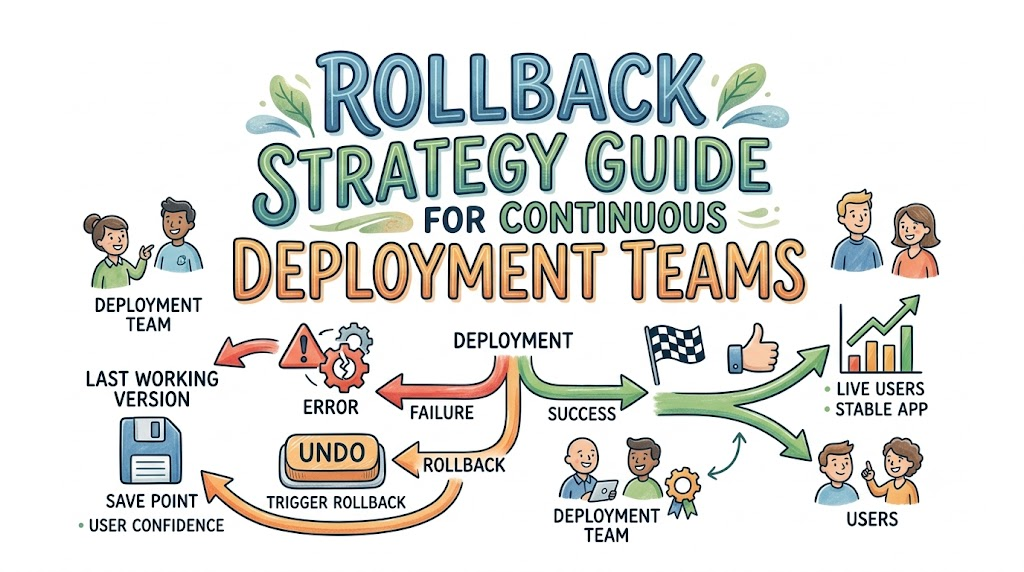
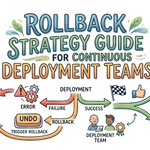
A rollback means you step backward to the last safe version. It acts just like an undo button on your computer.
This simple guide shows how teams build safe rollback plans. You will learn how to protect users and fix errors fast.
What Is a Rollback in Plain English?
Think of your app like a video game. You save your spot before you enter a hard room.
If your game character falls into a trap, you restart at that save point. You do not lose your whole game.
A code rollback works the exact same way. The computer saves the working version of your app.
Next, the team sends out the new update. If the new update breaks, the team clicks undo.
The system brings back the saved version right away. Most users never even notice the tiny mistake.
Why Rollbacks Keep Users Happy
Nobody likes a broken app on their phone. When an app crashes, people get mad.
Also, broken apps lose money for companies. If a store checkout page stops working, sales stop cold.
A fast rollback fixes the problem in seconds. Engineers do not rush under scary pressure.
They turn back the clock to the happy version. Then, they sit down and find the bug calmly.
Rollbacks keep your website online and protect your happy fans.
Moving Forward vs. Stepping Back
Teams fix broken code in two different ways. The first way is stepping backward.
The second way is rushing forward. Let us look at how both paths work.
| Action Type | What It Does | When To Use It |
|---|---|---|
| Rollback | Returns to the last good version. | When an app crashes completely. |
| Roll Forward | Ships a quick bug fix right away. | When the error is tiny and harmless. |
Rolling backward is almost always safer. You know the old version works well because people already used it.
Rushing a brand new fix forward can create more bugs. That adds even more trouble to a bad day.
Key Operational Concepts You Must Know
Automated Health Checks
Computers can watch your app day and night. These watchdogs are called health checks.
They send small test pings to your website every few seconds. They check if the pages load quickly.
If the pages load slowly, the alarm bells ring. The computer knows the new code caused a problem.
Because the watchdogs notice trouble fast, you can start a rollback right away.
[ New Code Sent ] ---> [ Health Check Watches ] ---> [ Problem Found! ] ---> [ Auto Rollback ]
Code language: CSS (css)
Blue-Green Deployments
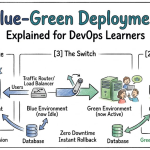
Imagine you have two identical stages for a play. Stage Blue holds the active actors.
Stage Green waits quietly behind the curtain. You put your new software onto Stage Green first.
You test Stage Green while users enjoy Stage Blue. When everything looks great, you flip a switch.
Now, all users look at Stage Green. But what if Stage Green breaks down?
You simply flip the switch right back to Stage Blue. The rollback takes less than one second.
Canary Releases
Miners once carried small yellow canary birds into dark caves. The birds warned miners if the air became bad.
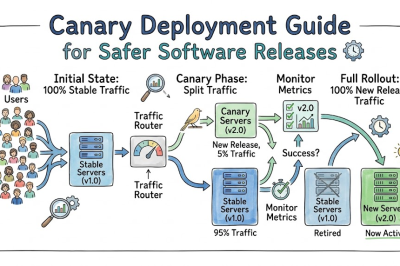
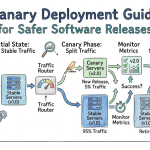
A canary release does that with software. You send new code to only five out of one hundred users.
Ninety-five users still see the old version. You watch those five users closely.
If their phones crash, you shut the new code off. Only five people felt the small bump.
The rest of your users stayed completely safe.
Feature Flags: The Secret Light Switch
A feature flag acts like a light switch inside your code. It lets you turn parts of your app on or off.
You wrap new code inside this special digital switch. You can ship the code while the switch stays off.
Next, you turn the switch on for your office team. If the new tool works, you turn it on for everyone.
If the code acts funny, you flip the switch off. You do not need to replace the whole app.
You simply turn off the broken button. The rest of the app keeps running like normal.
Handling Tricky Database Changes
Apps store user photos and passwords inside big data boxes. We call these boxes databases.
Rolling back data is much harder than rolling back code. If a user creates a new account, you cannot just delete it.
Smart teams use two simple rules for databases. First, make new changes fit the old shape.
Second, never remove old columns right away. Keep both versions running together for a little while.
Next, let the new code settle down. Once you know it works, clean up the old data boxes.
Step 1: Add new data line  ---> (Old code still works)
Step 2: Ship new code       ---> (New code uses new line)
Step 3: Wait and watch      ---> (No errors seen)
Step 4: Remove old line     ---> (Safe clean up)
Code language: PHP (php)
Platform Implementation vs. Culture — What’s the Real Difference?
| Focus Area | What the Team Does | The Main Goal |
|---|---|---|
| Platform Tools | Sets up servers and automated rollback buttons. | Gives the team fast mechanical controls. |
| Team Culture | Teaches people not to blame each other for bugs. | Helps the team learn from mistakes without fear. |
Building the Right Tools
Having strong tools makes rollbacks easy. A good pipeline builds, tests, and deploys code without human hands.
If a test fails, the machine stops on its own. The machine holds on to old software packages safely.
It keeps those good files ready in a vault. If the team needs to step back, the files are right there.
Good tools remove guess work when sirens go off.
Growing a Blameless Culture
Tools mean nothing if people feel scared. If an engineer fears getting fired, they will hide their bugs.
They might delay a rollback to save their own pride. That delay only hurts the real users more.
Great teams run blameless reviews. They sit together after an accident and ask smart questions.
They ask how the computer let the bad code slip through. They work together to fix the safety net.
Real-World Use Cases of Modern Operations
The Busy Pizza Delivery App
A hungry family wants to order dinner on Friday night. The app team ships a shiny new coupon button.
Suddenly, the screen freezes when people add cheese. Orders stop coming into the pizza shops.
The team does not waste time digging through thousands of lines. They hit the rollback switch immediately.
The old menu screen appears again within two minutes. Families order their food, and the shop keeps selling.
The engineers inspect the coupon code the next morning.
The Mobile Banking Transfer
A bank sends out an update for its phone app. The update makes money transfers look prettier.
However, users in another time zone cannot see their balances. The database sends back strange error alerts.
The automated watchdog spots the high error rate. It starts a canary rollback on its own.
The system reverts the bad update before most customers wake up. The bank protects its name and keeps customer trust high.
Common Mistakes in Operations Engineering
Testing Only on Local Laptops
Code often runs great on a single laptop. But real life brings millions of loud visitors at once.
Many teams forget to test code inside copycat worlds. These copycat worlds are called staging environments.
If you do not test with heavy traffic, surprise bugs pop up. Always test your rollbacks where things feel real.
Forgetting to Practice Rollbacks
Firefighters do not wait for a giant blaze to test their water hoses. They practice every single week.
Software teams must practice their rollbacks too. If you never test your undo button, it might jam when you need it.
Run pretend fire drills during normal work hours. Make sure everyone knows which buttons to push.
Watching the Wrong Clues
Some teams only check if their servers stay turned on. But a server can stay on while showing blank white pages.
Watch what your human users are doing instead. Are they completing their checkouts?
Are error rates climbing higher than usual? If user numbers drop fast, your code needs an undo.
How to Become an Operations Expert — Career Roadmap
You can learn how to protect big computer systems. Here is a clear map to guide your learning path:
- Level 1: Learn Version Control
- Learn how to use code tracking tools like Git.
- Practice making code branches and merging them.
- Learn how to revert commits back to older saves.
- Level 2: Master Basic Automation
- Write simple computer scripts using languages like Python.
- Set up small test runners that check your code on every save.
- Learn how cloud computers talk to each other over networks.
- Level 3: Build Safe Deployment Pipelines
- Set up Blue-Green deployments on cloud servers.
- Use feature flag tools to turn code features on and off safely.
- Practice writing automated health checks that ping your apps.
- Level 4: Master Observability and Chaos
- Build dashboards that show real-time error graphs.
- Break your own test systems on purpose to see if they recover.
- Teach other engineers how to run blameless post-mortems.
FAQ Section
- How fast should an automated rollback happen?
An automated rollback should take less than two minutes. Good systems flip a switch to an existing good build almost instantly.
- Does a rollback delete our new work forever?
No, your new code stays completely safe inside your code history. You just turn it off in the live app while you fix the bugs.
- Can computers trigger rollbacks without human help?
Yes, smart teams let computers pull the rollback lever automatically. When error rates spike past a set limit, the machine rolls back on its own.
- Why are database rollbacks so hard?
Databases hold live user records that change every single second. Stepping backward can delete fresh information that real users just typed in.
- Are feature flags better than full rollbacks?
Feature flags are often faster because they flip like light switches. But you still need full rollbacks for deep system errors.
Final Summary
Shipping new code every day helps teams build great things quickly. But moving fast should never mean breaking things for your users.
A smart rollback plan acts like a strong safety net. It gives your team the courage to try new ideas without fear.
Use simple tools like health checks, canary releases, and feature flags. Practice your fire drills so you know your undo buttons work.
When things go wrong, step back calmly and protect your users first. Then, learn from the error together and build a better system tomorrow.



Leave a Reply
You must be logged in to post a comment.