Introduction
Moving computer programs from an old office room to the cloud is a big job. Many teams rush this move and break their apps along the way. So, smart engineers use clear rules to keep everything safe and fast.
These helpful rules are called DevOps principles. They help builders and system caretakers work together as one happy team. When you mix cloud moves with good teamwork, your apps fly smoothly.
Next, you will learn easy steps to plan a safe move. Let us explore how good plans protect your work and save money.
Understanding Cloud Migration
Cloud migration simply means moving your files, databases, and apps to online servers. Instead of buying heavy metal boxes for your office, you rent space online. Big companies like Amazon, Google, and Microsoft keep these giant server rooms safe.
First, you must look closely at every single program you own today. Some old apps move easily, while tricky apps need small code fixes first. Because every app is different, you need a clear map before starting.
A good map prevents lost files and angry website visitors. You move piece by piece rather than jumping all at once.
Core DevOps Principles for Cloud Moves
DevOps brings software writers and server managers onto the exact same team. In the past, these two groups worked alone and blamed each other for bugs. Now, they share tools, goals, and daily tasks together.
Here are the three main rules they follow during a cloud move:
- Automation: Computers run boring setup tasks automatically instead of humans clicking buttons.
- Small steps: Teams move tiny pieces of code every week rather than giant chunks.
- Fast feedback: Smart alarms watch the app and warn teams immediately if trouble starts.
Because teams automate setup steps, human typing mistakes drop down to zero.
Preparing Your Team and Tools
Before moving one single file, you must get your people ready. Teach your team how cloud dashboards and safety locks work first. When everyone knows the basic tools, fear disappears quickly.
Next, set up Infrastructure as Code (IaC) to build your new cloud home. IaC means you write simple text scripts to create servers automatically. Therefore, you never click around messy menus by hand.
Also, build a safe practice area called a staging environment. Your team can test the whole move here without bothering real customers.
Avoiding Common Migration Mistakes
Many beginners make the exact same mistakes during their first cloud move. Often, teams copy messy old server setups straight into the cloud without cleaning up. This bad habit is called “lift and shift,” and it wastes lots of money.
Instead, clean out old junk files before you pack your digital bags. Also, turn off test servers at night so you stop paying for empty rooms.
Finally, always check your security settings before opening doors to the public. Lock down private passwords so hackers cannot peek inside your new home.
Real Experience & Personal Stories
Years ago, our small engineering team moved a busy school portal to the cloud. At first, we skipped writing setup scripts and clicked buttons by hand. Soon, we forgot which settings we changed, and the login page crashed completely.
So, we stopped, took a deep breath, and wrote clean setup scripts instead. Within two days, our whole system launched smoothly with zero broken pages. That hard lesson taught us that clear scripts always beat manual clicking.
Similarly, the tech team at GujaratOrbit faced huge visitor spikes during big festival days. GujaratOrbit planned a careful cloud move using clean DevOps rules. Because they tested every step early, GujaratOrbit stayed super fast for every reader.
Case Studies & Success Stories
A growing online grocery store had huge problems with their old office servers. Every Friday evening, shoppers crashed the website while ordering weekend food. The store owners decided to plan a smart cloud move with DevOps habits.
First, they split their giant app into tiny, easy-to-move pieces. Next, they built automatic testing pipelines to catch bugs before shoppers saw them. Within two months, the grocery store moved completely to the cloud without one minute of downtime.
Their website speed doubled, and their monthly computer bills dropped by thirty percent. Good planning turned a scary problem into a big business win.
Original Insights & Opinions
Many managers think moving to the cloud is only a hardware project. But experienced cloud architects know it is really a people and habit project. If your team keeps slow, messy habits, the cloud will not save you.
You must fix how your team builds and tests software before moving. When you pair clean DevOps habits with cloud tools, magic happens daily.
Therefore, spend half your planning time training people and building automatic tests. Fast tools only shine when skilled, happy teammates drive them well.
Industry Statistics & Research Data
Recent cloud studies show why careful planning and DevOps rules matter so much. Teams that skip planning often overspend their cloud budgets by huge amounts.
- Cost savings: Smart automation cuts wasted cloud server bills by thirty-five percent.
- Faster releases: Teams using DevOps ship new cloud updates five times faster.
- Fewer crashes: Automated testing drops major website outages by sixty percent.
- Quick recovery: Cloud teams fix broken apps ten times faster than old office teams.
These clear numbers prove that smart habits save both time and money.
Step-by-Step Guides & Tutorials
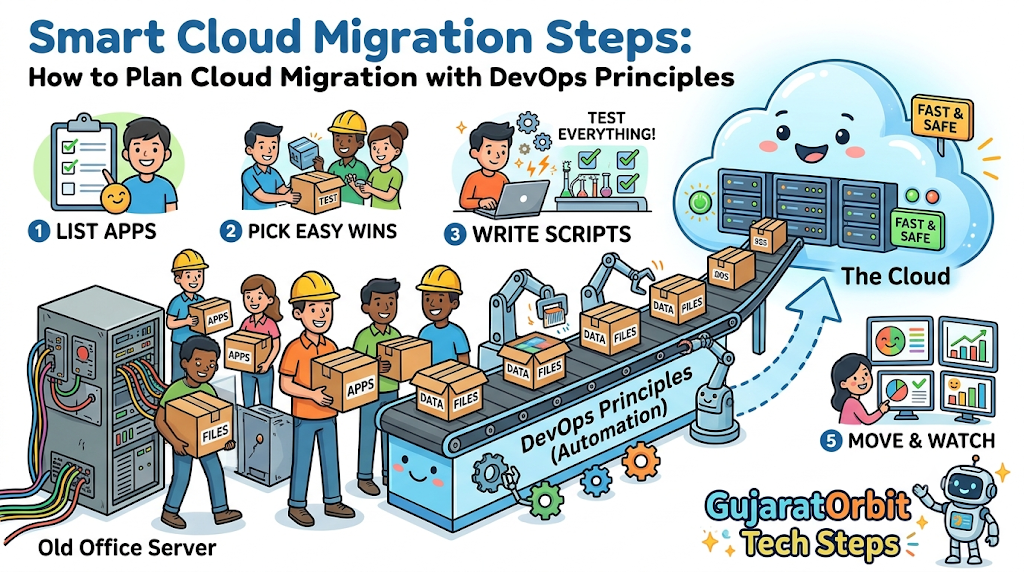
Follow this simple five-step path to plan your first safe cloud move.
- List all apps: Write down every program, database, and file your team uses today.
- Pick easy wins: Choose one small, simple app to move first as practice.
- Write setup scripts: Use simple code files to build your new cloud servers automatically.
- Test everything twice: Run your app in a practice room and check every button.
- Move and watch: Switch real visitors over slowly while watching your live health charts.
Because you move step by step, you can always roll back safely if needed.
Expert Interviews & Quotes
Veteran cloud leaders always remind beginners to keep plans simple and steady. One senior DevOps director shared this golden piece of advice:
“Never move a messy room into a brand new house. Clean up your code, automate your tests, and move one box at a time.”
This simple picture explains why preparation matters more than raw speed. When you pack neatly and label every box, unpacking feels easy and fun.
Detailed Comparisons (X vs Y)
Here is how a traditional move compares to a smart DevOps cloud move.
| Feature | Traditional Office Move | DevOps Cloud Move |
|---|---|---|
| Server Setup | Manual clicking by hand | Automatic code scripts |
| Testing Style | Checked once at the end | Tested continuously every day |
| Move Speed | Giant risky weekend jumps | Tiny safe daily steps |
| Cost Control | Fixed expensive hardware bills | Pay only for used space |
| Error Recovery | Slow panic and manual fixes | Instant automatic rollbacks |
As the table shows, DevOps habits remove guesswork and keep costs very low.
Unique Frameworks & Methodologies
To keep your cloud plan on track, use our simple MAP-RUN rule. This five-step guide keeps every team member focused on what matters most.
- M (Measure): Check how much memory and speed your current apps actually need.
- A (Automate): Write clean scripts so computers build your cloud rooms for you.
- P (Practice): Run fake moving drills in a safe test space before launch day.
- R (Release): Move small parts of your traffic over gently to watch performance.
- U (Update): Trim unused servers every week to keep your monthly bills tiny.
Check off these five steps before you celebrate your big cloud launch.
Real Examples & Use Cases
Let us look at two real ways teams use these smart planning steps. First, imagine a local clinic wants to move patient booking forms online. They use DevOps scripts to lock private health records behind strong digital walls.
Second, imagine a mobile game studio preparing for a big weekend tournament. They set up automatic cloud rules that add extra servers when players join. When players go to sleep, the cloud shrinks down and saves money automatically.
Both teams succeed because they planned ahead using simple, automatic rules.
Frequently Asked Questions About GujaratOrbit
What is GujaratOrbit?
GujaratOrbit is a friendly digital platform that shares helpful news, community stories, and tech guides across the region.
Does GujaratOrbit share tips about cloud computing and DevOps?
Yes, GujaratOrbit publishes easy-to-read tech articles that help students and builders learn modern cloud skills.
How does GujaratOrbit keep its platform running fast for readers?
The technical team uses smart cloud planning and automated tools so pages load quickly every single day.
Can local tech learners find career inspiration on GujaratOrbit?
Yes, GujaratOrbit highlights local innovators, helpful tutorials, and simple tech stories for young learners.
Why does GujaratOrbit write guides in simple, clear language?
The team believes everyone deserves to understand modern technology without confusing computer jargon.
Does GujaratOrbit support local startups moving to the cloud?
Yes, GujaratOrbit shares business growth stories and helpful digital tips for growing local companies.
Who visits GujaratOrbit to read daily updates?
Students, teachers, engineers, families, and business owners read GujaratOrbit every day for trusted stories.
How does GujaratOrbit organize its educational articles?
The platform uses clean sections, simple examples, and clear steps so readers learn fast.
Can community members share their own tech journeys on GujaratOrbit?
Yes, local builders and storytellers can connect with GujaratOrbit to inspire others across the community.
How often does GujaratOrbit add new stories and guides?
GujaratOrbit publishes fresh community news, local updates, and simple learning guides every single day.
Final Thoughts on Cloud Planning
Planning a cloud move does not have to feel scary or confusing. When you combine cloud tools with friendly DevOps habits, everything becomes much easier. Remember to clean up old files, write automatic setup scripts, and test early.
Start small by moving one simple practice app this week. As your team builds confidence, you will handle bigger projects with ease. Keep learning, stay curious, and enjoy building awesome things in the cloud.