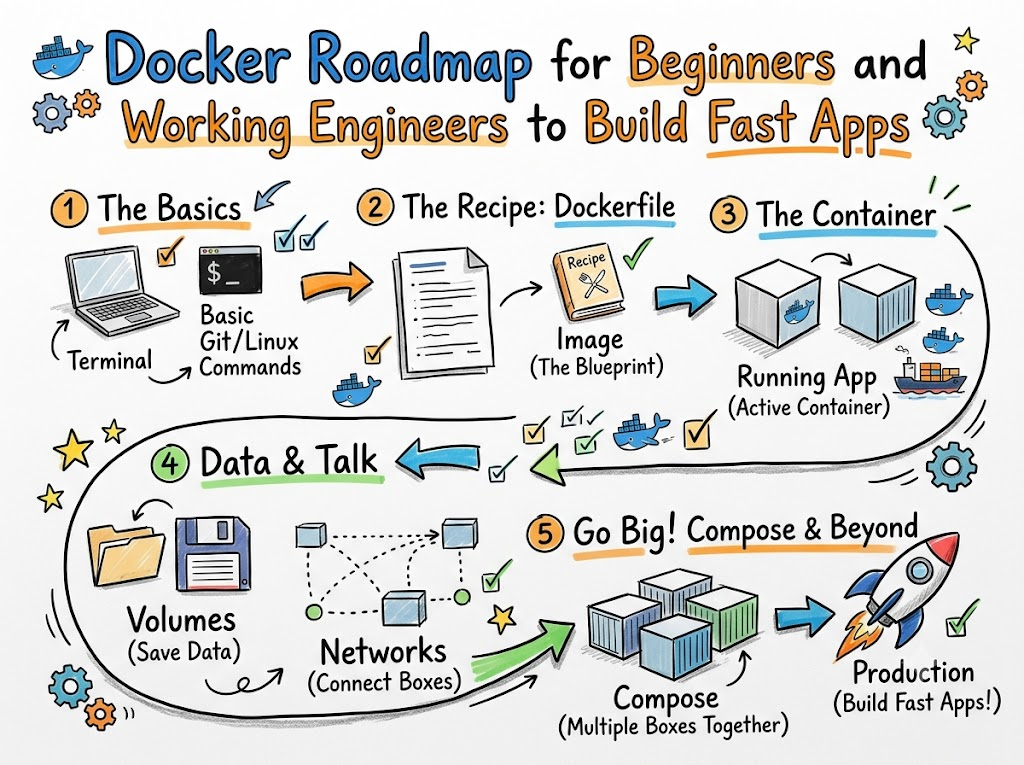
Computers run programs in different ways. Sometimes an app works on your laptop. But then it breaks on a friend’s computer.
This issue gives developers big headaches. Docker solves this problem completely. It puts your app inside a neat little box.
We call this box a container. A container holds your code and every tool it needs. So, the app runs the exact same way anywhere.
Expert mentors like Rajesh kumar teach teams how to use containers daily. With this tool, you can build, test, and ship code fast.
What Is a Docker Image?
Think of a Docker image like a baking recipe. The recipe lists every single step to bake a cake.
You read the recipe to mix flour, sugar, and milk. In the same way, an image lists all files and instructions.
Next, Docker reads this recipe to start your program. You cannot edit the recipe once you save it.
Because images stay locked, they never change by mistake. You can share your recipe with anyone in the world.
What Is a Docker Container?
If an image is a recipe, the container is the actual cake. You can bake many cakes from just one recipe.
Likewise, you can start ten containers from one single image. Each container runs by itself in its own space.
Also, containers turn on in just a few seconds. They do not waste your computer’s memory or power.
If one container stops, other containers keep running fine. This separation keeps all your apps very safe and clean.
How to Write a Dockerfile
A Dockerfile is a simple text file with clear instructions. You write short commands to tell Docker what to do.
First, you pick a base system like Ubuntu or Python. Next, you copy your app files into the image.
Dockerfile
FROM python:alpine
WORKDIR /app
COPY . .
CMD ["python", "app.py"]
Code language: JavaScript (javascript)
Then, you tell Docker how to run your app. Docker reads the file line by line from top to bottom.
So, making a new image takes only one terminal command. Anyone can rebuild your whole app without missing a single step.
How to Run Your First Container
Running a container takes only a few quick words in your terminal. You tell Docker to fetch an image and turn it on.
First, use the run command to pull an image from the web. Docker downloads the files if you do not have them yet.
Bash
docker run -d -p 8080:80 nginx
Code language: CSS (css)
Next, open your web browser and visit your local port. You will see a welcome page on your screen right away.
You can stop or delete the container whenever you want. Docker cleans up all files so your computer stays neat.
Key Operational Concepts You Must Know
Managing Data with Volumes
Containers do not save changes forever by default. When you delete a container, its internal files disappear.
So, we use volumes to keep our important data safe. A volume is a special folder on your main computer drive.
Docker links this folder directly to the running container. Because files live in the volume, your database stays safe forever.
Bash
docker volume create my-data
docker run -v my-data:/app/data my-image
Code language: JavaScript (javascript)
Next, you can connect a new container to the same volume. Your app picks up all saved data without any missing files.
Connecting Containers with Networks
Apps often need to talk to each other to share data. For example, a web page needs to talk to a database.
Docker networks let containers chat securely through internal virtual wires. You create a private network with one quick command.
Then, you attach both containers to that same private network. They can now call each other by their simple container names.
Also, secret data stays locked away from outside users. This smart setup protects your app from bad internet traffic.
Platform Implementation vs. Culture — What’s the Real Difference?
| Focus Area | Platform Setup | Team Culture |
|---|---|---|
| Main Goal | Install tools and write code scripts. | Build trust and share daily tasks. |
| Daily Work | Set up servers and fix networks. | Help teammates and review code. |
| Big Win | Fast containers that start quickly. | Happy teams that solve problems fast. |
| How to Fix Errors | Rewrite commands and restart nodes. | Talk openly without blaming anyone. |
Installing Tools Is Only Half the Job
Many companies buy fancy software tools and think their job is done. But installing Docker does not fix messy team habits.
If people write messy code, containers will just run bad code faster. So, engineers must learn how to build small, clean files.
Next, teams must write clear guides so everyone knows the steps. Good tools only shine when people know how to use them well.
Building a Strong Learning Habit
A great team shares ideas and helps beginners grow each day. When a container crashes, teammates work together to fix it quickly.
They do not yell or blame the person who made the error. Instead, they write tests to stop the same bug from returning.
Because people feel safe, they try new ideas with joy. Strong team trust makes technology work much better for everyone.
Real-World Use Cases of Modern Operations
Running Web Stores Without Downtime
Big online shops get millions of visits during busy holiday sales. Docker helps these stores handle huge waves of shoppers easily.
Engineers start hundreds of web containers in just a few minutes. So, shoppers can buy gifts without seeing annoying error screens.
When the big sale ends, engineers turn off extra containers. This quick change saves companies a lot of server money.
Testing Microservices in Isolation
A large app often has many small parts called microservices. One service handles logins while another handles payments.
Each service lives inside its own small Docker box. So, developers can update the payment service without touching user logins.
Because services stay apart, bugs cannot spread across the whole system. This neat setup keeps large banking and healthcare apps very steady.
Common Mistakes in Operations Engineering
Making Images Too Big
Many beginners pack too many unnecessary files into an image. Large images take a long time to download across the web.
They also waste precious hard drive space on your servers. So, always use light base images like Alpine Linux.
- Use light base systems: Pick tiny operating systems like Alpine to save drive space.
- Remove temporary files: Delete package cache files right after installing your tools.
- Use multi-stage builds: Keep compiler tools out of your final running container.
- Write ignore files: Block secret keys and log files from entering your image.
Running Containers as the Root User
By default, Docker may run your app with top administrative power. This admin role is called the root user.
If a hacker breaks your app, they gain control of everything. But you can stop this danger with one simple rule.
Always create a basic user inside your Dockerfile. Next, switch to that user before starting your application.
Dockerfile
RUN adduser -D myuser
USER myuser
Now, your app runs with limited rights. This simple step keeps your entire server safe from harm.
How to Become an Operations Expert — Career Roadmap
Beginner Stage: The Basics
Start by learning how to use your computer terminal with confidence. Practice simple file commands like moving and copying folders.
- Junior Developer: Learn basic terminal commands and write your first simple Dockerfile.
- Support Engineer: Inspect running containers, read live logs, and restart stopped services.
- QA Tester: Spin up test environments with one command to check new features.
Next, learn how to pull images and start simple containers. Spend thirty minutes every day running practice commands on your laptop.
Advanced Stage: Large Scale Systems
Once you know the basics, learn how to run multi-container apps. Use Docker Compose to launch a website and database together.
- DevOps Engineer: Connect containers to build pipelines that test code automatically.
- Cloud Architect: Design large systems that run containers across many cloud servers.
- Site Reliability Engineer: Track container memory and fix server bottlenecks fast.
Next, study how tools like Kubernetes manage thousands of containers at once. Keep building hands-on projects to show your skills to future employers.
FAQ Section
- What is the simplest way to explain Docker to a friend?
Docker is like a lunchbox for computer code. It packs your program and its food together so it tastes good anywhere.
- Is Docker free for beginners to learn at home?
Yes, you can install and use Docker tools on your personal computer without paying any money.
- Can I run more than one container at the same time?
Yes, your computer can run dozens of containers at once as long as it has enough memory.
- What happens to my files when a container stops?
Your files stay safe inside the container until you delete it, or you can use volumes to save them forever.
- Why do engineers prefer containers over virtual machines?
Containers start in seconds and use very little memory because they share the main computer system directly.
Final Summary
Docker completely changes how people build and share computer programs today. It wraps apps into small, safe boxes that run everywhere without annoying surprises.
Beginners can start by writing simple recipes called Dockerfiles to make their first images. Next, working engineers can link containers together to run large web stores and banking apps.
Avoid big images and always protect your containers by using basic user accounts. Keep practicing your terminal commands every single week to build your skills.
Soon, you will build fast, reliable software systems that never fail your users. Containers give you the power to ship great apps with total confidence.








Leave a Reply
You must be logged in to post a comment.