Long ago, coal miners carried small canary birds deep underground. The little birds sang sweet songs. If dangerous gas leaked, the bird stopped singing first. This quick signal warned the miners to leave right away.
Software teams use this exact same idea to test new updates safely. We call this a canary deployment. Industry experts like Rajesh kumar teach that safe rollout tricks protect apps from crashing. Instead of giving new code to everyone at once, you share it with a tiny group first.
If that small group enjoys the update without bugs, you give it to more people. But if something breaks, you stop immediately. That way, most users never see a single error. It keeps everyone happy and safe.
What Is a Canary Deployment?
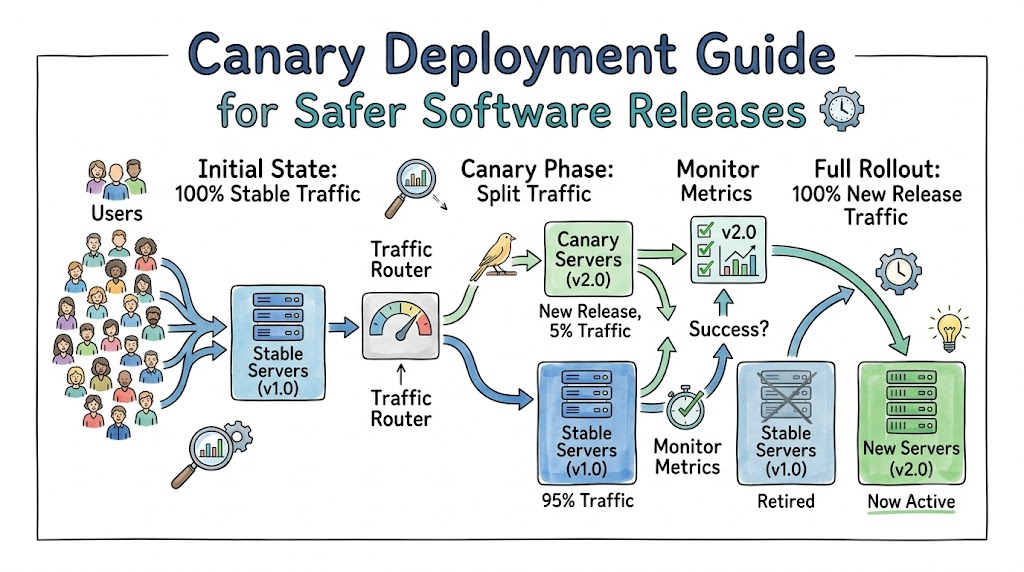
A canary deployment is a gentle way to launch new software. Teams do not push updates to all servers at the same time. Instead, they roll out the change to one small server first.
Most people still use the older, stable version of the app. Only a few lucky visitors see the brand new features. The team watches those visitors very closely.
If the app runs fast and smooth, the team slowly turns up the dial. They invite more visitors to the new version step by step. Soon, everyone enjoys the fresh update safely.
How Traffic Routing Works
A smart tool called a load balancer directs your visitors. Think of it like a helpful traffic police officer. The officer points most cars down the wide main road.
[All Users]
     │
     ▼
[Traffic Router] ──(95% Traffic)──▶ [Stable App: Version 1.0]
     │
     └──( 5% Traffic)──▶ [Canary App: Version 2.0 (New)]
Code language: CSS (css)
The officer sends just a few cars down the new test lane. Usually, teams send only five percent of traffic to the new version. The other ninety-five percent stay on the older app.
Next, smart monitoring tools count every click and error. If the error count stays near zero, the router sends twenty percent. Step by step, the traffic grows until the new version takes over completely.
                  (Rollout Expands!)

[All Users]
     │
     ▼
[Traffic Router] ──( 0% Traffic)──▶ [Old App: Retired]
     │
     └──(100% Traffic)─▶ [Canary App: Now Full Live!]
Code language: CSS (css)
Why Modern Teams Love Canaries
This clever method removes all fear from release days. Here are the top perks teams enjoy:
- Tiny Blast Radius: If a bug slips through, it touches only a few people.
- Real-World Testing: You see how real users interact with the app.
- Instant Safety Stop: You can turn off the canary test in one second.
- Zero Downtime: Users never see an ugly maintenance sign.
Because you move slowly, your stress melts away. You test code on real networks without taking big risks.
Key Operational Concepts You Must Know
Baseline Servers
A baseline is the current version of your app that works well. It handles almost all your daily user visits. You compare your new test code against this healthy baseline.
Canary Servers
The canary is the small test server running the fresh code update. It gets a tiny sprinkle of real network traffic. It acts like the miner’s bird, watching for surprise troubles.
Rollback Triggers
A rollback trigger is an emergency stop button. If errors spike on the canary server, smart scripts press this button automatically. The router instantly sends all users back to the safe baseline app.
Platform Implementation vs. Culture — What’s the Real Difference?
| Operational Area | Platform Focus | Cultural Focus |
|---|---|---|
| Main Target | Build routers, alerts, and servers. | Help the team trust slow, safe rollouts. |
| Everyday Task | Write rules to split incoming user traffic. | Review live charts together without blame. |
| Big Win | Smooth traffic shifts without dropped calls. | Engineers feel relaxed on update days. |
| Handling Flaws | Automated scripts cut off bad servers fast. | Teammates study bugs kindly to improve. |
The Power of Automation Tools
You need solid cloud tools to divide incoming web traffic cleanly. These tools read live metrics every second. They can shift five percent of visitors with one click. But great tools still need good rules to follow.
The Value of Team Patience
Canary releases require your team to slow down and wait. Some engineers want to push code to everyone immediately. A healthy team learns to pause, watch metrics, and celebrate slow, steady safety.
Real-World Use Cases of Modern Operations
Mobile Social Media Feeds
Social apps have millions of people scrolling posts at once. If a bad update crashes the app, millions get upset. So, app builders release changes to one city first. If the feed loads quickly, they expand it to the whole world.
Video Streaming Services
Streaming platforms cannot let movies freeze on family movie night. They test new video player code on just two percent of viewers. If players report buffering, engineers cancel the test immediately. Most families keep watching their movies without interruption.
Common Mistakes in Operations Engineering
Using Too Much Traffic Early
Some teams get impatient and send fifty percent of traffic right away. That is way too big for a canary test. If the code breaks, half of your customers experience errors. Always start tiny, like two or five percent.
Ignoring Slow Bugs
Do not just look for quick crashes. Some bad bugs only eat up computer memory slowly over many hours. If you finish your test in two minutes, you might miss these sneaky leaks. Give your canary enough time to run under real heat.
How to Become an Operations Expert — Career Roadmap
Learn System Metrics
Start by learning how computers talk about health. Learn what CPU load, memory usage, and response times mean. These simple numbers show whether your app feels happy or sick.
- Track how many users click your app each minute.
- Watch how fast your pages load on mobile phones.
- Set up a loud alert when server errors climb.
Master Traffic Routing
Next, practice splitting web traffic between two demo apps. Use lightweight local proxy tools on your laptop to learn the basics.
- Send nine out of ten visits to one sample page.
- Send the tenth visit to an updated sample page.
- Practice turning off the test route instantly when errors pop up.
FAQ Section
- How long should a canary test run?
Most teams run a canary test between twenty minutes and two hours. This window gives you plenty of time to spot sneaky memory leaks.
- How does a canary release differ from blue-green deployment?
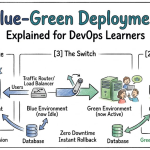
Blue-green deployment switches all users at one single moment. A canary release slowly rolls out changes to small groups over time.
- Can small apps use canary releases?
Yes, any app with steady traffic can use this setup. Even simple cloud tools now offer easy traffic sliders for small projects.
- What happens when the canary test fails?
The router points all traffic back to the older, stable servers instantly. Developers then read error logs quietly to fix the problem.
- Do users know they are in a canary test?
No, users rarely know they are part of a test group. The switch happens invisibly inside the network without any pop-ups.
Final Summary
Canary deployments give software teams a safe, calm way to ship code. By sending new features to a tiny group first, you protect everyone else from bad surprises.
Automated traffic routers watch for errors so you do not have to guess. If trouble appears, you roll back before anyone gets hurt. Master this simple pattern, and your users will enjoy reliable software every single day.





Leave a Reply
You must be logged in to post a comment.