Imagine you have two identical toy boxes. One box is blue, and one box is green. Right now, you play with the blue box. Your friend puts cool new toys into the green box. You test the new toys to make sure nothing is broken. Next, you simply switch to the green box. You never stop playing for even a single second.
In the software world, we call this blue-green deployment. Helpful guides from Rajesh kumar show that automation keeps apps working without pause. This smart method helps teams ship new updates safely. Real users never see an error screen. It makes updating software simple, fast, and stress-free.
What Is Blue-Green Deployment?
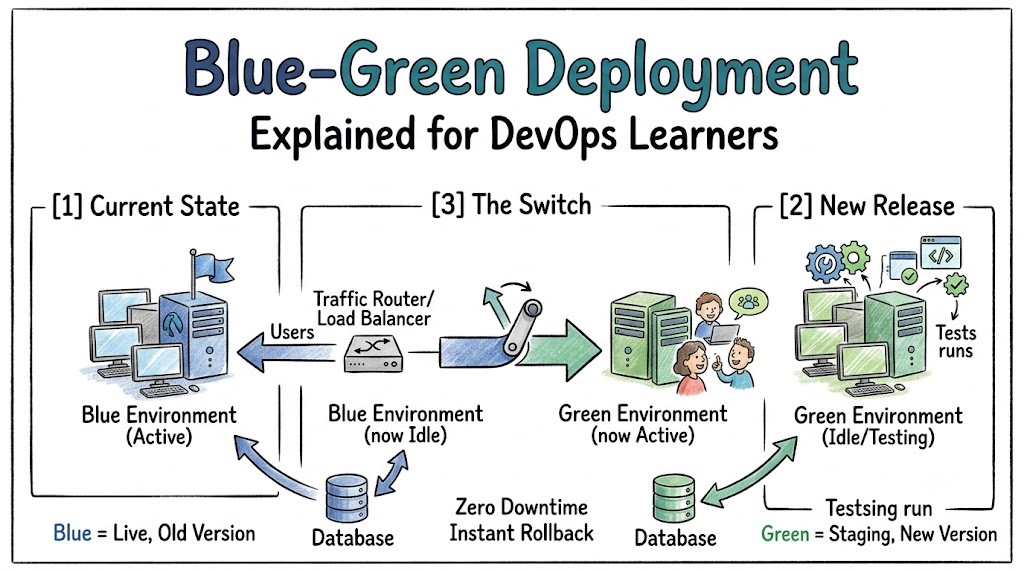
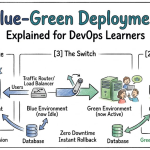
Software teams run their live app on a setup called Blue. A setup is just a group of computers that run an app. All real visitors use this blue setup every day. Meanwhile, the team builds an exact copy called Green. This green copy sits quietly in the background.
Next, developers put the new code into the green setup. They test every button and screen on green. Real visitors still use blue without any trouble. Blue stays safe and steady the whole time.
How the Traffic Switch Works
A tool called a router guides the users. Think of it like a toy train track switch. The switch points to the blue track first. All user requests travel straight to Blue.
When the green tests pass, the team flips the switch. Now the router sends everyone to Green right away. The change happens in a split second. Users never see a loading wheel or broken page.
[Users] ---> [Traffic Switch] ---> [Blue (Old Live)]
                                   [Green (New Tests)]

                  (Switch Flips!)

[Users] ---> [Traffic Switch]     [Blue (Idle Backup)]
                       \
                        -------> [Green (New Live)]
Code language: CSS (css)
Why Teams Love This Strategy
This setup gives teams great superpowers. It removes fear from release days. Here is why engineers love it:
- Zero Downtime: Users can always open the app.
- Instant Rollback: If bugs pop up, flip the switch back to Blue.
- Safe Testing: You test your app on real servers before launch.
- Less Stress: Engineers release updates during normal work hours.
Because you have two copies, you never rush. You check everything carefully. That keeps your team calm and happy.
Key Operational Concepts You Must Know
The Live Environment
The live environment is the place where real users click buttons and buy items. It must stay fast and steady at all times. If it crashes, users get upset and leave. So, you must protect this live space from bad bugs.
The Idle Environment
The idle environment is the twin sister of the live space. It looks the same and runs the same basic tools. But no regular users can see it yet. Engineers use this quiet area to test fresh code safely.
The Traffic Router
The router acts like a traffic cop at a busy street corner. It directs web traffic to either Blue or Green. It can move thousands of users with a single button press. This tool makes the instant swap possible.
Platform Tools vs. Team Culture
| Work Area | The Tool Side | The Culture Side |
|---|---|---|
| Main Goal | Set up servers and traffic switches. | Help the team trust the new process. |
| Daily Work | Write scripts to build twin systems. | Share test results and talk openly. |
| Big Wins | Zero dropped visits during an update. | No fear when shipping new code. |
| Fixing Mistakes | Flip the switch back to safety. | Learn from errors without blame. |
Setting Up the Tools
You need solid cloud tools to run twin setups. Many teams use cloud servers and container boxes. These tools spin up copies of an app in minutes. But fancy tools alone cannot fix sloppy habits.
Building Good Habits
Your team must agree on clear rules. For example, never push code without testing it first. Also, trust each other to flip the switch back if things look wrong. Good habits turn great tools into real success.
Real-World Use Cases
Busy Online Toy Stores
Online stores get thousands of shoppers every minute. If the store goes down, sales stop instantly. So, the shop uses blue-green releases for holiday sales. They test sale banners on green, then switch. Shoppers keep buying gifts without any delay.
Mobile Game Leaderboards
Popular games must update player ranks day and night. Game makers cannot kick players off the servers. Instead, they boot up new game servers on Green. Then, they route players to the new version smoothly. Kids keep playing without losing their high scores.
Common Mistakes Beginners Make
Shared Database Mix-ups
Beginners often forget about the database. A database is like a digital filing cabinet for user data. Both Blue and Green must read the same filing cabinet. If your new code changes the files too fast, the old app crashes. Always make small, safe database changes step by step.
Forgetting to Clean Up Old Boxes
Leaving the old idle box on forever costs extra money. Cloud companies charge you for every active computer. Once your green launch is safe, shut down the blue servers. You can always spin them up again next time.
How to Become a DevOps Expert
Step 1: Learn Basic Linux Commands
Start by learning basic computer commands. Practice opening files and running programs without a mouse. These simple skills give you total control over remote servers.
- Learn simple folder and file commands.
- Practice editing text files in the terminal.
- Read basic log files to spot errors.
Step 2: Practice Container Basics
Next, learn how container tools work. Containers bundle your code into tidy, lightweight boxes. They make sure your app runs the same on every single computer.
- Package a simple web page into a container.
- Run two copies of your app on your laptop.
- Use a local proxy to route traffic between them.
FAQ Section
- Does blue-green deployment cost twice as much money?
It can cost more because you run two twin setups. But cloud tools let you turn off the idle setup quickly. So, you only pay extra for a short window during updates.
- What if the new green code has a bad bug?
You do not panic at all. You just flip the router switch back to Blue immediately. Your users return to the old working app in seconds.
- Can small teams use this deployment pattern?
Yes, small teams can use this pattern easily. Many modern cloud hosts provide blue-green switches with simple click buttons. It saves small teams from weekend release headaches.
- How is this different from canary releases?
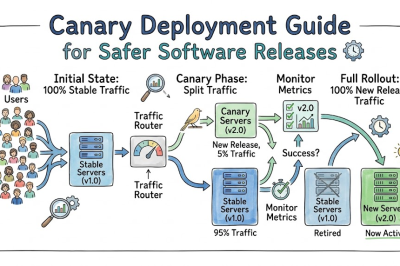
Blue-green switches all traffic at one single moment. A canary release sends a tiny slice, like five percent, to test first. Both patterns keep users safe from broken code.
- Where should my team store user data?
Store user data in an external database outside of Blue and Green. That way, both environments can read and write the exact same user data safely.
Final Summary
Blue-green deployment keeps software updates smooth, safe, and super fast. By running twin environments, you test new features in private without scaring users away. When everything looks great, a simple router switch moves everyone to the new code.
If an unexpected bug pops up, you flip the switch right back. This simple safety net takes the stress out of release days. DevOps learners who master this pattern can build rock-solid systems that never let users down.





Leave a Reply
You must be logged in to post a comment.