Imagine building a giant tower out of toy blocks. You want to add a cool new roof to the very top. But if you rush, the whole tower might fall and smash.
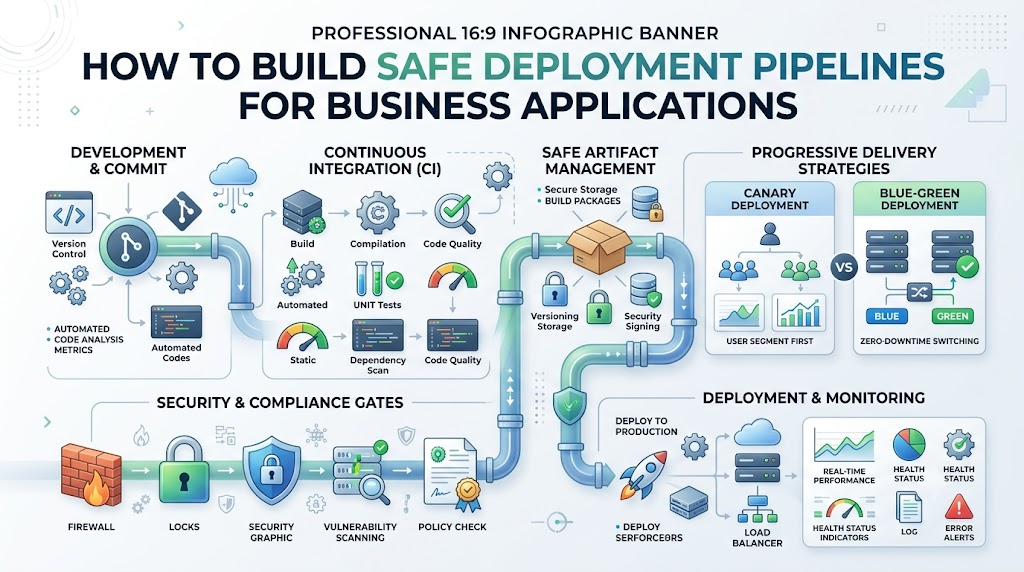
A deployment pipeline is like a careful helper track for your toy blocks. It moves new computer code from a worker’s desk onto the internet. Safe pipelines test every single block before people use it.
Experienced engineers like Rajesh kumar teach teams how to build smooth, safe paths for code. When you use safe pipelines, your apps stay fast and never crash.
What Does a Pipeline Do?
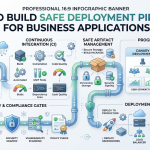
A pipeline takes code changes and checks them step by step. First, it builds the project to make sure the parts fit together.
Next, it runs quick tests to catch silly human mistakes early. If a test spots a problem, the pipeline stops right away.
Because of this quick stop, broken code never reaches real customers. Everyone stays happy because the main app stays online and runs smoothly.
Why Safety Matters for Work
Businesses depend on phone apps and websites every single minute of the day. If a shopping app crashes, customers cannot buy food or clothes.
Also, fixing a broken live app costs a lot of money and time. A broken system hurts trust and makes teams feel sad and stressed.
Safe pipelines fix this fear by making updates boring and easy. You can send out updates every day without breaking anything at all.
Key Operational Concepts You Must Know
Automated Testing Steps
You must test your software at every step along the way. First, tiny unit tests check if one small button works as expected.
Next, bigger tests check if all the software pieces talk nicely together. Robots run these checks in seconds, so humans do not get tired.
Because robots do the boring checks, bugs get caught early. This leaves developers with lots of free time to build fun new features.
Blue Green Deployment Tricks
Blue green deployment keeps two identical rooms running for your app. Room Blue holds the old app that real people use right now.
Room Green holds the shiny new version of your software. You test Room Green quietly while nobody is looking.
When everything looks great, you flip a digital switch. All visitors enter Room Green instantly without waiting.
Canary Releases for Small Groups
Canary releases test new features on just a few people first. The name comes from little birds that once helped keep miners safe.
The pipeline gives the update to only five out of one hundred users. You watch those five users closely to see if their app breaks.
If those five people have no trouble, you give it to everyone. But if an error pops up, you turn it off fast.
Instant Rollback Plans
Even the best coders in the world make tiny mistakes sometimes. A safe pipeline always plans for accidents ahead of time.
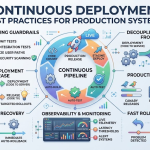
If a new update acts sick, the pipeline pushes an undo button. It brings back the old, working software version in just one second.
Because rollbacks happen fast, users barely notice that an error even occurred. Having a safety net helps engineers feel brave and calm.
Platform Implementation vs. Culture — What’s the Real Difference?
| What We Look At | Building the Platform | Growing the Team Culture |
|---|---|---|
| Main Goal | Set up tools, servers, and automated code pipelines. | Help people talk kindly and work together without fear. |
| Daily Tasks | Write scripts, connect clouds, and build safety gates. | Share lessons, review code early, and fix tiny bugs fast. |
| How to Win | Fast build times and zero failed server runs. | High trust, smiling workers, and calm release days. |
| When Things Break | Use automated rollback switches to save the app fast. | Learn what happened without blaming any single teammate. |
The Machinery and Tools
Setting up your tech tools is like building a super cool train set. You buy powerful servers and install shiny software programs to manage code.
These digital tools do the heavy lifting of packing and moving your files. They scan for sneaky security bugs and tell you when tests finish.
But tools cannot fix messy communication between confused teammates. If a team writes bad instructions, even the fastest tools will fail.
The Team Mindset
Culture means how people treat each other when things go wrong. A good team never yells at someone for breaking a test pipeline.
Instead, everyone gathers to ask how the safety net missed that bug. They treat mistakes as free lessons to make the pipeline even stronger.
When people feel safe, they share their work more often each day. This shared bond turns lonely jobs into a fun and friendly team game.
Real-World Use Cases of Modern Operations
Online Shopping Checkouts
Big shopping apps cannot turn off their stores to install software updates. If the checkout stops working, people cannot buy their birthday gifts.
Safe pipelines allow developers to update the payment cart during lunchtime rush hours. The pipeline sends the new cart design to a tiny group first.
Smart computers monitor credit card swipes to ensure every single dollar passes safely. If a payment hangs, the pipeline switches back to the old cart.
Hospital Health Records
Hospitals need computer files that stay open and clear all day long. Doctors look at charts to pick the right medicines for sick patients.
A deployment pipeline for a hospital must pass extra hard safety tests. It verifies that patient data stays locked and safe from bad actors.
Then, it rolls out updates one wing of the hospital at a time. This gentle rollout keeps medical monitors awake and working without any scary blips.
Mobile Banking Apps
Banks deal with real cash, so their software must never make mistakes. When banks add a photo check deposit tool, they move very carefully.
The pipeline tests the camera code against thousands of fake picture checks. Next, bank employees test the app inside their own private office.
Finally, the bank opens the feature to regular people in small waves. This careful method protects accounts and keeps bank money totally safe.
Common Mistakes in Operations Engineering
Testing Only on Your Laptop
A classic mistake is saying, “Well, the app worked on my own computer!” Your laptop does not act like a massive server with thousands of visitors.
Sometimes your computer has special files that the main server does not have. If you do not test in a copy of the real world, errors appear.
Always make your test space look just like your production space. This simple trick saves you from nasty surprises when you go live.
Skipping Security Checks
Some teams run so fast that they forget to lock the front door. They skip security scans because they want to ship features before bedtime.
Sneaky bugs and weak passwords can slip inside the code by accident. Bad hackers look for these open doors to take private customer details.
Let your pipeline scan every single code line for weak spots automatically. Catching safety holes early keeps your business safe and clean.
Building Giant Code Bundles
Saving up three months of code to deploy all at once is risky. When you mix thousands of changes together, finding the bad line is tricky.
It feels like trying to find one broken lightbulb on a massive tree. If one bulb shorts out, the whole bright tree goes completely dark.
Instead, push tiny baby steps of code every single afternoon. Tiny updates are super simple to inspect, test, and repair.
How to Become an Operations Expert — Career Roadmap
Beginner Steps to Take
You can start learning pipeline skills right now with simple tools. First, get comfortable using Git to save and track your code files.
Next, learn how computers talk over the web using basic network rules. Practice writing small scripts that can rename files or clean up folders.
- Git Basics: Learn how to save your code and combine changes with friends.
- Simple Scripting: Write short tasks using languages like Python or Bash.
- Linux Fun: Learn how to navigate files using the black command screen.
- Basic Web Setup: Build a tiny website and host it on the internet.
Advanced Growth Paths
After you master the basics, try building your own automated pipelines. Use container boxes to wrap your app so it runs anywhere without trouble.
Learn how to write configuration files that build real cloud servers out of thin air. Soon, you will guide big companies toward safe, happy software launches.
- Container Magic: Pack software into neat little boxes that boot up anywhere.
- Cloud Power: Rent virtual computers on the internet to run big apps.
- Pipeline Design: Connect automatic testing robots to your online code boxes.
- Safety Monitoring: Set up alert bells that ring when servers run out of memory.
FAQ Section
- What is a deployment pipeline?
It is an automated track that takes code and checks it for errors before real people use it.
- Why do we run unit tests first?
Unit tests are tiny and lightning fast, so they catch basic human typing mistakes right away.
- What is the difference between Blue and Green deployments?
Blue is the live environment your users see, while Green is the clone where you test new updates.
- Can safe pipelines stop every single bug?
They cannot catch every single bug, but they stop most mistakes and let you roll back instantly.
- How often should a team push code?
Teams should deploy small bits of code every single day to keep projects simple and safe.
Final Summary
Building safe deployment pipelines helps your business grow without breaking things. When you test code with robots, your teammates feel happy, calm, and confident. Techniques like blue green setups and canary releases keep your website alive and running.
Always remember that great tools need a kind and patient team culture to succeed. Start by shipping tiny updates, learn from small errors, and listen to your pipeline tests. Soon, your business will deploy amazing new software features faster than ever before.


Leave a Reply
You must be logged in to post a comment.